
Your Browsing History


James V.
Joined on 03/27/05
0
0
product reviews
- 1
Works OK so far, Windows 7 64-bit
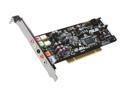
ASUS Xonar DS 7.1 Channels 24-bit 192KHz PCI Interface Audio Card
Pros: Just wanted to help out anyone installing this card in Windows 7. 1) Download the latest drivers from Asus' website--do not use the driver CD! 2) Use a program like 7-zip/Winrar to extract the rar file. 3) When I ran the setup it didn't install correctly. Just sat there for 30 min or so and said the card was not detected. So instead of running setup, try this: 4) My Computer, right click->Properties->Device Manager->Sound, video, and game controllers. 5) Right click on Asus Xonar DS->Update Driver Software->Browse my computer for driver software. 6) Point it to the ASUS download directory and let it find the driver. 7) Enjoy your new sound card.
Cons: Driver software didn't install correctly.
6/18/2012See more detail