
Your Browsing History


Jonathan K.
Joined on 10/09/06
0
0
product reviews
- 3
Seems to do the job
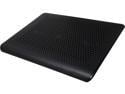
Targus HD3 Gaming Chill Mat AWE57US
Pros: Very slim design. You will be hard pressed to find another cooler with 3 fans in it that isn't the size of a 3 ring binder. It lays flat and doesn't have some stupid angle to it. If you like angled coolers fine, this isn't that, it doesn't change the profile your laptop is sitting on. Seems to have good cooling after the first day of use. My Sager is pretty beefy with a GTX 470m video processor, 840 QM core and 8 gigs of 1333 memory. Even idling with just the desktop up, the fans on it run but there is negligible heat out the back. Putting it on this cooler, the laptop fans were able to shut themselves off as it took over the cooling and even dropped the temps down to the low 40's almost across the board which is rather impressive considering the nature of my laptop.
Cons: The views that Newegg and Targus put up on their website are not showing the four feet that stick out on the bottom of the unit which do add a good bit of height. Just thought people might want to be aware of that. The 3 fans are centered along the midline of the cooler, and modern laptops have their fans located midline to the upper end, so I guess placement isn't that bad, but could have been better if they were closer to the upper end not the middle. As stated before, it requires two USB ports open on your laptop to run it at full power, but in all honesty, if you are buying this 18" cooling plate, you have a large laptop, and all modern laptops have a minimum of 3 USB ports, the standard being 2 on the backend or you got ripped off. So the power fits just perfectly, no loss of an egg there. Speed dial works, also as an off switch when you don't want to use it, though the fan speed really only seems to be low, and high. Fans are nowhere near silent, even on low speed.
Overall Review: I'm quite impressed that this thing pushed out enough air on the bottom of my laptop to the degree my laptop's fans are able to just turn themselves off when idling at the desktop. I will have to run more temp tests when running pushing the computer's abilities, but in the long run, just lowering temps even at idle, should hopefully add to the life of this laptop which is essentially a desktop replacement for me. I like that it's still slim enough to slip in with the laptop carrying case or backpack I have for my 17.3" laptop, unlike about 90% of the cooling plates out there. If you want something FLAT and generally as low a profile as you can get, but still comes with 3 fans that can provide a decent flow of air, this seems to be the unit for you. If you want extra USB ports, some crazy angle on your cooler, or the ability to move the fans around inside to different spots, maybe another one is your choice. Last thing, only the top plate is metal, the rest is plastic.
2/22/2011See more detail
Nothing better
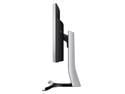
Samsung S34E790C Glossy Black 34" Curved WQHD Cinema Wide 4ms (GTG) HDMI LED Backlight LCD Monitor 300 cd/m2 DCR Mega Infinity (3000:1) Dual Speakers, Height Adjustable
Pros: What more is there to say that others have not already said? If you can't just observe all the pro that this display brings, then you don't deserve it.
Cons: The only thing I have come up with as a con is the on off button which is located on the BACK of the display with a crosshair button, down in the lower right corner. My workstation sits at my office section in my bedroom and never shuts off, so I have to turn the monitor off when done with it for the day/night. My old Samsung had a remote control that allowed me to do this from anywhere, or even use the remote control from my cable device. This monitor does not. I can understand that as it's a rare feature, I just got used to it. The issue is that you can't just touch the front of the monitor to turn it on or off. Have to reach your fingers behind to tap that 4 way controller for on or off, the same button you use to adjust all settings. On the LG's this is located on the bottom in the center of the display, but this is not enough of a dealbreaker to me to warrant losing an egg.
Overall Review: Flat out this is the future. If you expect to play modern games like Star Citizen or World of Warships, 3440x1440 gives you an unparalleled advantage over the competition. It destroys the old school way of using 3 monitors side by side. I upgraded from a 1920x1200 monitor and my options were full 4k display which wouldn't give me the widescreen ratio I wanted for gaming or cinema display, or to go with a 3 monitor setup and suffer with bezels. Well cost was the issue there as I would have had to upgrade from a 1200p resolution monitor as you really cannot find any 1200p monitors in 27" or above these days sadly. I absolutely will not pay money for a single 1080 screen let alone 3 of them, come on this is 2015 not 2005. 1080 was obsolete 10 years ago with 1200p resolutions for crying out loud. I have never been disappointed by Samsung, whether it be a phone, a monitor, or an HDTV, so that was foremost in my selection. Those that think the curved screen is a gimmick are WRONG. W R O N G. You don't notice it that much, but when you compare this to a flat screen 34" running this resolution, you realize just how bad the corners get in your peripheral vision. This screen is that wide that the curved feature is mandatory to make it natural on your eyes. Comparing this to other monitors at this resolution, the Dells are garbage, I know as we use them at work and they have to be sent back for warranty repair/replace CONSTANTLY. AOC I would not trust and can't even find reviews for. The other alternative is LG who has been in this resolution for a while now, dating back to 2014. Sadly for LG, their displays do not come anywhere close to this one. You're paying more for the Samsung for a reason. The LG displays, use an outdated IPS display technology that has not improved in years, yet the Samsung uses VA which offers drastic improvements over IPS in all technical areas reviewed save for what the monitor nerds call "responsiveness". Even this panel surprised most in that regard. The LG options have very bad issues with backlight bleed and spotty color and heat across the displays. Not even sure why they are still selling them with the serious issues they have that haven't been addressed as of yet. None of that in this display. Will need slight adjustments out of the box but is pretty much trouble free. This is the only way you can watch HD movies as all movies these days are filmed in DCI's resolution which is approximately 1.9:1. You want to watch your movies without black bars on the sides or the bottom? This is the resolution you need. Once you play any kind of game on this display, you will never ever tolerate anything less. I'm dying here at work toiling away on this junk alienware laptop as it is running caveman era 1080p resolution. You will not be disappointed in this especially as the price has dropped to 999$ for the deal currently. I paid 1300$ for mine new and do not feel ripped off one bit.
4/28/2015See more detail
Has worked great
Targus HD3 Gaming Chill Mat AWE57US
Pros: Very solidly built. I take this at all times with my 19" Sager. Don't even bother turning the laptop on without this cooler as I don't want to burn up 2,500$ worth of laptop. Lightweight, very low noise compared to competing models, sturdy and well constructed. I love that it is flat and not angled like the vast majority of laptop coolers out there. I have no need for uselessness such as that, I need a flat cooler as slim as I can get it.
Cons: Only two negatives I can find is that it does not have any USB ports to make up for the one you use to power it. This doesn't matter to anyone with a decent laptop built in the last 2-3 years though as you have plenty of ports on your laptop to begin with. The other negative is that you cannot move the fans around like on some other models to specifically line up with the input fans on the bottom of your laptop. They are so big on this cooler though, it does not matter. My laptop shuts all 4 of it's fans down when it's running with this cooling plate under it and it runs dual GTX470m video cards on it.
Overall Review: Have owned this since Feb-2011. Not sure what all the 1eggs are on here with other people, they must be throwing theirs out the windows of moving cars. I've dropped mine twice and still works as good as the first time I got it. I even use it without the laptop while at work as a fan on my desk, just tilt it up, plug it into my work computer and let it run. Weight and size is negligible on this model as the laptop you've bought a cooling plate this big is larger and heavier anyways. At this rate, as long as I don't go taking this thing with me when I go scuba diving, or throwing it under road construction equipment like some folks here must be doing, I expect it to last as long as my laptop does, if not longer. Only other con I can think of, and it's not against the cooler itself is that I bought this when it was 58$ and I see that almost 2 years later, it now costs 80$. Was an ok value for me at 60, considering the price of my laptop, but 80$ for a fanplate?
9/14/2012See more detail