
Your Browsing History


John A.
Joined on 03/06/04
0
0
product reviews
- 11
ENERMAX OSTROG
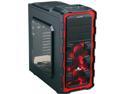
ENERMAX Ostrog GT ECA3280A-BR Black / Red Steel / Plastic ATX Mid Tower Computer Case
Pros: -Spacious -Elegant looking -3 quiet fans with 3-pins -Adequate space behind motherboard for cable management -Removable drive cages to improve air flow -Can fit Corsair h100/h100i sort of. See other thoughts
Cons: -Not enough space at the top of the case for 8/4 CPU cable. I had to buy an extension cable. An extra inch of space could have provided a cutoff -The included SSD cage has the wrong orientation when moved on top of the lower HDD cage to make way for a long power supply unit or for a fan to be installed
Overall Review: -To get the H100/H100i to work, I had to mount only the bare unit inside the case using the two 12cm at the top with no fans -The 8-pin CPU cable was in the way of fan 1 and the RAM modules were in the way of fan 2 ( AM3+ board) -So the fans went outside the case with grills (another purchase). Luckily the fan cables were long enough to be threaded through the provided holes in the back. -So the case can handle the h100s but some elbow grease is required!
9/6/2014See more detail
DIYPC IDX7-BK-ARGB
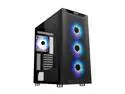
DIYPC IDX7-BK-ARGB Black Steel / Tempered Glass ATX Mid Tower Computer Case with 4 x 120mm Halo ARGB LED Fans Pre-Installed
Pros: QUITE ROOMY, EASILY ACCOMMODATING AN ATX MOTHERBOARD. A 360 AIO ALSO FIT THE FRONT AS ADVERTISED. TEMPS ARE PRETTY GOOD WITH A 360 RAD, BUT LOSE THE FRONT DUST MESH. IT WAS CHOCKING MY BUILD!!
Cons: IMMEDIATELY GET RID OF THE FRONT DUST MESH. IT IS A CHOICE BETWEEN AN OVERHEATING BUILD AND POPPING THE FRONT PANEL EVERY 3 MONTHS OR SO FOR DUST CLEANING DUTY. A 240 OR A 280 AIO ON TOP WILL BE PRETTY TIGHT. MY 240 RAD/FAN COMBO DID NOT WORK. THE CPU POWER PLUG AND THE HEAT SINKS AROUND THE CPU GOT IN THE WAY. YOUR MILEAGE MAY BE DIFFERENT DEPENDING ON YOUR MOTHERBOARD
Overall Review: THE INCLUDED 4 ARGB FANS DON'T PUSH MUCH AIR AND SHOULD BE REPLACED AND/OR MOVED TO SERVE AS EXHAUSTS. THE COLORS ARE PRETTY THOUGH THE FRONT PANEL HARNESS LABELLED "LED" MUST BE LEFT PLUGGED INTO CONTROLLER BEHIND THE MOBO TRAY. REPEATEDLY MASHING THE 'LED BUTTON" ON TOP OF THE CASE CYCLES THE PRETTY LIGHTS....HINT MINE POPPED OUT SO BE AWARE THE 'DIYPC" LOGO IS ALSO PART OF THE LIGHTING SYSTEM, SO BE CAREFUL WHEN REMOVING THE FRONT PANEL . JUST GENTLY SLIDE A FLAT HEAD SCREW DRIVER AT THE BASE IN FRONT AND CAREFULLY PRY IT OPEN TRACE THE LED WIRES TO THE CIRCUIT BOARD AND UNPLUG IT WHEN PLAYING AROUND WITH THE FRONT FANS AND THE ANNOYING FRONT DUST MESH. IT IS THE ONLY LED CABLE AT THE TOP OF THE CIRCUIT BOARD. THE LED HEADER IS ON THE TOP RIGHT WHEN LOOKING AT THE BACK OF THE MOBO TRAY TWO METAL PLATES ( BEHIND MOBO TRAY AND ON TOP OF THE PSU SHROUND) ARE SUPPOSED TO GIVE YOU 2 ADDITIONAL CADDIES FOR 3.5" HDDS. BAD IDEA FOR THERMALS IF YOU ASK ME. THE ONE ON THE PSU SHROUD IS TAILOR MADE FOR 2 SSDS. UNSCREWING THE CAPTIVE THUMP SCREW AND PULLING THE PLATE RELEASES IT BY THE WAY, THE CASE CAME WITH A LOT OF SCREWS!!
2/14/2021See more detail
ENERMAX 360 AIO COOLER
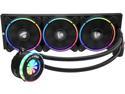
Enermax LIQFUSION 360, Addressable RGB All-in-one CPU Liquid Cooler for AM4 / LGA 1700/1200/1151, 360mm Radiator, Patented Flow Indicator Design, T.B. RGB Addressable M/B Sync PWM Fan, 5 Year Warranty
Pros: -GREAT PACKAGING -ADAPTERS INCLUDED TO TEST COOLER ALONE BEFORE INSTALLATION -GREAT FANS WITH GORGEOUS RGB -MOTHERBOARD IS ABLE TO CONTROL FANS AND RGB LIGHTS ON COOLER ( HINT: 5V HEADER REQUIRED) -FOR MOTHERBOARD LACKING THE NEWER 5V RGB HEADER, THE INCLUDED CONTROLLER DOES AN EXCELLENT JOB -GREAT COOLING -QUIET SYSTEM SINCE THE FANS ARE PWM CONTROLLED WITH DAISY CHAINING
Cons: NONE AT THIS TIME
Overall Review: -EASY AND STRAIGHT FORWARD INSTALLATION ON MSI X470 GAMING PLUS MOTHERBOARD -THE MSI X470 BOARD HAD NO ISSUES ON THE INCLUDED BACK PLATE. -TAKE YOUR TIME TO ALLIGN THE SCREWS BEFORE TIGHTENING THEM -AN EXCELLENT PRODUCT AND IS HIGHLY RECOMMENDED
2/9/2020See more detail
Great Case for the Price
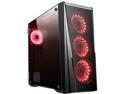
DIYPC DIY-VX-RGB Black Dual USB3.0 Steel/ Tempered Glass ATX Mid Tower Gaming Computer Case w/Tempered Glass Panel and Pre-Installed 4 x RGB 18LED Fan (7 Different Color in 3 Mode Control)
Pros: Price 4 pre-installed RGB ADDRESSABLE fans Tempered glass side panel Power supply shroud and filter Detachable front panel without the front I/O wires Pre cut area for CPU power on top ( Unlike the DIYPC DIY-Model X-W-RGB White Steel CASE, I also own ) Top panel fans slots or 240 AIO's are off-centered to clear mosfets heat-sinks and taller RAM modules
Cons: Tight fit power supply area. I have a small power supply but still had to remove the HDD Cage {Held by screws, so Removable} for installation . No zip ties provided Only 8 motherboard standoffs provided { 5 pre-installed}
Overall Review: For the customer above claiming the provided fans aren't addressable, please check the wiring on the fan controller attached to the right panel. The LED SW was not connected but hanging with the other front panel wires. Also Double check the 12V pin on the LED WIRE coming out of the fan controller to your motherboard RGB pin out. Finally, your are supposed to hold the LED SWITCH on the case for about 3 sec to hand over control of the fans to your motherboards RGB software I have an Asus B450 board and AURA is in charge and the fans look great! This was a great case to work on unlike the DIYPC DIY-Model X-W-RGB White Steel, which gave me headaches despite being warned by previous owners
6/25/2019See more detail
M.2 NVMe heatsink
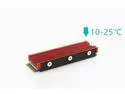
M.2 NVMe Heatsink for SM951 SM961 950PRO XP9410 M.2 SSD Cooling Heatsink
Pros: Excellent and works great. Reduced the temperature of the M.2 drive about 20 degrees celcius.
Cons: An instruction manual will help. See my go to method below.
Overall Review: Peel off any labels on the M. 2 drive ( Hint your warranty, so keep it some place} Place the pink thermal pad on the bottom ( remember to pull off all the clear plastic covers from the thermal pads ) of the U shaped part. The thinner light blue thermal pad goes on the bottom of your M.2 drive and the fatter on goes at the bottom of the SHINNY RED heat-sink. Gently sandwich the M.2 drive and secure with the 6 of the 7 provided tiny screws, making sure the screw hole of the M.2 drive is not BLOCKED by any of the thermal pads or the heat-sink. The last screw is meant to secure the sandwiched unit to the motherboard stand off. Do not tighten the 6 crews before checking the orientation of the heat-sinked M.2 drive. The top end is where you ripped off the nice manufaturer's pretty label. Hope this helps.
5/27/2019See more detail
Luck of the Draw
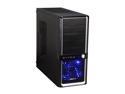
Diablotek EVO RPA-6170 Black 0.6mm SECC ATX Mid Tower Computer Case
Pros: Deep enough to accommodate CM Hyper 212 Plus 4 fans An adapter that can handle two 2.5" HDs or SSDs Bottom mount PSU Nice cutout behind motherboard for easy heat-sink removal Air filter for the PSU
Cons: Not enough space behind motherboard for cable routing.
Overall Review: Bought 2 of the Refurb Diablotek Evo RPA-6170. One was perfect. The other, not so much. The front panel had sheared off with all 10 plastic connectors broken. It was unusable so had to do an RMA. It appears there are more than one warehouse "refurbing" these cases. If you get lucky the case is a steal. Went ahead and ordered two more, based on the case's depth in accommodating my beloved CM hyper plus heat sink and the bottom mount PSUs
5/26/2014See more detail
seller reviews
- 1
The RGB 200PRO has worked as advertised. It was nicely packaged and also arrived on time. Will surely buy again.
On-time
Delivery
Product
Accuracy
Customer Service
Satisfactory
7/30/2019See more detail