
Your Browsing History


Walter E.
Joined on 05/29/02
0
0
product reviews
- 63
Green Storage Hard Drives
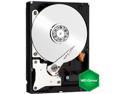
WD Green WD10EZRX 1TB IntelliPower 64MB Cache SATA 6.0Gb/s 3.5" Internal Hard Drive Bare Drive
Pros: WD quality. Product nicely packaged and no damage: -QUIET, QUIET ... very quiet! -quickly initiated and formatted with Win 7 -Sata III speed (backward compatible) -WD Intellipower rotation speed (~ 5400 rpm) -quick startup and operation -buffer to host (6 GB/s) to/from drive, sustained (150 MB/s) -64mb cache -energy efficient , low heart generation -two year limited warranty
Cons: No identifiable product cons from this installation and review
Overall Review: Interesting niche, "Green," touting environmentally conscious hard drives? No problem recommending this drive in the service it is intended ... low power storage. Online research confirms that earlier models had problems, although more recent iterations appear more reliable. Users are impressed with low noise and low operating temperatures, but remain wary of history. User comments also indicate that some people are using this drive as a bootable primary hard drive or in RAID service, ignoring WD's intended application usage and warnings. Potential buyers would do well to review description and specifications of WD drives to get a better understanding of intended applications. They are easily obtainable online: Enter WD10ZRX in your Brower to open WD's information sheet on this drive, then open the PDF specifications document and read Product Features and Applications. Want to compare Black and Green? Then do a similar search for WD1002FAEX in your Browser. A twenty dollar differential separates the two but the difference in use is very significant. Comparison of energy/noise produced in WD Black 1 TB vs WD Green 1 TB drives: Model: WD1002FAEX (Black 5yrs) WD10EZRX (Green 2yrs) Energy: Read/Write (W) 6.8 3.8 Idle 6.1 2.6 Standby/Sleep 0.7 0.6 Noise: Idle (dBA) 28 21 Seek mode 33 22 Watts (W) and average decibels (dBA) The human ear can typically distinguish musical sound between 20 - 20,000 Hertz. Noise is measured in decibels (dB). Zero (0) dB is the lower end whereas 150 dB would represent the roar of a jet engine. A quiet library or whispering is roughly 30 dB; whereas a conversation is typically 60 dB. These two drives are quiet, especially the Green drive. Adding typical ambient noise of your office or computer room makes it even more difficult to hear or distinguish either of these hard drives in operation as they disappear in the background noise. Green hard drives are more energy efficient and are literally designed for use as "secondary drives" (think quiet: medical facilities, HTPC hard drive storage, external hard drive on the top of one's desk, secondary drive in PC, etc.). These drives are also expected to see much idle, standby, and sleep time. Operating in their recommended service will help assure they meet or exceed their two year warranty period. I installed the WD Green drive in an external eSata II enclosure on my desk top and you can't hear it. It literally disappears in the background noise. It's easier to look at the blinking enclosure light to witness its' operation! With Sync Toy 2.1 (64bit) in my Win 7 system, I routinely sync critical files, pictures and data between three drives (source and two storage drives). With Sata II/III equipment, the syncing occurs almost instantaneously and the Green drive does not disappoint. I have purchased numerous hard drives over the years and WD has represented itself well. I always pay attention to manufacturer
2/4/2013See more detail
Worked but then failed
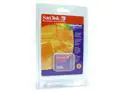
SanDisk SDCFB-256-768
Comments: I was excited to get the 45x speed Transcend due to many Transcend users in the Olympus C5050z group. Some had indicated problems, and YEP, the first one I received worked great and then fizzeled out and wouldn't load anymore that 7 PICs on my Oly. RMAd and now have a replacemnet that appears to be OK. We will wait and see, test it good, then post again! Of course one can't have this degree of try-out/RMA without working with a great supplier like NEWEGG. They make the difference!
10/23/2003See more detail
SuperSpeed Enclosure
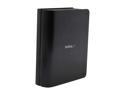
StarTech SAT3510BU3 Aluminum / Plastic 3.5" BlackSuperSpeed USB 3.0 SATA Hard Drive Enclosure w/ Fan
Pros: Sleek, great looking, simple setup, fast, quiet fan
Cons: None
Overall Review: I own several external drive enclosures and have never had problems with any of them (ICY Dock, Rosewell, Venus) operating within their limits of technology. But when you match a SATA III hard drive with a USB3 enclosure such as this sleek StarTech, and your MOBO is up to par, then you are in for some serious speeds in transferring information/data. Love it!
6/22/2013See more detail
Super WIFI Router
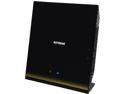
NETGEAR AC1750 Dual Band WiFi Gigabit Router R6300-NAS
Pros: -Netgear reputation -Router is large, attractive, good design, has extras -802.11ac – the standard for 5G WiFi -Backwards compatible -Setup is not complicated/good Netgear guidance -Netgear Genie for R6300 (router) and R6200 (adapter)
Cons: NO cons or issues
Overall Review: What is there not to like about Netgear's R6300 1750 router? Out of the box it has been an awesome experience two months running with no issues and rock solid performance (two office computers were updated with Netgear's R6200 WiFi adapters ... which have also been flawless). Technical understanding and Netgear's easy-to-follow setup information made it an easy installation. The router was established as an Access Point on an AT&T U-verse modem/router system, and as such, results in "g", "n" and "ac" wireless systems availability. The home/office computer/network system (laptop, printers, iPad, smartphones, Internet connected TV’s, game consoles, apple TV, etc.) are operating like we had always expected they would. The entire network is secure through the primary router AT&T U-verse and Netgear Access Point combination. Using a smartphone radio frequency (bandwidths) analyzer, it was interesting to scope the WIFI signal strength throughout the entire house in WiFi radio wave decibels (dBm) and via different systems (g, n and ac). There are literally no dead spots in this 3,000+ sq ft two story residence and connectivity is immediate on the 5G-WIFI system. I compared notes of other reviewers commenting on Netgear's router (R6300/1750) on AT&T U-verse forums and Newegg and found that most expressed very satisfactory experiences. Netgear's Genie got mixed reviews; however, for me it was/is very useful. NOTE: Netgear also has a genie for the R6200 wireless adapter and I found it to also be very user-friendly and useful. I have no problem recommending this excellent WIFI equipment.
3/4/2013See more detail
TL-WR700N Mini Pocket Router
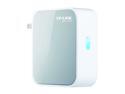
TP-LINK TL-WR700N Wireless N150 Portable Router, Pocket Design, Multifunction, 150Mbps
Pros: This product may be small, but it will put a smile on your face: -Versatile, portable, and inexpensive -Quick and easy setup -Excellent TP-LINK online assistance (go there) -A perfect companion for traveling computers -Extends "n" to routers with only b/g wireless
Cons: Signal strength can drop off not too far from unit (not a con for traveler who needs good "n" signal in motel room, etc).
Overall Review: After setting up the unit via laptop (ethernet to ethernet), it was installed behind an AT&T Uverse residential gateway (RG) modem/router in repeater mode using a 7-foot ethernet cable to get tt a little further away from Uverse modem/router. TP-LINK webpage (support) provides guidance for multiple setups including: Access Point (AP), Bridge, Client, Router or Repeater. Go to TP-Link home page and execute in this order: products, wireless, 150Mbps wireless n, TL-WR700N, Application ... then take your pick of which mode to try. -Excellent User Guide and online help -Great unit for travel use: motel room Ethernet cable -Unit provides complete data privacy via multiple protection measures, including SSID broadcast control and wireless LAN 64/128/152-bit WEP encryption, wi fi protected Access (WPA2-PSK, WPA-PSK), and advanced Firewall protection. How do you beat something as cool as this? Like the GPS fad, I wouldn't want to travel without this baby when working away from home or on vacation. A good product that, among typical uses, will find its home on the road. A great idea TP-LINK...
12/24/2012See more detail
MY PASSPORT (500GB)
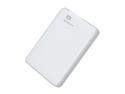
WD 500GB My Passport External Hard Drive USB 3.0 Model WDBKXH5000AWT-NESN White
Pros: My Passport is compact, lightweight, and attractive (colors: black, white, red, blue, and gray). The polycarbonate exterior and soft elastomer cushion lining protect the drive. Soft supports located on bottom corners cushion the unit and allow air movement on hard surfaces. Plug 'n play via USB-3 cable (backward compatible with USB-2 and plugs into USB-2 port). External power is provided via provided USB-3 cable. A light indicates power and activity. Quiet and exceptionally fast (advertized up to 5GB/sec transfer rate via USB-3 system). NTFS formatted Can be reformatted for MAC computers Good user manual Free 30-day support Two year limited Warranty (USA) from date of purchase
Cons: Short USB-3 cable (laptop use) No specification for hard drive disk speed (likely not above 5400 rpm) WD’s backup software is good, but not designed to clone a new hard drive
Overall Review: One of the quietest 2.5” hard drives I have ever experienced, and although the accompanying software package was installed in late 2011, its execution was flawless and WD updates were quickly recognized and installed by Microsoft/Windows 7. Comparing the transfer of a 1.2GB Outlook pst file for USB2 vs USB3: (29 MB/sec USB2) verses (60 MB/sec USB3). [Computer system: ASRock Z68Extreme4Gen3 SATAIII] Upgrading to Win 8? My Passport can backup your critical information ... your family photos, financial documents, your music, videos, etc. WD Utilities, Security and Backup software are easy to implement and automatic/continuous backup keeps selected folders updated. My Passport is small enough to slip into a shirt pocket if transporting from home to office and vice versa (just remember it’s … a hard drive). My Passports is available in capacities up to 2 Terabytes. An excellent external drive … USB-3 makes it exciting …
10/31/2012See more detail
seller reviews
- 1
SYMA S107G metal series
Precision Helicopter... it's a challenge at first and then just plain fun. Good product
On-time
Delivery
Product
Accuracy
Customer Service
Satisfactory
5/11/2012See more detail