
Your Browsing History


Don T.
Joined on 04/18/01
0
0
product reviews
- 6
Very quiet
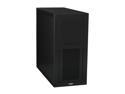
LIAN LI Lancool PC-K7B Black Aluminum/ SECC ATX Mid Tower Computer Case
Pros: Excellent for building a low noise sysyem. Three low rpm 120 mm fans quietly move a lot of air through the case. The location of the Power and Reset buttons and USB & Firewire connects on the front top of the case are very convenient. No bending down & searching. The overall quality is up to Lian Li's high standards and the brushed black aluminum finish is attractive. The case allows you to run the cables behind the motherboard mounting plate and gives you a clean looking system with a minimum of effort. The rubber anti-vibration hard drive arrangement make for some of the easiest hard drive mounting I've experienced. You screw on the rubber gromets and slide the drive(s) into place. The hard drive power & SATA connects face the back of the case so your cabling runs unseen behind the motherboard mounting plate. There are two long clips on the backside of the mounting plate that hold the cabling in place; very convenient and makes cable access & rearrangement a snap.
Cons: Any hard drive changes and access to cabling require removal of the right side access plate. The plate slides in easily and is secured by two thumb screws so this is a very minor "con". You do have to sort your cabling out so that the plate doesn't buldge but that's not difficult.
Overall Review: I took advantage of the bundle offering the LIAN LI PS-A650GB 650W power supply. This Lan Li PS is almost silent. I added an ASUS EN8400GS SILENT GeForce 8400 GS 512MB with a passive heatsink, an ASUS P5Q LGA 775 Intel P45 ATX Intel Motherboard with passive heatsinks, and an Intel Core 2 Quad Q9550 with the stock fan (also very quiet). The overall result is an exceptionally quiet high performance computer. This is not a high fps gaming rig but that's not what it is designed to be. This was a special request build for a friend.
7/30/2009See more detail
Video Issues
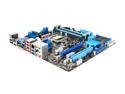
ASUS P7H55D-M EVO LGA 1156 Intel H55 HDMI USB 3.0 Micro ATX Intel Motherboard
Pros: Very good board if you understand what you are buying. The Intel H55 does not have integrated video. The H55 chipset and this board are designed to support CPUs with the integrated graphics built into the CPU. Most of the i5 & i3 CPUs have integrated graphics. Read before you buy. The P7H55D-M should have a long life cycle. USB 3.0 is a must in the long term. Support for integrated CPU graphics allows for future upgrades of the CPU & GPU simultaneously.
Cons: The product marketing is confusing. The board appears to have traditional integrated video when in fact it does not. Intel's site comes closest to an adequate description of the H55 chipset: "Platforms based on the Intel® H55 Express Chipset, when configured with a graphics card and memory devices of adequate amount and speed, meet all current requirements for the Microsoft Windows 7 OS system logo."
Overall Review: This board, with the right CPU, provides adequate if not respectful video performance. You can always add a discrete video card using the one PCI Express 2.0 x16 slot provided and with a separate video card you can install an i7 or other CPU that does not include integrated graphics. STRONGLY RECOMMENDED: go to the Asus web site and purchase the system memory they recommend.
2/23/2010See more detail
Stronger than it looks
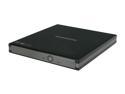
SAMSUNG USB 2.0 Slim External DVD Writer Model SE-S084C
Pros: I purchased the SE-SO84B model on 12/15/08 (the SE-SO84C offered here is the same machine with minor updates). I've hauled it all over the country in a varirty of backpacks & carrying cases jammed under airplane seats, etc. The unit is durable and performs as advertised. Small, light & useful.
Cons: None
Overall Review: The fact that it runs on USB power alone is very convenient. It works well with a netbook and can run off the netbook's battery; just keep in mind the increased power drain will shorten the available charge time. Highly recommended as part of the standard kit for IT professionals.
2/23/2010See more detail
VERY NICE!
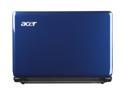
Acer Aspire AS1410-2801 Sapphire Blue Intel Celeron SU2300(1.2 GHz) 11.6" 2GB Memory 160GB HDD Netbook
Pros: Bang for the bucks; you can't beat it. I purchased this from newegg to replace my Eee (keyboard died). I loved the Eee but the keyboard was 92% normal & felt cramped. Be sure that you are buying a unit with the dual core SU2300 processor. It makes all the difference in the world. Dolby reproduction is good but keep in mind that this machine is designed with long battery life in mind. A good headset is recommended for the full Dolby experience. The battery life is very good and ranges from 8 + hours light duty to 4 - 5 hours watching videos. Windows 7 Home Premium runs great on this netbook (that was a very pleasant surprise). The sleep & hibernate functions perform perfectly. Quiet. Almost no heat except under full video load and then still acceptable on a bare chest. Touch-pad is easy to use and the two finger capabilities work great. Check out Anandtech.com for an in-depth review of the very similar, but more expensive, Acer AS1810.
Cons: LCD display has a somewhat limited viewing angle but acceptable, especially considering the price. Doesn't come with a carrying case so be sure and order the Rosewill 13.3" Vertical Messenger for Netbooks or similar product from newegg. The Rosewill comes with a removable netbook carrying compartment.
Overall Review: Windows experience index is 3.2 gaming graphics, 3.8 processor, 4.8 memory, 3.3 desktop/Aero & 5.4 primary hard disk. I watch Hulu & ESPN college basketball through the wireless connection and the quality is very good. I already own a USB powered external Samsung DVD (also from newegg & highly recommended) that I can use when needed for movies, which isn't very often. I prefer to rip the movies into MPEG4 format using my desktop and transferring them to the netbook's hard drive. After owning this Acer I rarely use my Dell Inspiron laptop anymore (only when a larger desktop is needed). This industry product line may well do serious damage to notebook & laptops market segments. Laptops are too hot & heavy and serious gamers are going to usually use a desktop. I have no doubts that gamer friendly versions will be coming out in the future using some version of the GeForce G210M or equivalent GPU. nVidia may force Intel to come out with a ULV netbook version of the i5 core processor.
2/6/2010See more detail
One and a half years later
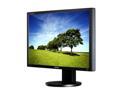
SAMSUNG 30" TFT LCD WQXGA LCD Monitor 6ms(GTG) DVI-D (Dual link) SyncMaster 305T
Pros: I have been using the SyncMaster 305T monitor in my office for a year and a half now. Everything about this monitor is first class. No dead pixels and the best brightness/contrast combination I've ever experienced. The color reproduction is gorgeous and small print stands out clearly and is easy to read. I have to have four to eight applications on the desktop simultaneously and move data between them. This Samsung meets the challenge and I highly recommend it to anyone needing a lot of desktop real estate.
Cons: It puts out a fair amount of heat so keep it where it can breath.
Overall Review: I only wish that the industry would craft a larger, higher resolution standard for general production.
1/16/2010See more detail
Very good choice
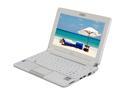
ASUS Eee PC 1000 40G – Pearl White NetBook Intel Atom 10.0" Wide SVGA 1GB Memory 40GB SSD Integrated Graphics
Pros: I've owned this netbook (in black) for six months & it has become my most used portable. I replaced the default linux with Ubuntu Eee, now called Easy Peasy. All hardware was recognized & set up. Easy Peasy runs faster than Windows of any flavor, even faster than my Dell Inspiron dual core running XP. Boot time is much faster and the opensource linux software is very good (and free). You will need an external DVD drive & newegg sells a usb powered Samsung for ~ $50.00 that works great for me. For more convenience I rip movies on my i7 desktop system, convert them to MPEG-4 and load them on a memory stick. Linux has several excellent opensource media players; VLC is my favorite. Plug in your noise cancelling headset and you're good to go anywhere. Bluetooth & wireless are easy to set up and use & the built in audio & video capabilities are quite acceptable. Runs very cool & quiet with a long battery life.
Cons: Right shift key takes a little getting used to but it's nothing major.
Overall Review: The volume of opensource software is incredible and immediately available on-line. Star Office is comparable to Office 2003 and creates .pdf files without requiring Adobe software. I've been an MSDOS & Windows user since the old Win 3.0 days and I am really impressed with where linux has come in the last couple years. If you haven't nosed around linux recently I recommend you take a look. It brings the fun back to just playing around with your computer. Easy multi boot software & mobo hardware systems keep your Windows games convenient or you can create virtual operating systems in either Windows or Linux.
6/1/2009See more detail