
Your Browsing History


Daniel U.
Joined on 07/14/01
0
0
product reviews
- 18
Replace MicroDrive in Ipod Mini!
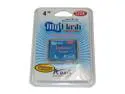
ADATA 4GB Compact Flash (CF) Flash Card Model 120x 4G
Pros: The Microdrive in my Ipod Mini bit the dust. The replacement cost for a new microdrive is ridiculous! I read that you can replace it with a CF Flash drive so I took the plunge and it works! As a bonus, the battery life is improved and it's now shock proof since there's no mechanical hard drive to break down.
Cons: None!
Overall Review: You can also replace the microdrive with 8GB and 16GB flash drives.
4/9/2007See more detail
Here's the deal on the ports
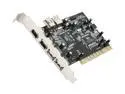
SYBA PCI USB 2.0 & FireWire/1394a combo card Model SD-COMBO-02
Pros: Works. The one I got is the VIA chip, not the ALI. Saves a slot versus separate USB and Firewire cards.
Cons: Manual is utterly useless. Port sharing information is CRUCIAL. Not specifying this is dumb.
Overall Review: There's a lot of confusion regarding the ports on this card, so for your benefit I followed the circuit traces and mapped out which is what. For the record, there's the real story on the ports: There are a total of four independent USB connections and three independent firewire connections. The internal firewire port (label PORT1) is shared with the top outer firewire port (label PORT2). You CANNOT use both ports at the same time. The third firewire port (label PORT3) is independent. The two external USB ports (label UJ1 and UJ2) are independent. The internal USB port (UJ3) is shared with the *bottom* set of USB headers. You CANNOT use these two USB connections at the same time. The top set of USB headers is independent. Someone earlier mentioned that the ALI chip doesn't support the full USB speed and unstable. I had the same problem with an ALI USB card but a motherboard chipset driver update and new drivers from Nvidia (they own ALI/ULI) fixed the problem.
10/24/2007See more detail
Running out of ports? Get this!
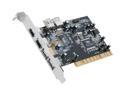
Koutech FireWire/1394 & Hi-Speed USB2.0 Combo PCI Card Model IOFLEX-PFU331
Pros: Everything is USB these days, so my motherboard's four USB ports weren't enough anymore. This is great because it adds six (6!) more USB ports. Plus it adds two more firewire ports for connecting DV camcorders. All in one card, too, so it saves a PCI slot versus using two separate cards. I'm using Windows XP SP2, so the driver CD wasn't even needed.
Cons: The internal jacks are not fully independent. The internal firewire jack is shared with one of the external ones, so you can't use both of them at the same time. Likewise the internal USB jack is shared with one of the sets of pin headers. No big deal though, since there are so many ports to begin with.
Overall Review: For some reason when I first plugged it in, USB 2.0 wasn't activated so everything was operating in super slow USB 1.1 mode. I uninstalled it's USB devices in the Device Manager then used the Add Hardware Wizard to redetect the card, and that fixed the problem. I can't say I'm having the instability problems others are having. So far it's working great, transferring at the full speed you would expect.
11/28/2007See more detail
Requires fine soldering for some Toshiba laptops
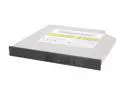
SAMSUNG Black 8X DVD+R 8X DVD+RW 6X DVD+R DL 8X DVD-R 6X DVD-RW 5X DVD-RAM 8X DVD-ROM 24X CD-R 24X CD-RW 24X CD-ROM 2M Cache E-IDE/ATAPI Slim DVD Burner
Pros: Fast, quiet, and supports DVD-RAM.
Cons: The available firmwares only support CSEL and inverse CSEL modes. Unfortunately my Toshiba Satellite Pro 4600 requires the optical drive be set to Master. To do this, I had to physically short pins 45 and 47 using some solder. The soldering wasn't a big deal, but if you have a Toshiba laptop, save yourself the trouble and get the Sony NEC Optiarc slim DVD drive instead, which comes from the factory set to Master.
Overall Review: Here's what I don't get. This drive is made by Toshiba-Samsung, so WHY does it not easily work with Toshiba laptops?
10/3/2007See more detail
3.75GHz stock Vcore!
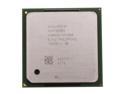
Intel Pentium 4 530 - Pentium 4 Prescott Single-Core 3.0 GHz Socket 478 84W Desktop Processor - NE80546PG0801M
Pros: WOW 3.75GHz at stock Vcore and air cooling using a modest Zalman 6500 HSF. I just cranked the FSB from 200 to 250MHz. This will make my socket 478 last just a little bit longer till I do a complete upgrade. Newegg of course provided fast 3 day shipping!
Cons: It gets toasty. Idle temp is 45C. Make sure you have good airflow.
Overall Review: My Crucial DDR400 Valueram does not tolerate overclocking, so I set the memory to "DDR320". Actually what this does is activate a 4/5 memory/FSB ratio, so my 250MHz FSB will result in the correct 200MHz (doubled to 400MHz) memory bus. Also I had to set the PCI/AGP to async 33/66 so I'm not overclocking the PCI/AGP bus. Some cards don't like a fast bus.
6/11/2007See more detail
Works good. Needed some mods to fit.
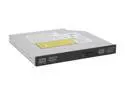
LITE-ON 8X Slim DVD Burner 8X DVD+R 8X DVD+RW 4X DVD+R DL 8X DVD-R 6X DVD-RW 8X DVD-ROM 24X CD-R 24X CD-RW 24X CD-ROM Black IDE Model SSW-8015S
Pros: Costs HALF of what Fujitsu wanted to charge for a replacement!
Cons: None.
Overall Review: My brother's Fujitsu laptop CD/DVD burner was getting flaky so I bought this as a replacement. The original CD/DVD burner had the plastic in the lower right corner cut away to fit the eject lever. I just took a dremel cutting wheel to do the same to this drive and it fit's perfectly!
5/2/2007See more detail