
Your Browsing History


Carol H.
Joined on 11/06/05
0
0
product reviews
- 28
This board doesn't get enough positive ratings!
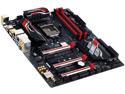
GIGABYTE G1 Gaming GA-Z170X-Gaming 5 (rev. 1.0) LGA 1151 Intel Z170 HDMI USB 3.1 USB 3.0 ATX Intel Motherboard
Pros: I purchased three of these boards for three builds. Each went pretty easily. I was pleased to have received rev. 1.1 of this board as well, and perhaps that makes a difference. It arrived with the only BIOS update available. Gigabytes UEFI is bland, but all the settings are there. I don't much care what the UEFI looks like. Everything set up pretty easily except for XMP, which offered a slight variation on the reported memory timings. Other than that though, the board is great! No worries about this one. There is not a ton of documentation that comes with the board on how to set things in UEFI, however, I've never in 30 years seen that kind of instruction come with a motherboard, other than to tell you what the settings do. This is no different. I chose to use the speaker that came with my Lian-Li case. I realize there is a diagnostic LED on the board, which is going to be useful when a problem isn't clear. For me, hearing that first post single beep letting me know all is well with the world is very satisfying. On first boot, the machine turned on, shut off, and then turned on again a few seconds later and I had my wonderful single beep. This is normal as it occurred in all 3 builds.
Cons: XMP read my Gskill 2666 15-15-15-35 at 2667 15-15-15-36. Not that big a deal as I was able to set the timings correctly myself. The myriad negative reviews on almost all the z170 boards make it incredibly difficult to choose something. It's not difficult to build a computer, but people who have less experience will run into problems naturally. Please don't blame the hardware.
Overall Review: Windows 10 Pro Gigabyte G1 Z170x Gaming 5 Intel 6700K Noctua DH15s 32GB G.Skill Ripjaws 4 Series DDR4 2666 EVGA GTX 1080 FTW 2TB Western Digital Black SATA 1TB Western Digital Black SATA All in a Lian-Li PC-7HB
8/18/2016See more detail
Don't buy this Drive
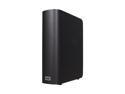
WD My Book 3.0 1TB USB 3.0 3.5" External Hard Drive WDBAAK0010HCH-NESN
Pros: Purchased November 2010. It worked one time. It was flawless once.
Cons: I've RMA'd the drive twice, first time the connector broke off when we unplugged the cable, it came back I didn't test right away, found it would not read or write. Second time it just came back, and they sent back the wrong USB cable, and it didn't come back in the original packaging I shipped it in, further they sent the wrong tracking number. I've written again to WD, no response yet. No idea if the drive works or not because the USB cable is the wrong type.
Overall Review: I've been an exclusive user of WD products for over 20 years and I have never had a problem like this. I don't know what has happened, but I'm terribly disappointed. Wish I could get my money back, but I bought the drive in November 2010. I think $90 for one successful back up is ridiculous.
6/1/2011See more detail
Great Palm Grip mouse

SteelSeries Prime+ - Esports Performance Gaming Mouse – 18,000 CPI TrueMove Pro+ Optical Sensor – Magnetic Optical Switches
Pros: Switch in this mouse is great, and doesn't double click over time like so many others will. Responsive Steel Series GG is great and not resource hungry
Cons: RGB color settings don't save, not a big deal though.
Overall Review: This is a replacement for another Prime+ mouse I've owned since it first came out. It was great until I broke it out of frustration. Nothing to do with the mouse. Steel Series GG software is easy and seems much lighter on resources than competitor's. The mouse this replaces has lasted longer than any other since I owned the original Logitech MX518. Every "gaming mouse" I've owned in the last 10 years or so has developed a double click over time. Logitech will replace their mice after making you jump through several hoops, but having been through that several times, I'm done with Logitech. Asus Gladius mice allow for easy replacement of switches when it happens to them, but it still happens too often. Armoury Crate software for their mice is miserable. Razer mice also develop the double click over time. Overall, this is a solid and responsive mouse that does everything I want it to do and doesn't make me sad.
1/16/2025See more detail
So far so good!
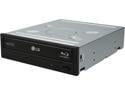
LG Black 16X BD-R 2X BD-RE 16X DVD+R 5X DVD-RAM 12X BD-ROM 4MB Cache SATA Blu-ray Burner WH16NS40
Pros: Installed easily, runs well, slick and speedy. All good!
Cons: None
8/18/2016See more detail
Does what it should
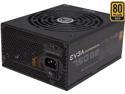
EVGA SuperNOVA 750 G2 220-G2-0750-XR 80+ GOLD 750W Fully Modular EVGA ECO Mode Includes FREE Power On Self Tester Power Supply
Pros: I just installed 3 of these in 3 separate builds. Nice quality PSU. More than enough cables. Easy to install. I love that it comes with a tester, and we tested each one prior to install.
Cons: None
Overall Review: Windows 10 Pro Gigabyte G1 Z170x Gaming 5 Intel 6700K Noctua DH15s 32GB G.Skill Ripjaws 4 Series DDR4 2666 EVGA GTX 1080 FTW 2TB Western Digital Black SATA 1TB Western Digital Black SATA All in a Lian-Li PC-7HB
8/18/2016See more detail
Very nice
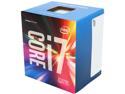
Intel Core i7 6th Gen - Core i7-6700 Skylake Quad-Core 3.4 GHz LGA 1151 65W BX80662I76700 Desktop Processor
Pros: Easy to install, stock cooler works nicely and installs easily.
Cons: None
8/18/2016See more detail