
Your Browsing History


pt4fun
Joined on 12/07/03
0
0
product reviews
- 5
works great
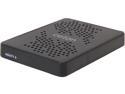
Ceton InfiniTV 6 ETH – Six-Tuner CableCARD Ethernet Network Tuner for Win7 and Win8 PC 5504-DCT06EX-ETH
Pros: Using Ceton InfiniTV6 as external tuner for Toshiba Satellite Laptop running Windows 8.1 Pro and Media Center. Installed Ceton using Win 8.1 Pro firmware and software. The PC is connected to the Ceton device via a gigabit switch and cat5e cable. Works flawlessly. Have recorded simultaneously with 4 channels, but have not yet had the need to use 6. Bought this unit so I could also record on another PC connected via Cat5e cabling and Gigabit switch. Don't have that setup yet as I'm still building the new PC.
Cons: I already had the cablecard paired due to using it on an InfiniTV4 PCIE unit in another HTPC. The Ceton installation instructions were not accurate with regards to how to deal with this situation since I did not have to call the cable company at all (Comcast). Had initial problem with laptop not passing the Media Center Digital cable advisor test due to 'incompatible graphics card or driver". Turns out you can't have a TV connected to the HDMI output AND have the laptop screen showing at the same time. I disabled the laptop screen and only used the HDMI output and the advisor completed successfully. Nothing wrong wit Ceton, just something I thought others might find valuable. One other note, I also have a SiliconDust Prime unit on my home network and those showed as eligible tuners in my laptop media center tuner list, but I did not install the software for that. For some reason the Ceton tuners did not show as primary in media center so I had to fix that 'per channel' which was a pain. Probably more of a media center issue than Ceton though.
Overall Review: Unit runs warm so I moved it to a separate shelf away from other devices. The InfniTV4 also ran hot in my HTPC case and contributed I'm sure to multiple power supplies going over a 4 year period. The main reason I went with this external unit and a laptop PC was to mitigate heat issues.
1/12/2014See more detail
nice but not perfect
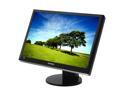
SAMSUNG 2493HM Glossy Black 24" DVI HDMI Widescreen LCD Monitor with Height/Pivot Adjustments 400 cd/m2 DC 10000:1 Built in Speakers
Pros: Good size, nice adjustability features, including tilt, swivel, etc. Good picture viewed "head on" (see cons).
Cons: poor vertical viewing angles (from either top or bottom). Visual quality goes down hill rapidly. MagicTune software is buggy in XP and causes auto reboot periodically (had to uninstall it). Front panel options are not visible without a flashlight. "Touch" buttons are horrid (way too sensitive). Adjusting this monitor without Magictune software is an excersise in patience.
Overall Review: I own a 40" Samsung HDTV. Some issues with it regarding SD television, but overall much nicer than this monitor. Samsung is generally good so I'm somewhat disappointed, but luckily I view this head on 95% of the time. I use for photo editing, limited TV watching, but no gaming. Not sure how it would work for that. Using VGA (not DVI or HDMI) due to use of KVM switch. May be impacting video quaility.
11/12/2008See more detail
super fast
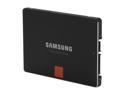
SAMSUNG 840 Pro Series 2.5" 256GB SATA III MLC Internal Solid State Drive (SSD) MZ-7PD256BW
Pros: Installed in new PC build with Asrock H87M motherboard and i7-4770 haswell CPU with 16 GB DDR3 RAM. Built PC with WIndows 7 Pro 64 bit (better in my opinion for mouse/desktop (non tablet) computing). Noticed how fast Windows 7 installed and booted. From turn on to functional desktop in 15 seconds after install was completed. Experience same boot times after installing all Microsoft updates and Norton Security Suite. Apps open instantly.
Cons: not a con of the unit, but a con of the cost of SSD's. Hope they come down to be in parity with disk drive prices within a few more years. Will get SSD's to replace HD's on my other PC's. (have 5 total for various purposes including 2 media center PC's).
1/12/2014See more detail
works great
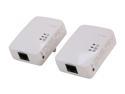
ZyXEL 500 Mbps Mini Powerline AV Ethernet Adapter Kit (PLA4201KIT)
Pros: Much improved over AV200 Netgear unit and 3-4 times faster than first gen netgear unit from 2007. Internet download speeds increased from 18MB/sec download to 40-50MB/sec download (matching speeds for PC connected to router through gigabit switch). Easy to use, didn't bother with bundled software. Just plugged units in and they found each other within a couple minutes and paired. Have not turned on encryption yet.
Cons: none.
1/12/2014See more detail
good but not great
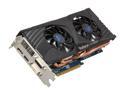
SAPPHIRE Radeon HD 6950 2GB GDDR5 PCI Express 2.1 x16 CrossFireX Support Graphics Card 100312-3L
Pros: I bought this card because reviews indicatd it was 'quiet'. My previous Radeon HD 6830 had one fan and ran very quiet in my medium tower case with stock cooling (120mm back fan, power supply fan only). I do not overclock and play only supremem commander 2 for gaming. The card provides good playability and framerates. No lag or delay even with SC2 mods to include 1500 units.
Cons: Once unit count rises above 1000 and more graphics power is needed, the fan speed rises above 50% and is noticeable. Above 65% max fan speed the fan borders on obnoxious with a higher pitch whine beginning. At 100% fan speed it is irritating when I set it manually. The highest I've seen it is 67% of max speed with 70 degrees C so it is getting rather hot. The construction of the unit seems OK, just not sure if the fans 'should' be so loud at max speed.
Overall Review: Rebate process is lame. Requires you receive an Amex prepaid card. Requires you to enter info in a website, print out a form and mail it with the UPC code and proof of purchase. Will see how long it takes to receive it.
12/29/2011See more detail