
Your Browsing History


N P.
Joined on 10/05/04
0
0
product reviews
- 35
Sweet Device
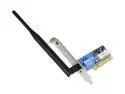
Linksys WMP54G Wireless-G Adapter IEEE 802.11b/g, PCI 2.2 and 2.3 32bit PCI2.2 Up to 54Mbps Wireless Data Rates
Pros: This is a great Linksys Product. Second one I own, b/c gave first one to buddy. Pricey, but Linksys is good quality. Try to avoid using the install CD, by going to linksys.com and getting driver only. Then put device in computer and after Win XP detects it, just use the driver. Windows manages the wireless better than Linksys software. Newegg lightning fast delivery, and was the most recent version Linksys offers. Goto a Best type dealer, and you may get older version of card. Newegg good, other egg bad.
Cons: None
12/18/2006See more detail
Great Memory
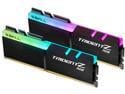
G.SKILL TridentZ RGB Series 16GB (2 x 8GB) 288-Pin PC RAM DDR4 3200 (PC4 25600) Desktop Memory Model F4-3200C16D-16GTZR
Pros: Worked fine in Dell Optiplex 3050 that originally had 4 GB ram (1 stick). However, the G.Skill did not fit because of the flashy light piece in the 2nd port. Also had to remove the slim line Optical drive to make the 1st stick fit, and then the CPU booted up just fine and recognized 8 GB (because only used 1 stick). If you have the space, this works well, and the lights in a clear CPU case would be a nice show piece. Can't knock the product though, because I think it is great so giving 5 eggies. Just won't fit my CPU though.
Cons: Large foot print, and so I had to remove my slim DVD optical drive for it to even fit in 1 bay. Could not get 2nd stick to install due to large flashy LED on the RAM. I have a Dell Optiplex 3050. However, the computer booted up and recognized the 1 stick of 8 GB ram just fine.
Overall Review: If you have a clear CPU case, the flashy lights are pretty. However, my Dell Optiplex 3050 does not have the space to fit the sticks due to the lights taking up an extra 1/4 inch or so. However, the computer did recognize the 1 stick I was able to install by removing the DVD optical drive. Computer booted up and was able to use. It just does not fit, but works fine though! I would buy again if I had a clear CPU case cover. 5 eggies deserved.
9/20/2019See more detail
Great Router
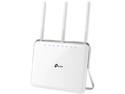
TP-LINK Archer C9 Wireless AC1900 Dual Band Gigabit Router
Pros: Great speed, DDWRT capable, stable connection, great price
Cons: White color, stands up so cant be mounted-unless ya drill a screw or 2
Overall Review: I like flashing routers with ddwrt cause they give stable connections. For years, used the Linksys WRT54GL and flashed it with DDWRT, but the speeds are only G. Then found the TP link TL-WR814N router which was really inexpensive and DDWRT flashable and gave a rock solid connection, but was only N speed. Then I got an AC router, and since these past routers last a while, I wanted to try the newest speed which was AC. Neither the Linksys or old TP-Link failed on me by the way. The Archer C7 was decent, but I wanted a USB 3 port to have a NAS, and so I returned it and got the Archer C9. My wireless speeds went from sub 10 Mbs to close to 30 Mbs download (also had great speeds with the Archer C7). So my router was the bottleneck. Had I more sense, I would have upgraded long ago. The Archer C9 is DDWRT capable, and I am using the beta DD-WRT version from 6-24-2016 r30016. I flashed with "factory to ddwrt", if anyone is trying to figure out which file to use. I like the fact you can plug in websites to block, but have noticed there is a limit of 11 sites in the "Website Blocking By URL Address" before all the sites actually become accessible. So I just put the main name of the site in the "Website Blocking by Keyword" to block extra sites. It works great! I think the Archer C7 also has the same problem, but just remove the sites from "Website blcoking by URL Address" and throw them in the keyword section. For example, if you have over 11 sites you want to block, and www.ups.com is name of the website, simply put "UPS" in the "blocking by keyword" section, and it will block it! Took a while to figure out, but I'm glad DDWRT is still doing a fantatstic job!! Do yourself a favor, and upgrade to this router, flash it, and fuhgeddaboudit!!
8/20/2016See more detail
This is a tank!
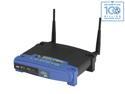
Linksys WRT54GL 802.11b/g Wireless Broadband Router up to 54 Mbps/ Compatible with Open Source DD-WRT (not pre-load)
Pros: So like everyone says, put ddwrt on this puppy and fuhgetabouit... The thing works. Again, it's not N or AC, but if u need a working stable router, get it, flash it, forget about it. I have bought a bunch of these over the years, and they are the best.
Cons: Doesn't come in teal
9/8/2014See more detail
Printer Server Rox
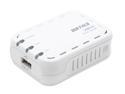
BUFFALO Network USB 2.0 Print Server - LPV3-U2
Pros: Works with HP LaserJet 3050. If ur new to routing, just follow posting on 7-10-2010 at 2:39:30 PM. Just find the router on your network. Since I use DD-WRT on my router (linksys blue box WRT-54G), it showed up in the router software as 192.168.1.114. Plugged that IP address on my web brower (Google Chrome) and I knew it was running. Follow the 7-29-2012 posting to get to run as a printer. It rox! Running Win 7 64 bit. Login is root/
Cons: none
5/12/2013See more detail
Good memory
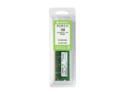
Rendition by Crucial 1GB 200-Pin DDR2 SO-DIMM DDR2 800 (PC2 6400) Laptop Memory Model RM12864AC800
Pros: Works great with Dell D630 laptop with Win XP 32 bit. Now have total of 2GB
Cons: none
4/30/2012See more detail