
Your Browsing History


Ilya S.
Joined on 06/04/04
0
0
product reviews
- 9
Beware of ASUS Update for BIOS
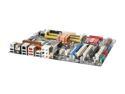
ASUS P5K-E/WIFI-AP LGA 775 Intel P35 ATX Intel Motherboard
Pros: Very fast motherboard, Q6600 (G0 revision) ran at 3 GHz from first boot, Prime95/Orthos stable under Windows Vista x64 ultimate. Runs very cool, has huge overclocking potential, best quality motherboard I have owned so far
Cons: DO NOT use ASUS Update software to flash BIOS under Windows Vista x32 or especially x64. Flashed mine through Vista x64, erased successfully, programmed successfully, but failed to verify (step 3). Flash utility lost BIOS read access and after restart the board ceased to function. Turns on for 3 seconds, then off... then on... then off...
Overall Review: The hardware is awesome, P35 chipset guarantees future-proof investment when Perynn core CPUs arrive. Software, on the other hand, is horrible. ASUS update destroys your BIOS and CrashFree BIOS 3 does not rescure you. ***After some investigating in the lab, I think ASUS Update bugs out under Vista X64 and burns the EEPROM read pins on AMI BIOS chip, so even CrashFree bootstrap fails to work. Time for a replacement.
8/30/2007See more detail
Lasted... for 1 year
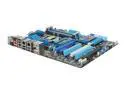
ASUS P8P67 EVO (REV 3.0) LGA 1155 Intel P67 USB 3.0 ATX Intel Motherboard
Pros: I got this board at Frais when it was on sale, about a year ago. For a whole year it worked great, stable, no issues. Bios easy to navigate. Stable, high memory compatibility, reliable bios (unlike MSI P67A-GXXX boards). Everything worked perfect for a year until...
Cons: ... after a year of use motherboard failed. 8pin CPU 12V connector is shorted to ground. CPU rails are also shorted to ground. Two 5030AL VRM modules failed, one on top side of motherboard, one on bottom side. Turns out, VRM heatsink is not flat, so center row of VRMs is not cooled. This leads to overheating and failure. If you use air cooler, this problem is somewhat mitigated by airflow. If you use a water cooler on CPU, there is no airflow and eventually 5030AL chips overheat and will fail.
Overall Review: Very poor cooling system design that leads to eventual failure. To avoid this issue, get a thicker thermal pad or apply thermal compound on voltage regulators under the blue heatsinks. VRMs on the back side of the motherboard are completely exposed, with no cooling. A flat piece of copper attached with adhesives should solve this issue. Hopefully ASUS addresses this design fault in future revisions.
2/13/2012See more detail
Two cards with Black PCB, Flashed to 470, SLI
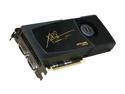
PNY XLR8 GeForce GTX 465 (Fermi) 1GB GDDR5 PCI Express 2.0 x16 SLI Support Graphics Card RVCGGTX465XXB
Pros: Bought two cards when they were new, not refurbished. Received black PCB version, successfully flashed to GTX 470. Stock speed, 3dMark Vantage GPU P-score 24300, E-score 14700. Insanely fast. No freezes or crashes. Connected to 55 inch HDTV for giant gaming Runs on EVGA 780i SLI motherboard, 4 GHZ Intel Q9550 barely keeps up.
Cons: First card has default vcore of .95V, second card has default vcore of 1.025V. If lower Vcore card is inserted into first slot, second card will be forced to lower voltage, causing it to crash. I placed higher voltage card into first and problem went away.
Overall Review: Running too hot? Use MSI Afterburner, Underclock memory to 1400 mhz. Then drop vcore to .925V. RAM bandwidth is not even fully stressed, core speed is at stock, no performance drop, less heat, better life, ... , profit!
10/20/2010See more detail
4 640GB Caviar Black drives in RAID 0
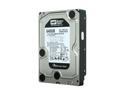
Western Digital Black WD6401AALS 640GB 7200 RPM 32MB Cache SATA 3.0Gb/s 3.5" Internal Hard Drive Bare Drive
Pros: Incredibly fast hard drives, especially the two platter version, much faster sustained speeds. I was lucky and received the two platter versions, not the slower 3 platter versions. Connected 4 drives to Pr0mise EX4650 SAS controller in RAID0, caching enabled, Shortstroked to 1 TB for faster access. Sustained reads of over 400MB/sec over full 1TB array, 4K random reads / writes at 15MB/sec (compared to 0.5MB/secsingle drive)
Cons: Newer versions use 3 platters. They have faster access speed but slower throughput. No TLER function, not for use in redundant arrays
Overall Review: Get a pair of these drives in RAID0 on good Intel ICH9R or newer controller, will give most SSDs a run for their money
10/20/2010See more detail
Insanely fast
Western Digital Black WD6401AALS 640GB 7200 RPM 32MB Cache SATA 3.0Gb/s 3.5" Internal Hard Drive Bare Drive
Pros: Bought 3 of these drives for RAID0, whopping 2 TB of space! Benchmarks over 300 MBPS sustained reads, with 10.5ms access times. 32MB * 3, thats almost 100MB of cache. Faster than an equally expensive SSD in my laptop and way more space
Cons: 3 drives need lots of juice, require staggered startup. Managed to overload SATA power rail
Overall Review: Going to get another one and make 4 drive RAID0 monster, 2.5 TB with 400+mbps speed. Just like memory, you can never have too much storage space
8/1/2009See more detail
Best performance for the money
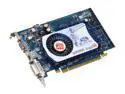
SAPPHIRE Radeon X1550 512MB (128MB on board) GDDR2 PCI Express x16 Graphics Card 1001
Pros: For the price it is reasonably fast video card, low power, compact, works with latest catalyst drivers. Plays WoW on max settings, even with 4x AA with good framerates! 4x pipelines at 550mhz give good fill rate, full dx9 support, bought four cards and all of them work
Cons: 128mb 64 bit onboard frame buffer, so the card falls back on system ram and PCI-E bus. Provided you have ddr2 667 in dual channel 128bit mode you are fine. Otherwise it can slow down
Overall Review: 550mhz core 400mhz vram clock, ran stable at 650 mhz 500mhz. If integrated graphics just dont cut it, this card is the best choice
5/14/2008See more detail