

Your Browsing History


Lance R.
Joined on 07/18/05
0
0
product reviews
- 18
Basics done right
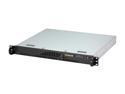
SUPERMICRO CSE-512L-260B Black 1U Rackmount 14" Mini Server Case Thermal control 260W AC power supply with PFC
Pros: This is a basic case for the "why pay more" crowd willing to turn a screwdriver. Its interior layout is clean, with two separate cooling zones: one for the hard drives and one for the motherboard, with an internal platic partition dividing the two. The fit is a bit tight on the hard drives, but the drives get reasonable ventilation due to the location of the blower which cools the motherboard compartment (the blower intake is in the HD compartment, which itself is ventilated from the outside, so there will be airflow over both drives). The case itself is sturdy and cleanly laid out, and there is no "sag" if you mount it by the brackets on the front only. While noisy in an office setting, by server standards it's not loud at all. The packaging is sturdy, too... it would take serious effort to damage it in shipping. Highest praise from me: not only will I buy more for work, but I bought one for myself for my own hobbyist server with my own cash.
Cons: The power connectors are "previous generation": 4-pin Molex only for the hard drives (you will need a SATA power cable adapter if your drives do not have "classic" power only), and no EPS-12V (24-pin +4 pin CPU power only). This will limit your motherboard selection a little, though in a case this small you don't want multiple CPUs anyway. Also, the front panel connector is Supermicro-proprietary, and the rear IO shield is not a conventional design (you cannot use the normal pop-in shield that tends to come with motherboards). But given that Supermicro has a huge assortment of motherboards with the appropriate layout and front panel header, some for very reasonable prices, this is not an impediment. Just make sure you get a motherboard with the right back-panel layout and no audio headers, unless you're very brave and equipped with a Dremel tool.
Overall Review: My build, which has worked flawlessly and comes in at well under five hundred dollars, includes a Supermicro PDSBM-LN2+ motherboard (Socket 775), an Intel "Allendale" 1.8ghz dual-core CPU, a Dynatron P168 active low-profile heatsink, 2gb of Kingston DDR2/667 memory (the above motherboard does not need ECC), and a pair of Western Digital 320gb SATA hard drives. Yes, the M/B in question has an 8-pin CPU power header, but with the 4-pin power from the case' power supply in the first four positions on the header it worked just fine. It all went together without hassle, booted up the first time, took a CentOS install, and has been performing as well as the Dell servers above and below it... for a quarter of the cost.
4/7/2008See more detail
Optimus Budgetus
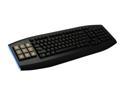
OCZ Sabre Black 103 Normal Keys 9 Function Keys USB Wired Standard OLED Gaming Keyboard
Pros: (purchased elsewhere) This is a good, solid keyboard. It has a good heft to it, and the most important function of any keyboard (the regular keys) it gets right. The keys have good weighting, are quiet, and are at a proper angle for my style of typing. There is also a unique layout for the Home/Del/Ins/End cluster that works extremely well, and the 128mb flash drive built into the keyboard (which is where the driver software installers are at) is a handy idea. Oh yeah, the OLED keys! The OLEDs are a sharp, crisp 64x64 pixel amber layout, with thick clear plastic key bodies. They have a firm, springy feel which is very satisfying. Any 64x64 BMP works fine, though you may want to convert to black-and-white yourself if you want to control how dithering works (remember, this is not a greyscale OLED, the pixels are either on or off). The geek-cred of this keyboard is well-nigh infinite.
Cons: There are several shortfalls and limitations. Firstly, installation on WinVista64 SP1 was a real pain, giving unhelpful "Error 1722". This is a permissions-related issue; you must turn User Account Control (UAC) off while installing; running the installer as Administrator is insufficient. This will require a reboot. You also need Microsoft .NET version 3.5 SP1 installed (get it at http://www.microsoft.com/downloads/details.aspx?FamilyID=ab99342f-5d1a-413d-8319-81da479ab0d7&displaylang=en), and this fact is not flagged by the installer. Once installed, you can turn UAC back on and you're fine. I'm sure this will be fixed in future releases. The manager software is clunky and not well-documented, but can be figured out. The manager software needs to be active for the OLEDs to work; minimize it to tray instead of closing. The OLEDs auto-turn-off after a few minutes (no doubt to extend their life and prevent burn-in; OLEDs aren't durable), but hitting one of the OLEDs will wake it back up
Overall Review: Note that the main keyboard is NOT backlit. A keyboard this expensive really should have a couple of USB ports built in. A keyboard of this type and expense should also have media controls (volume, playback-controls) and a brightness control for the glowy-blue-lights at the end.
9/5/2009See more detail
Excellent compact computer
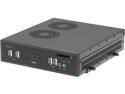
Shuttle DS61 V1.1 Intel H61 Black Mini / Booksize Barebone System
Pros: This is an excellent compact computer. Approximately the size of a Mac Mini, this system is barely larger than the mini-ITX board it is built around. The ability to take any Socket 1155 CPU with a 65w TDP or less, which means up to a Core I7-3770S at the time of this writing, (limited, no doubt, by the ability of the power brick to deliver power and by cooling requirements), to take up to 16gb of memory, and to take both a 2.5" and an mSATA SSD or a mini-PCIE Wifi module results in a great deal of grunt in a tiny form factor. For anyone not needing gaming-class graphics, this is an excellent choice. Just don't expect overclocking, as it is based on the Intel H61 chipset (the "61" in the DS61 product name), and if you use the mini-PCIE slot remember to set the right mode (mini-PCIE or mSATA) in the BIOS. Yes, its styling is industrial, as that is exactly what the original intent was, The chassis includes removable brackets to bolt onto the VESA mounts on the back of a monitor or TV to make a "poor man's iMac", or as Shuttle intended, a digital sign controller (hence the "DS" in the DS61 name). As an industrial computer, the two serial ports are welcome, as are the two 1000baseT NICs (Realtek) and SD-card reader are equally welcome. It also doesn't waste time during bootup, either. Ubuntu 12.04 Server installs on it without a hitch. My company has used several of these as prototypes for networking appliances, and have found them to be reliable and quiet. I've done the assembly on all of these, and they go together quickly with no fuss. Shuttle has even included a small tube of thermal grease to make sure the laptop-style cooler does its job. I'm extremely impressed, as are the other engineers I work with; two have already bought DS61s of their own to use as HTPCs. As long as you can live with the integrated graphics of whatever CPU you choose, you have a real winner here. This would also make an outstanding car-PC for those of you embedding touchscreen monitors in your dashboards.
Cons: The only downside I found is the styling, which as mentioned earlier is appropriate for industrial and embedded computing.
Overall Review: If Shuttle were to make these without serial ports and in black with a nice bezel, they'd sell a ton of 'em.
6/18/2013See more detail
Awesome, quiet cooler, but beware clearance issues
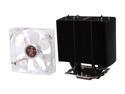
EVGA M020-00-000234 Superclock CPU Cooler
Pros: This is an extremely efficient cooler. Various reviewers have found it is as effective as preassembled liquid-cooling units like the Corsair H70, and I believe it. It is also very quiet, even in a mid-size case (I use the Antec Three Hundred). The mounting assembly, though a little complex, does a great job (socket 1155 in my build). No motherboard warping; I can't say that's always true with other cooling solutions I've used in the past. Seriously, cool + quiet + inexpensive (compared to other cooling solutions in this performance class)... what more could you ask?
Cons: This is a very large cooler; cramped cases will be a problem. Beware RAM heatsink clearance issues. If you choose RAM with tall heatsinks such as the GSkill Ripjaws X I used, with a motherboard that locates the DIMM slots relatively close to the CPU such as on my ASRock Z68 Extreme4 Gen3, the fan will press against the DIMM heatsink. Over time, this will degrade the quality of electrical contact between the DIMM and its socket, and "mysterious bluescreens" will be in your future. I had to make my own fan-clips to hold the fan about 3-4mm higher than the included clips, which added an hour or so to the build effort, but the results worked extremely well. Rotating the heatsink to blow up instead of back wouldn't help, because the cooling fins are just as close to the motherboard.
Overall Review: The "secret sauce" in this heatsink is the texturing on the cooling fins. The metal plates are not smooth; they have a dimpled texture which breaks up the laminar flow over the cooling fins which dramatically increases thermal transfer from fin to air. The devil is in the details! This technique has been known to serious thermal engineers for many years; the interesting thing is that this principle has finally made it to CPU cooling. Evolutionary, not revolutionary... but at this price-point? THAT is amazing. This is a cooler that competes with the Noctua DH14, Corsair H70 and Antec Kuhler in every aspect except price; it absolutely trashes them in that regard. Even though this is likely a relabeling of a cooler manufactured by others, kudos nonetheless to EVGA for 80-dollar performance in a 50-dollar price point.
8/25/2011See more detail
Excellent phone system
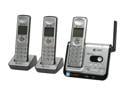
AT&T CL82309 1.9 GHz Digital DECT 6.0 3X Handsets Cordless Phone Integrated Answering Machine
Pros: AT&T has a winner here. The most important aspects of a cordless phone are range and voice clarity; this phone excels at both. I've taken one of my handsets outside to the street and still had excellent voice clarity. In my home this is particularly challenging, as the outside of my house is stucco... concrete backed by a mesh of chicken-wire that acts as shielding (can you say "Faraday cage"?). The signal getting to my phone handset must be weak, but I couldn't tell the difference. Ah, the joys of digital voice... The phones themselves are well-built and sturdy. I did not have to refer to the manual to set up the outgoing answering machine message or to figure out how to listen to and delete messages, nor did I have to "pair" the handsets. Aside from installing the batteries in the handsets and hooking up the base station to the phone jack and power outlet, there was nothing I had to do to make it work. Plug it in. Done. Why can't other manufacturers get it right like this?
Cons: This phone system is somewhat more expensive than some of its competition, but not excessively so; in this case, you get what you pay for. DECT's encryption standard is not particularly strong, and reportedly has been broken (check it out on Wikipedia). I do not view this as an impediment, though. The encryption will keep you private from Billy-Bob and his scanner, and if you have something to say that you're worried about getting picked up from the airwaves, you shouldn't be using a cordless phone of ANY kind.
Overall Review: While you can mount the base station on a wall phone mount, it's a little ugly. AT&T could have included a more attractive adapter plate that would dress things up better. A minor nitpick, though, and it would have likely added several dollars to the price. NOTE: Regardless of which cordless phone you get, you should avoid the 2.4GHz models. DECT operates at 1.9GHz. Microwave ovens which are not perfectly shielded will leak radio noise which make your connection static-ish (as well as messing up your WiFi network). Also, choosing a non-2.4GHz phone ensures that you won't boot your laptop (or your neighbor's laptop, for that matter) off of WiFi whenever you make a phone call.
9/26/2009See more detail
nice but...
ECS Gift - FLYER INSERT
Pros: Sturdy. Capable of giving office co-workers a vicious paper cut.
Cons: Can't overclock.
9/25/2009See more detail