
Your Browsing History


Conor M.
Joined on 04/20/07
0
0
product reviews
- 18
Great value, great quality, great brand
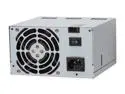
Antec Basiq BP500UB 500 W ATX12V Version 2.01 Active PFC Power Supply
Pros: Dual 12v rails with 18A on both for $40?! That's and insane deal. I bet you 90% of all other 500W PSUs can't put out the same amount of power for the price and stand up to the quality of this unit.
Cons: P4 cpu power connector was a little short in an Antec 300 case but it reached. 20+4 pin gave me a hard time since it didn't label which side the 4 extra were supposed to go on so there I was spending 5 mins trying to push it in wrong. But that's my fault for being stupid.
Overall Review: It powers an E7200 @ 3.61GHz on an ASUS P5QL-PRO, 4GB DDR2 1066MHz, HD 4850 with no problems.
9/15/2008See more detail
Works fine, no issues. Buy an HD audio extension and some fan extensions
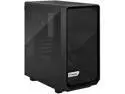
Fractal Design Meshify 2 Mini Black TG mATX High-Airflow Dark Tinted Tempered Glass Window Computer Case
Pros: Thermals are fine. No issues so far. My GPU just barely fits but I lucked out and was able to get it in there and slide the front fans in after it.
Cons: front IO cables can be a bit short. Buy an HD audio extension cable and some fan extensions/splitters if you need them.
Overall Review: Looks good, feels solid and easy to disassemble quickly. My 4070Ti Super and 7800X3D stay cool and very quiet.
2/26/2024See more detail
Works fine. Bit of coil whine if you are near it.
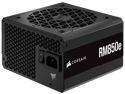
CORSAIR RM850e Fully Modular Low-Noise ATX Power Supply - ATX 3.0 & PCIe 5.0 Compliant - 105°C-Rated Capacitors - 80 PLUS Gold Efficiency - Modern Standby Support
Pros: Does what its suppose to.
Cons: Noticeable coil whine at idle. Goes away with a decent load though.
Overall Review: Works fine. Just noticeable coil whine if you're within a few feet.
2/26/2024See more detail
Works very well so far. Replaced a defective Gigabyte B650M Aorus Elite AX
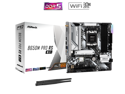
ASRock B650M Pro RS WiFi AM5 AMD B650 Micro ATX Motherboard
Pros: Actually works, decent BIOS, OK layout, Easy driver software. Nothing really to complain about so far. No WiFi or boot issues like the board it replaced.
Cons: Could use more fan headers. Had to order some fan splitters. Also fans are set to silent mode by default which in my case they were all barely moving any air. Wish the 2nd NVMe drive came with a heatsink. You need to install the RGB software to turn off the onboard RBG LEDs.
Overall Review: Works well. Fast boot ups. Am unable to get my RAM to run at 6400MHz but runs fine at 6000MHz. Don't care that much. 7800X3D 64GB Corsair Vengeance 4070Ti Super 2TB Samsung 980 Pro 850w Corsair 850e Fractal Meshify
2/26/2024See more detail
So far very impressed - Edit: NZXT H1 owners read the bottom paragraph.
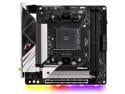
ASRock B550 Phantom Gaming-ITX/ax AM4 AMD B550 Mini ITX AMD Motherboard
Pros: Great board with a decent layout and features. No issues at all so far. XMP worked right away, everything was recognized and installed. The new BIOS is responsive and easily navigable. Fan headers can be switched to pump mode which was nice. Front panel USB-C is a welcome site.
Cons: - 90 degree SATA ports could be an issue in certain cases but for me it wasn't. - HD Audio header location is far away toward the IO/PCIe slot which isn't ideal for small cases. - ASRock's Overclocking Utility seems to freeze up and barely chugs along in Windows. It works, its just not ideal to have an overclocking utility freezing up and being unresponsive while you're overclocking... - RGB lights need to be turned off with the RGB software. - You will NEED to use the included antenna for bluetooth to work well. I had bluetooth connection issues until I installed it. Now the range is phenomenal. - IF YOU'RE USING A PCIe 3.0 RISER CABLE - set your PCIe lanes to x8 for any graphics card on a PCIe 3.0 riser cable.
Overall Review: FOR ALL THOSE WITH AN NZXT H1 CASE - This board supports PCIe 4.0 but that case only comes with a PCIe 3.0 riser and it causes crashing and graphical issues if you don't change it in the BIOS. In the BIOS set the PCIe setting to x8 instead of x16. Its not the boards fault, it is the riser cable that is causing crashes. NZXT H1, Ryzen R5 3600, 32GB Corsair Vengeance 3200Mhz, Western Digital WD BLACK SN750, RX 5700 8GB.
8/21/2020See more detail
Simplest thing to setup. Works very well.

EDIMAX EW-7238RPD N300 Concurrent Dual-Band Universal Wi-Fi Range Extender / Repeater / Bridge, Wall Plug Design
Pros: Works exactly as advertised. I probably didn't need the 5Ghz version since my router doesn't support that. Anyways, setup was a breeze. Used to get a better signal for a Roku streaming stick in our living room as well as better signal in our basement.
Cons: None really. On/Off switch can be hard to get to if you have something plugged in under it.
8/28/2014See more detail