


Your Browsing History


Jeff S.
Joined on 11/28/06
0
0
product reviews
- 7
Good AIO for the price.
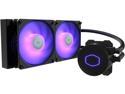
CoolerMaster MasterLiquid ML240L RGB V2, Close-Loop AIO CPU Liquid Cooler, Dual SickleFlow 120mm, RGB Lighting, 3rd Gen Dual Chamber Pump for AMD Ryzen/Intel LGA1200/1151 LGA 1700 Compatible
Pros: - My biggest pro on this would be the fact that it doesn't say anything on the pump... allowing you to mount with the tubes on the left or right without it looking weird. - This AIO will run off the RGB headers on your motherboard unlike Corsair AIO's which have proprietary latching mechanisms which unless you want to cut them or something will render RGB useless without extra software. - The installation is super straight forward... you don't have a bunch of cables to manage as the pump only has the RGB and the 3-pin connector. - The temps are pretty comparable to higher end AIO's that I have tried and if you're not running a really hot CPU it should have plenty of room for overclocking.
Cons: - Tubing is very stiff which is good and bad? It's a little difficult to work with, but once it is in place there is very little chance that your tubing run will move making tighter bends workable. - The screws! The screws as seen in the pictures that connect the fan are not flush fitting sticking up about a quarter inch over the fans so if you have a removable tray and no other screws to use the fan placement is a little limited. - Would love to see more AIO's use their own AMD brackets to clean up the look and feel instead of the latching method, because that is kind of a pain to install. Also, with this latching method it leaves the product looking less clean than it could look.
Overall Review: - Great looking product.
9/23/2020See more detail
Great build, but a lot of considerations...

SAMA IM01 Black Steel Micro ATX Tower Computer Case
Pros: - The quality of the build is really good. The fan/sdd/hdd brackets are noticeably thicker than in my Lian-Li 205. - Comes with a PC Speaker. :) I have been meaning to buy a new one for so long... my computer finally beeps during POST. Maybe an old school ideal but it's so nice to get that "OKAY" at start up. - As I am looking at the thick plastic panel fasteners like "Wow... those look like they'll almost never break." I notice they gave me two of those... not necessary, but definitely a plus. Not to mention the nice case for all the screws etc. - Although their site is pointless... they are very up front on here with specs. Pay ATTENTION they mean what they say. Your "I can probably make it work" thought will be met with SAMA saying "I told you so" as soon as you realize the clearance.
Cons: - I love that they made a nice SFF Case for mATX. It would be nice if they would have added a little extra somewhere (top or length) to provide support for 2 120mm fans somewhere other than the bottom with an ATX PSU. This means that 240mm AIO you got ain't gonna cut it anywhere. ** EVERY side comes off though so you can do like me and mount it outside until you get a replacement. - It's a little tight EVERYWHERE. If you have an mATX you might lose that bottom PCIe slot if you opt for 2 fans otherwise you can position a single fan somewhere. You might need the room if you haven't bought custom length cables. - No way to really mount an ATX PSU with the intake towards the front since my GPU would block the cables. - No USB-C like on the Pro version.
Overall Review: - This case feels and looks great. Comes with nice to have extras. - If you are upgrading or building a new PC online, PAY ATTENTION to what they say. If they tell you up there it won't work... it won't work. - Lots of flexibility with configuration and every panel comes off tool-lessly so cable management is easy to play with. - Definitely would not recommend for first time builders. It takes a lot of consideration and the clearances are so tight that you might find yourself removing parts as you figure out where everything is going. Also, there are measurements to be considered so that makes your parts picking more time consuming, especially with PSU (determines every thing), GPU, and CPU air cooler. // I'm actually considering taking the whole build out to rearrange PSU cables and tuck fan cables now that I know where things sit. You might be better off buying the Asus AP201, the case I was considering before this, as it seems it has more room to throw it together.
2/12/2025See more detail
Decent for the price...
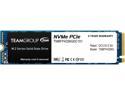
Team Group MP34 M.2 2280 256GB PCIe 3.0 x4 with NVMe 1.3 3D NAND Internal Solid State Drive (SSD) TM8FP4256G0C101
Pros: - Read speeds are excellent at price point. - Extra SSD storage is always nice. - Adobe and more intensive programs are ready to go much faster. (Not games or OS.)
Cons: - Write speeds are a bit lacking. - The overall real world performance of NVMe is not as amazing as switching to SSD from HDD for the first time. You won't be blown away in everyday use / basic OS stuff. - Games still seem like they load at about the same speed... it's hard to tell.
Overall Review: - I would say this is a great drive... especially because you don't have to take another SATA port if your board supports NVMe's. - Take the performance with a grain of salt with file heavy editing programs you will notice a difference... day to day user stuff and games/system boot times (* this was written before I enabled fast boot in BIOS, without it the boot times are almost the same with it they are about half...) the difference if any is so little that a human couldn't detect it. - I did not run a Secure Format on this before installing Windows, which might be an issue... for the best performance on any drive new or used a full format can help improve write speeds if there are any hiccups.
5/12/2019See more detail
Day one and minus 20+ degrees
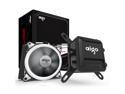
AIGO AigoDIY, Liquid CPU Cooler, 120mm Radiator Quiet Fan Water Cooler Easy Installation All-In-One Liquid CPU Cooler with Led Halo White Lights, INTEL/AMD with AM4 Support (120mm)
Pros: -> Dropped about 20 deg on socket and about 30 on core. *Read other thoughts. -> Looks nice except for the name being off brand. ADDED AFTER 3 MONTHS: -> The fans by this company look awesome... I love the aesthetic of them and wished more brands did this that weren't in the $25 a piece range, because though they look awesome if you try to buy one of these their CFM(Air flow) seems a little low for anything other than an exhaust in a mid tower case where you really want to bring more cool/fresh air into from the bottom or front to make sure your GPU and components are getting some relief.
Cons: -> (IGNORE THIS CON: MY CASE MANUAL STATES THAT FAN MUST GO ON BEFORE RADIATOR (AKA I'M AN IDIOT) SO NOW RUNNING A 2 FAN SETUP, AS IN MY MID TOWER THAT SET UP ACTUALLY TAKES OVER ONE OF MY TOP 120MM SLOTS. STILL LEAVING THIS IS AS IT WAS MY ORIGINAL THOUGHT) Radiator is a bit long for the back of my mid tower (didn't line up with holes due to the case I/O and PCI slots having a ridge more... not really their fault) so had to put it up top, blocking the second slot for a fan up top and had to squeeze a fan in the rear exhaust. Cable is pretty long could have mounted it up front and might later. - Just the brand name so far... I mean maybe eventually they will have a better status, but it's not one of those bragging right brands, haha.
Overall Review: The massive drop could be due to bad heatsink and when removing it I realized the original seller did not have it evenly spread. Also, I used Arctic MX-2 vs whatever he used. UPDATE AFTER 14 DAYS: Added the extra egg (4 -> 5), because this cooler has been amazing. It's really hard to push my FX processor past about 45 Celsius on core and 60 on socket. So, that is still about 25 degrees less than the maximum operating temperature. However, if it gets to this point my overclocks were horrible and probably going to fail due to other hardware issues or the CPU just can't hang at the speed/voltage... (could be due to the one different RAM stick I have in the setup) Idle temps are amazing, even at high voltages I am likely to only hit about 23 degrees. At normal voltages... I am hitting lows of 10-12 degrees; however, this number quickly jumps whenever the operating system does anything, but only to about 17-20 degrees. No leaks thus far and I have tried placing it in many different spots on the case while it was still connected to CPU. The hoses are very easy to adjust and very flexible, though I wouldn't just man handle them or try to really test it... we're talking liquid and electronics here after all. UPDATE (November 15, 2018) ABOUT 2.5 MONTHS IN: I noticed that the pump on the CPU's LED was dim and have switched it over to a different fan header on the motherboard, which seemed to make it light up on the corners as for a little over a week the LED has been dim on the A and O. Now, the LED that lights up the A seems to go on and off intermittently. I am probably going to try slapping on a Molex cable onto my PSU and try seeing if giving it that juice will help as I am unsure if it is a sign of the motherboard not powering things right or the pump is not getting full power. Also, if this is not a motherboard power issue it kind of scares me a little bit as I don't want to not know that pump failed and kick on my computer. Right now it is still connected to the CPU_Fan header so if it fails my speaker should warn me. UPDATE ON THE ABOVE ISSUE (6-7 days later): It seems that it might just be a power or motherboard issue as the LED seems to have been working fine for the passed 3-4 days? Not counting the pump out just yet, but all seems well now. -> MAKE SURE TO GET A GOOD PASTE: Also want to point out that... I used some other paste as I regrettably had ran out of Arctic MX-4 when my new motherboard came and I was too antsy to set it up. I now run... at about 29-33 degrees idle (About a 10-14 degree difference as the old paste) and I'd say it can get up to about 55-60 on load which is still about 15 degrees less than the recommended maximum, but just shows how far a good paste can go... I will be grabbing some MX-4 soon. :)
11/18/2018See more detail
A lot of backup screws, but not black.
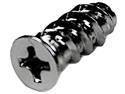
StarTech.com FANSCREW Computer Case Fan Mounting Screws - 50 Pack
Pros: A whole bunch of backup screws for when yours eventually get stripped, because yeah we could use the right sized driver but that's not always the case when you are hurrying.
Cons: These are just plain silver and not black... so if you have a black case these are probably best for rear exhaust and covered fan mounts.
Overall Review: Quickly shipped and received.
9/27/2018See more detail
Doesn't look cheap.
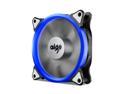
AIGO AigoDIY aigo 12cm 120mm Computer PC Cooling Case Fan with LED Halo Ring, 3-pin/LP4, Anti-Vibration Pads
Pros: - The blue ring looks awesome. - Thing is super quiet at full speed.
Cons: - Airflow feels a bit lacking. I might end up having to use this as an intake once I finally decide to replace my case's stock fans... so I can get a bit more airflow on the exhaust. - The ring looks awesome and it would be awesome to see it on both exhaust and intake side, like the 3 fan RGB pack that they offer. - The Molex connector is tied in/wired to the 3-pin connector. Would have been nicer to see them supply an adapter, because if you were to actually use this on the motherboard, the Molex connector would be a bit difficult to hide. Especially being that it is probably only given about a half inch to inch slack from the 3-pin connector.
9/21/2018See more detail
seller reviews
- 1
They do not send items
I believe this company is a scam as they have not sent my item I purchased... September 12th and here it is October 2nd and USPS still says they have not received the item.
On-time
Delivery
Product
Accuracy
Customer Service
Satisfactory
10/2/2018See more detail