
Your Browsing History


Cameron P.
Joined on 10/17/05
0
0
product reviews
- 41
Good Small Case
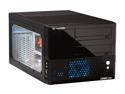
Thermaltake Black SECC Japanese steel LANBOX Lite VF6000BWS Micro ATX Media Center / HTPC Case
Pros: This box WILL fit a x8800gtx *read other thoughts. Very Quiet. I recommend replacing stock heatsync with a wide one. You have about 100mm of clearance off the top of the mobo for a heatsync. Everything is thumbscrews (except for the parts that you want screws). Expansion slots use screws (THANK YOU). I hate those cheap clips that never work. You can pretty much take apart the entire case without a screw driver, except for the hard drive cage, and the PSU mounts.
Cons: Not many places to hide cables. Cables on front to connect to mobo are quite long. 12" cathodes wont really fit anywhere in this case with all the cables. I recommend smaller ones, maybe 8". Top panel has a lot of vent holes, but half of them are covered by metal. I am thinking about cutting a hole in the PSU mount to install another 60mm fan blowing up out the top. Hard drive cage conflicts with long cards. I wish they moved it over an inch or two, but oh well. I improvised (read below).
Overall Review: I fit both my hard drives in the cage, and used an x8800gtx. Tips: Mount the hard drives backwards (so only 2 screws per drive in the middle). Then slide the drive cage onto only 2 brackets, and drill a new hole for the screw. Put some foam under the other end. I tried every other combination and this is the only one that works After doing that, the drive cage doesn't vibrate, and holds both my drives fine. Be sure to put the cd drive bays in before putting the x8800gtx card in, otherwise you wont be able to get it in. Also, mobo cables can be crammed to the side of the mobo, and taped or tied into place. Then they are completely out of sight. definitely go modular. With modular cables I have 4 cables plugged in and the 24 pin power cable, and its already overflowing the top part of my case. These wires can be stuffed above the cd drives though to remain out of sight for the most part. Get a third 60mm fan for the back. (30 degrees celcius dif without the fans running)
5/9/2007See more detail
Bad Fans
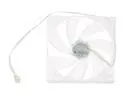
SilenX IXP-74-14B Blue LED Case Fan
Pros: They move a lot of air. They have nice blue LEDS. They come with rubber mounts and appear to be very durable.
Cons: The fan bearings (I assume since no blades are hitting) make scratching noises on one of my fans, really really loudly. Also, the other fan makes these noises when it heats up after 2 minutes of use. I'm not going to even bother opening the other 2 fans after seeing the quality of these. These things are LOUD, not 14 dba. They are louder then everything in my case combined together.
Overall Review: If I was going to keep these (if they didn't make clicking scratching noises) I would probably buy a fan controller for them, but they should already be silent. Don't waste your money on these fans, they are not worth 25$, especially if you have to RMA them like me. Get a fan controller and some cheaper fans. Also, I am positive its the fans making the clicking noise, and not the case. I removed the fan and slowly spun it and i heard a faint scratch every rotation around the same point. I assume its a bearing. But whatever it is it's making a lot of noise.
6/7/2007See more detail
Good Price Bad Manual
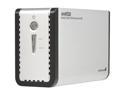
StarTech SAT3520U2ER Aluminum 3.5" Silver eSATA USB Dual SATA External RAID Hard Drive Enclosure
Pros: Easy installation, strong build, easy configuration, no software necessary
Cons: Manual is messed up. For minimum hair pulling: 1. Download the latest manual off the site 2. If your drive isn't working as desired (I had trouble setting up RAID 1) then read the following: The switches to configure the device are numbered 1-4, but this may be wrong. Try reversing the code. The guy in their support department says 1 is the closest switch to the reset button (labeled 4 on mine) and 4 is the farthest switch to the reset button (labeled 1 on mine).
Overall Review: Good price, but several hours wasted to a simple mistake in the manual. Hope you see this review before you spend hours The true test will be if it can keep my data safe.
2/25/2011See more detail
Very Studry Cable
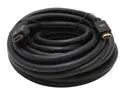
AMC HDM-HDMI35 35 ft. Black 24awg Premium Gold Series 1080p rated HDMI Cable Supports Sony PS3
Pros: The cable is very sturdy, I had it weaved through my wall mount and it got pinched and creased, but the cable never broke or had any picture issues.
Cons: The cable was so thick and strong it eventually put enough stress on the port on my tv, and cracked the port. The port still works, but the cable just slips out easier. If the cable was thinner and flimsier it would never have done this. If you are wall mounting a TV I recommend getting an easier to handle cable.
Overall Review: Very good deal for the length, very good picture quality. Ive owned this cable for just under a year, and it has never given me any issues besides being TOO long.
12/18/2008See more detail
Great Printer
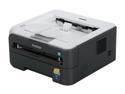
Brother HL Series HL-2140 Personal Up to 23 ppm Monochrome USB Laser Printer
Pros: Very fast printing, easy paper refill, and good documentation on setting the device up and changing cartridges. Very easy to unjam, only has jammed one sheet of paper for me so far and I have printed several hundred papers. Still using the cartridge that came with it as well, so it didn't come empty.
Cons: None yet
Overall Review: Glad I bought this printer
12/18/2008See more detail
Good Deal
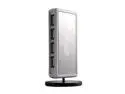
Rosewill RHUB-310W White USB2.0 7 Port Shining Standing Hub With Power Adapter
Pros: The device is sleek, and has enough ports for all my devices. My devices stay powered on when my computer is off.
Cons: For some reason my iphone won't get charged from this when my computer is off, even though all my other usb devices are getting power. Also, when you plug a lot of devices into this it does tip over, the stand should be weighted or larger.
12/18/2008See more detail