
Your Browsing History


John B.
Joined on 08/06/06
0
0
product reviews
- 5
Rocky Start but Solid Performer
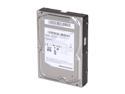
SAMSUNG EcoGreen F2 HD154UI 1.5TB 7200 RPM 32MB Cache SATA 3.0Gb/s 3.5" Internal Hard Drive Bare Drive
Pros: Super quiet. Super cool. Cheap. Fairly fast - I got speeds of about 50-70 MB/sec transfers. I am putting this in a HTPC so quiet and cool are very important. Even when this HDD is blazing away, it is near silent.
Cons: Had major issues with Windows being able to format the hard drive. It did not matter if I used the Vista disk or tried to format it from Vista itself. Windows install disk threw an error. Quick format from Vista threw an error. Long format from Vista stalled at about 70%. Boot disk from Samsung also was no help. I read everywhere and could not find out what my issue was. Tried updating motherboard drivers to no avail. Ended up plugging it into a 64 bit Vista Premium machine and it quick formatted within 2 min! Once formatted the other computer had not trouble using it. I am baffled, but it is working now. I am chalking this one up to random issues with very large/cutting edge drives.
Overall Review: System Specs that had issues formatting the drive: Vista 32-bit Home Premium Core 2 Duo E6600 ABIT Fatal1ty FP-IN9 SLI NF650i 3 GB Ram 8800 GT x 2 (SLI)
10/14/2009See more detail
Great Unit... While it Worked
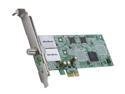
AVerMedia AVerTVHD Duet - PCTV Tuner (A188 - White Box)
Pros: Dual tuner feature is great and can hook into the same antennae! Works with no need for drivers with both Vista and Win 7. WMC picked up both tuners automatically and could utilize them properly. Video recording of HD on two channels at once did not take a significant CPU load and experienced no interruption even with heavy multitasking. Was able to capture 5.1 audio from over the air sources. The tuner was indeed very sensitive and could pick up video sources above the average tuner. This is everything you need for watching and recording over the air digital broadcasts.
Cons: Unit stopped working after a year and a half of regular use. Warranty only lasted for a year. The unit works great while it works. However, I think the build quality could be improved a bit. Unit lasted about a quarter of the time that I would expect from non-moving quality PC components.
Overall Review: Unit installed in horizontal low profile media center PC which was powered on 24x7. Low profile and regular brackets were included by manufacturer. User is A+ certified computer technician.
3/3/2011See more detail
Great Glossy WOLED
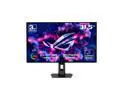
ASUS ROG Strix 32 inch Dual Mode UHD 4K 240Hz FHD 480Hz with AMD FreeSync Premium Pro & G-Sync Compatible 0.03ms HDR400 USB-C KVM OLED Gaming Computer Monitor with Height Adjustable, Swivel & Tilt Stand XG32UCWMG
Pros: - Sharp - Great text clarity - Good software - Good out of the box configuration - Sliver my stand - Good brightness for an OLED
Cons: - Slightly lower color volume than QD OLED
Overall Review: Today we are spoiled with OLED options. The main difference is QD OLED vs WOLED, screen coating, and then manufacturers implementation. QD OLED inherently leads to softer image and poor text clarity due to it's triangle pixel shape (even at 4k / 32"). WOLED is much better due to the more normal rectangular pixel layout. This will mean the fine details in games will not be lost and your text will remain clear without the edges becoming discolored. I originally bought the QD OLED equivalent of this monitor (PG32UCDM) and returned it because of the poor sharpness and text quality. The Strix WOLED has no issue with text clarity and is very sharp /detailed. For the screen coating, this is personal preference. I have a light controlled room, so there was no issue with a glossy coating. It does have decent anti-reflection, but I would be cautious of any light sources behind the monitor. The glossy does give you more inky blacks in a moderately lit room. ASUS does a good job of the user interface. It has enough settings for most power users to be happy. I wish there was more granular gamma control (I would really like 2.3 gamma), but there are probably other tweaks you could do. The color volume is a tad lower than the QD OLED, but most users will not notice the difference. If you love oversaturated pictures, you may want to pick up the QD OLED. Overall, this is a great OLED if you sometimes use your monitor for non-gaming tasks or want a sharp picture. The stand is excellent, the image quality is excellent, and the ASUS implementation is great. The only con is that this is a tad less colorful than the QD OLED.
9/25/2025See more detail
Great 1440P Monitor
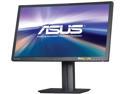
ASUS 27" 1440P Eye Care Monitor (PB278Q) - QHD (2560 x 1440), IPS, DisplayPort, HDMI, DVI
Pros: - Adjustable height (with a perfect place for my center channel speaker) - Vivid colors - Good pixel response time and input lag - Zero stuck pixels - Includes all cables (HDMI, DVI, Power, Audio) - Glare is not too bad with the screen finish - Indicator lights are subdued but visible
Cons: - Bottom right-hand corner is slightly greenish (only noticeable when screen is all black) - Is not OLED - Is not curved (starts to be helpful around this size) - Is not 4k
Overall Review: I use this panel mostly for gaming and am very happy with it. The colors are vivid and accurate, both light and dark content show well (however, very dark content does not work well with the intelligent dimming option). The input lag and pixel refresh speed are both good and I was not able to notice any noticeable ghosting. 27 inches is a good size for a 1440P monitor. Even at 1 foot away, it is hard to make out any individual pixels, but the default text size for Windows is still clearly legible up to 2 feet away. It is very easy to get two Word documents (or Internet browsers) side-by-side. It is great that you can get 60Hz without having to use display port (as you have to with 4K content). It is a lot easier to get games to run at high settings on 1440P than on 4K. With a higher resolution like this monitor, you can turn off AA in games and not notice the difference. If you are gamer, who wants a sub $1000 price point and either 1440P or 4K, I don't think you will find a better monitor than this.
12/10/2014See more detail
Solid Tuner Card
AVerMedia AVerTVHD Duet - PCTV Tuner (A188 - White Box)
Pros: Dual tuners, sensitive tuner, good price, easy setup.
Cons: Not compatible with Windows "sleep" function. Sensitive to overheating (causes stations with full signal to stutter).
Overall Review: I have owned three of these cards through a few different HTPC builds. This card does not always work if you put your PC to sleep (make sure your PC is always on when you are recording). Also, this card can easily overheat. I had this next to a very hot video card and it would show 6 green bars of signal for all stations (the highest Windows Media Center displays), but the stations would stutter and act like there was poor reception. I cracked open my case while watching TV and suddenly all the channels worked. If you have reception problems with this card, I would pop open your case and have a desk fan blow on your tuner card to see if it helps. I was astonished to see that heat caused better signal quality. Next up for me is to install a fan in the side of the case to blow directly across this card and to add some heat sinks on the two signal processors. When this card is working properly – it is a dream. Hopefully the newer revisions of this card fix the wake from sleep issue and include a heatsink.
9/30/2014See more detail