

Your Browsing History


VICTOR L.
Joined on 06/17/05
0
0
product reviews
- 13
Great Little Backup Drive
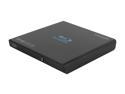
SAMSUNG USB 2.0 External Slim Portable Blu-ray Writer Model SE-506AB/TSBD
Pros: Compact, quiet and reasonably quick over USB 2.0 (about 15 Mb/sec). While it has a dual USB connection, only the primary connection was needed when running to my HP Pavilion Slimline desktop (YMMV). Does not need external power via 120v power brick. 100% usable (so far), no "coasters". Includes CyberLink Blu-Ray Disc Suite (3D-Advisor, InstantBurn, MediaShow 5.1, Power2Go 6.1, PowerBackup 2, PowerDVD 9, PowerProducer 5.5, PowerStarter 7.0_DB). Claims AV capability to be used when directly connected to USB media plug of a suitably equipped TV/monitor (not tested). "Green" friendly: low-power consumption and lead-free design.
Cons: Short 18" USB cable. May require both USB plugs to be plugged-in on low-power USB ports typical of some laptops. CyberLink software is about 2 years old (e.g., 3D-Advisor virtually useless because it doesn't understand current crop of hardware); Samsung should provide downloadable updates of these for free with registration. PowerDVD not as smooth as Media Player in some cases; seems to designed for direct DVD/BD playback and 3D capabilities.
Overall Review: I've only had this drive for about a week, but it's been all positive. Took me about 40 minutes to write or read a full BD-R. I've been using Verbatim BD-R LTH (low-to-high) single-layer 6x disks only, and they've worked great. Running on Windows 7 x64 SP1 (i3-2100, 6GB RAM, two graphic cards: AMD HD6450 + AMD HD5450).
5/4/2012See more detail
Great Deal but DVI dead
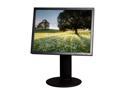
Famous Brand 20" 60Hz TFT LCD LCD Monitor 8 ms D-Sub, DVI-D L200ME-BF
Pros: Basic monitor, but with large "real estate" in the traditional 4:3 ratio (1600x1200). Colors good, no detectable backlight leakage. Stand adjusts height and can rotate screen 90 degrees.
Cons: DVI plug dead. Return for RMA. After 20 minute hold, got helpful rep. I am getting a replacement.
4/1/2012See more detail
Great monitor EXCEPT won't connect to my DVI
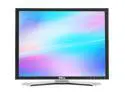
Dell 2007FPB 1600 x 1200 Resolution 20" WideScreen LCD Flat Panel Computer Monitor Display
Pros: The monitor looked clean and seems to work as designed. Very well packaged--with LOTS of bubble wrap.
Cons: Very picky on the DVI interface. If it does not get a connection signal within 2 seconds of power-up or switch-to-DVI, it will go to sleep. This causes problem with DVI interfaces that have a long startup time (e.g. certain graphic cards). In my case, I have active DisplayPort-to-DVI connectors that use parasitical power on the DVI to power-up the conversion circuitry. My computer has 3 DisplayPort connections, and 2 working 1600x1200 DVI monitors that are working fine this way. A third monitor had a power supply problem, so this was to be a replacement for it. But this new unit kept going to SLEEP! Quickly! No go. Had to return as defective.
Overall Review: Vendor is difficult to communicate with. Took forever to get return shipping label because he never told me what he actually needed (my own address!). I guess that info got lost when the first shipped it to me. After 7 days, called him directly (they are in Maryland) and managed to find out what the issue was (has very thick Russian accent that's difficult to understand).
4/6/2017See more detail
Does What I Need
GWC HU2024 USB 2.0 2-Port, bus-power, ultra slim for high mobility Hub
Pros: Simple and effective.
Cons: None so far.
Overall Review: Combined my mouse and keyboard, salvaging one more USB port.
5/4/2012See more detail
Works well for Samsung SE-506AB

Verbatim 25GB 6X BD-R LTH 20 Packs Spindle LTH Type Disc Model 97344
Pros: 6x BD-R LTH discs. No Coasters yet for backing up data on my Samsung SE-506AB. Higher speed than other brands.
Cons: None so far.
Overall Review: Haven't done movies yet.
5/4/2012See more detail
Great Little Controller
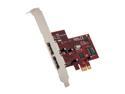
Koutech IO-PESA220 PCI Express x 1 Low Profile Ready SATA II (3.0Gb/s) Controller Card
Pros: JBOD configuration works for my Fantom GreenDrive Pro USB/eSATA 2TB external drive (GDP2000EU). I am able to use either the USB or eSATA configuration without reformat or data loss (cool!). Drive is much faster when on eSATA. Installed without issue into my low-profile eMachine EL1352-07e using PCIe x1 slot. 2 ports for two drives. Documentation claims more drives possible with port multiplier.
Cons: Haven't yet figured out how to get the drive to spin down when idle for long periods of time. Difficult to get into BIOS configuration for RAID/JBOD/CONCATINATED setup: took me repeated keystroke attempts with Ctrl-S or F4 done at the right moment during system boot, to get the menu to come up. No Windows-installed RAID configuration and/or status utility.
Overall Review: Installed on Windows 2008 R2 x64 (using AMD X2 Athlon) file server, using the Windows 7 x64 drivers. JBOD/CONCATINATED config done only at BIOS boot level. Combined with my network upgrade (now full-duplex 1Gb/sec), my Acronis backup is transferring about 50MB/sec (I could barely get 12MB/sec under USB 2.0). And the delay on Acronis startup (while it reads the backup data headers) is now less than 3 seconds.
4/20/2012See more detail
seller reviews
- 1
Product refused to operate with computer--return experience terrible so far
Product was well wrapped. But after hookup to my new PC, would not usefully "connect" . The DVI port was sometimes sensed, but the monitor, which went to sleep mode within 2 seconds of computer POST, could not be used. Reseller promises a return shipping label, but none has appeared, even after 7 days of reseller being informed. NewEgg intervention unsuccessful so far. Will try to update this if situation changes.
On-time
Delivery
Product
Accuracy
Customer Service
Satisfactory
4/5/2017See more detail