

Your Browsing History


Jason H.
Joined on 08/07/05
0
0
product reviews
- 30
Why?

Acer P244Wbii Glossy Black 24" 2ms (GTG) HDMI 16:9 Full 1080P Widescreen LCD Monitor 300 cd/m2 20000:1 ACM
Pros: see other thoughts...
Cons: ...
Overall Review: To answer Li's question, he needs to figure out the difference between TV lines and pixel dimensions. VGA monitors use square pixels, where as TVs use rectangular pixels. A 1920x1200 monitor can switch to 1920x1080, but with the limitations of any LCD: HDTV blur and downgraded picture quality. A 1080P monitor knocks two birds with one stone: it offers an adequate 1920x1080 desktop resolution and allows HD sources at a native LCD resolution. Because he confuses the two types of inputs, he's offering advice that could confuse any buyer needing a multipurpose display.
9/19/2008See more detail
Doesn't work in Linux
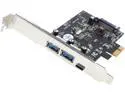
VANTEC 3-Port USB 3.0 Type A/C PCIe Host Card Model UGT-PC331AC
Pros: I don't think you will have issues plugging multiple USB devices into this card like the previous reviewer states, unless you are using dongle of larger than usual width.
Cons: The manufacturer's product page says Linux OS is supported, but I couldn't get it to work. I got a "Descriptor error read/64 error -110" message from the kernel on boot. Assuming it was just an IRQ conflict, I tried every other PCIe slot, and even moved my graphics card to the other PCIex16 slot. I found one slot that stopped the boot error, but it was still unrecognized by the OS.
Overall Review: I tried with and without the SATA power cable connected. Update: This is now in my Windows PC and working fine. I changed my review from 1 to 3 eggs, and would be higher if the manufacturer's product page was accurate.
6/16/2016See more detail
Good KVM
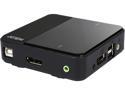
ATEN CS782DP 2-Port UHD 4K USB DisplayPort KVM Switch - allows to access two 4K-enabled computers from a single USB keyboard, USB mouse, and DisplayPort video console
Pros: - Switches quickly between inputs on a Windows and Linux machine. I have tried two DVI ATEN KVMs in the past and this was not the case. - Comes with a port switch button that can be plugged into the unit. May be handy if your keyboard is not working for whatever reason.
Cons: - Audio has some interference. There is a high pitched noise, and I had to add 3.5mm filters on the PC1/2 AUX connections to eliminate it. I suspect this interference is coming from the USB devices, but still wish ATEN would have found a fix for this (more shielding?) since I last tried their units.
Overall Review: Kind of irrelevant, but in Linux, switching off a displayport input is treated as if the monitor was removed. Unfortunately this is handled by moving all the windows to the right monitor, and you lose all your windows positions (I'm using Cinnamon DE). I got around this with shell scripts. If this affects you, google "dynamic-multiple-monitor friendly desktop environment available", and the top result should have some useful bash scripts on an Ubuntu site.
9/30/2016See more detail
Awesome motherboard
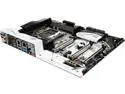
ASRock X99 Taichi LGA 2011-v3 Intel X99 USB 3.1 USB 3.0 ATX Intel Motherboard
Pros: - This is a high quality motherboard with a lot of options - SLI, Crossfire, USB-C, 802.11ac, and best of all, everything is working out of the box in Linux on kernel 4.7. - The debugging LED is also helpful as long as you have the manual on hand to figure out the codes. - Easy CMOS reset button on the back plate. - BIOS has a lot of options, and has a dual bios feature that you can toggle on the board. - With 8 DIMMs, and 3 PCI Express 3.0 x16 lanes, this board is more than adequate for development and video production. I am using a Xeon E5 2680 v4.
Cons: - No issues so far. I will update this review if I think of any.
9/1/2016See more detail
Great performance
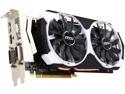
MSI GeForce GTX 970 4GD5T OC
Pros: I upgraded from a GTX 660 and use Linux. I didn't need to upgrade as I don't play many PC games, but it has improved the smoothness of the window manager a lot. It also has greatly improved hardware acceleration in browsers - CSS transitions and canvas is no longer choppy when I have a lot of tabs open. I haven't seen this card go above 58C under high load, and idles between 43-49C.
Cons: It runs a little warmer than the PNY GTX 660 I was using which has a similar (but smaller) cooler, but is within its thermal spec.
Overall Review: I played Cities: Skylines on all max settings at 3440x1440, and the frame rate stayed above 30 FPS. I will probably have to play at 2560x1080 on newer games to get a balance of performance and frame rates, but seeing how I picked this card up at $250, it's a great price to performance proposition. If you can find this card within the $250 range, it's a good deal. Though now that the 1060 is coming late July, and seems to have 980 performance at the $250 price point, it might be worth waiting if you are looking for a new mid-range graphics card.
7/9/2016See more detail
An adequate NAS solution
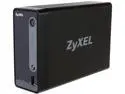
ZyXEL NSA310S 1-Bay Media Server
Pros: - Connects to many third party services out of the box. - Capable web UI. - Variety of pluggable apps that can extend the device's functionality, such as SMART control.
Cons: - Fan noise is annoying. It's the kind of whirring noise that's inconsistent and can drive you crazy if it is anywhere near you while you are trying to fall asleep. Signs of a low quality cooling fan. - Windows only instructions. This probably runs on Linux and doesn't acknowledge Linux exists in the instructions. It's ok though, they only want you to install software that is basically already available over the NAS' intranet site.
Overall Review: - I have never used a NAS or really attempted to send large files over a LAN (all wired with cat 5e), but I get a max of 25mbps file transfers. If it weren't for the cloud and media features, I'd just stick the hard drive mounted in the NAS in an external enclosure connected to my KVM.
5/31/2016See more detail