
Your Browsing History


Robert F.
Joined on 03/24/04
0
0
product reviews
- 7
First portable USB 3.0
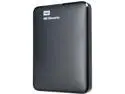
WD 1TB Elements Portable Hard Drive USB 3.0 Model WDBUZG0010BBK-EESN Black
Pros: Smaller than I thought it would be. My only previous experience has been with re purposed 3.5 drives in a Rosewill case with esata and USB 2.0 First big pro was lack of an external power brick. All you need is the drive and the supplied cable and you are off to the races. This makes it extremely portable and takes up no space in my 13" laptop sleeve. Speed seems really good to me though I haven't really done testing. I just fired up a USB 2.0 drive and transferred a bunch of saved files across in what seemed like a reasonable amount of time
Cons: None
Overall Review: Probably recommend it. I still haven't tried it on any older USB 2.0 systems like my Raspberry Pi 3 but I'm curious if the USB 2.0 will supply the power it needs. Havent seen any reviews complaining about that so maybe not an issue.
1/10/2017See more detail
Tiny!
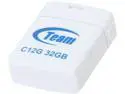
Team C12G 32GB USB 2.0 Flash Drive TC12G32GW01
Pros: Very small in size which is what I was after.
Cons: Only formats under FAT32 to 28.8 gigs. I understand formatting uses some overhead but didn't expect 3.2 gigs.
Overall Review: Bought for use with an auto media player and works fine for that. All in all for the sale price it was a good deal if it holds up over time.
7/14/2014See more detail
Does what its supposed to do
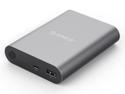
ORICO Q1-BK Qualcomm Quick Charge 2.0 10400 mAh Portable Charger External Battery Pack Power Bank for Phones, Tablet and More
Pros: Got a chance to use it at the Rolex 24 race in Daytona. I burned through the battery on my iPhone 6+ several times and hooked up to the Q1 and it topped it off in just over an hour or so. I ran the cable out of my backpack and was able to top off while I was walking around the course. Over the 24 hour race I was able to fill the phone with pics and video 2.5 times I also topped off some BT headphones I was using to stream the race call and topped up my vape box too. After all that I was still over half full on the power pack. I also connected it to my friends Galaxy for a test and it recognized the QuickCharge and indicated on screen.
Cons: Its heavy-ish and though it fits in a jeans pocket its better suited to carry in a backpack. My iPhone 6+ was pretty picky about which cable I used with it. I had to test 3 different ones before I found one that would work even though each of those cables worked well with standard wall wart chargers.
Overall Review: If all you need is a midday top off then you can likely get away with a smaller 5000 mah range pack. This beast will keep you going for multiple days if thats what you need.
2/8/2017See more detail
Nice enough
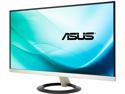
ASUS VZ239H Frameless 23” 5ms (GTG) IPS Widescreen LCD/LED Monitors, HDMI 1920 x 1080 Ultra-Slim Design, w/ Eye Care Feature and Flicker Free Technology, 178/178 Viewing Angle and Build in Speakers
Pros: Easy enough plug and play too. I bought this as an Xmas gift for my older sister and replaced a 19" LCD she'd had for ages. Its really impressive looking even while turned off and its as thin as I have ever seen. Basically all she uses it for is internet browsing so I didn't have any performance issues that gamers may be interested in. Only tested the speakers with system alerts and they were adequate for that.
Cons: I knew it going in but "frameless" doesn't mean edge to edge display. Once its powered up you can clearly see the 1/4 inch border on the sides. I set her background with a black gradient pic I made and it does look edge to edge in desktop.
Overall Review: For the money it was a great pre Christmas last minute score.
1/10/2017See more detail
Its black
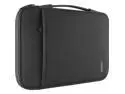
Belkin Carrying Case (Sleeve) for 13" Notebook - Black
Pros: Appears to be well made and fits my 13" Dell Inspiron 7368 with a little room to spare
Cons: None
Overall Review: Nice enough case. Kind of a cross between a simple sleeve and a carry bag with the addition of the handle on the top. I was able to get a small mouse, power supply and a spare USB charger in the side pocket with no problems.
11/16/2016See more detail
Works as Advertised
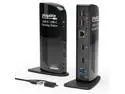
Plugable USB 3.0 Universal Laptop Docking Station Dual Monitor for Windows and Mac, USB 3.0 or USB-C, (Dual Video: HDMI and HDMI/DVI/VGA, Gigabit Ethernet, Audio, 6 USB Ports)
Pros: Effortless install on my Dell 7368 with a single hdmi connected Asus monitor. I downloaded the DisplayLink driver from their website and after install just plugged it all in rebooted and it worked. I didn't have to to do much of anything. It picked up the previous dual monitor settings I had already set using the Asus and the Dell display. Three of the four rear USB 2.0 went to keyboard, mouse and a portable HD. All worked just like they should.
Cons: Didn't have a lot of time to mess with it much but the Audio controls on the Dell appear to be disabled when you plug speakers into the front jack on the UD-3900. I had to locate the DisplayLink in the tray to access volume control. Adjusting volume and equalizer through the Dell app had no affect.
Overall Review: I chose the UD-3900 over others because of the increased video resolution over similar priced items. I would have liked an audio jack on the rear of the UD-3900 for speakers and the ability to use controls built into my Dell to adjust volume and other settings but its not a deal breaker. The fact that the other peripherals connected flawlessly was worth the price. All in all a good product that works like it should.
11/16/2016See more detail
seller reviews
- 1
Good experience
Shipped quickly and an overall good product that works as advertised
On-time
Delivery
Product
Accuracy
Customer Service
Satisfactory
11/21/2016See more detail