

Your Browsing History


Joshua B.
Joined on 07/01/10
0
0
product reviews
- 6
Good Combo
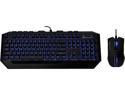
CM Storm Devastator - LED Gaming Keyboard and Mouse Combo Bundle (Blue Edition)
Pros: I found it to be a decent mouse and keyboard combo. It has the led back light that I was after and it matches My set up well. The keyboard has a nice clean feel to it and is comfortable to use. The mouse is comfortable once get used to it (see cons)
Cons: The only con's I have with this combo is solely with the mouse. The mouse is smaller then Im used to. (not that big of a con) The led lighting on the mouse stay's on all the time even with pc off. It's a bit annoying when trying to sleep. The biggest con I have with the mouse is the scroll wheel. Every time I scroll with the wheel it tends to go 180 in the wrong direction and has a habbit of stopping back at the point I started to scroll from. When it's not stopping back where I started from or going the wrong direction it bounces between a couple of spot's. It's not a big deal in some games but it's a major issue in other's and also an issue with regular web browsing. I also have to keep the dpi on at least the middle dpi or higher all the time for it to feel like it is responding quickly.
Overall Review: As with any purchase you get what you paid for. The keyboard and mouse for this price isn't a bad deal and is a good set up for people who are casual gamer's. The mouse takes a bit to get used to. I might contact newegg about the mouse and see if the mouse got messed up some during shipping or if it's a known issue with it (see con's) Over all I like this combo and most likely will buy it again in the future if I need another keyboard and mouse. For the price it's not bad, the mouse keep's it from being great so it's a good deal, not the best not the worst. There is also no built in macro which is hit and miss.
3/9/2014See more detail
not as advertised
Patch cable 15M 50 FT RJ45 CAT5 CAT5E Ethernet LAN Network Cable
Pros: it's a cable. it does what it's intended
Cons: the spec's on the cable are wrong. it is a 50 foot cable. under the spec's it says 125 foot, it truely is a 50 foot. I even talked to a customer support and they assured Me it was 125. it arrived today and it was only 50 foot. so now I have to buy a coupler not a big deal but would have been nice to know for sure it was a 50 foot instead of 125.
Overall Review: I got what I paid for. it's a 50 foot cable as advertised but newegg needs to fix the specs where it says it's 125 foot. customer support assured Me it was 125 when it's only a 50 foot. still does what I need it to and with an additional coupler I will reach the 75 foot length that I needed for still a price slightly cheaper then other location's
12/18/2013See more detail
Not bad
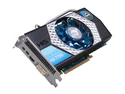
HIS Radeon HD 7750 1GB GDDR5 PCI Express 3.0 x16 CrossFireX Support Graphics Card H775QNT1G2M
Pros: it's very affordable and a higher end card out there. Alot better then the one I was using. Wish I could get another one, so I could do crossfire.
Cons: I keep getting random screen tear's with this card in some of the games I play like far cry 3. V-Sync on doesn't help Me any. It also does not like to have fraps being used with it. I tried to record some of My game play of far cry 3 to show a friend and the frames drop low to the point that the game is not playable while recording. When Im not recording I get good 30 frames. In other games I play such as APB Reloaded, I get 70-90 frames easy with this card, but when I try to record I get 10 frames. My old card was a 4000 series his radeon and I could record with that around 45 frames and not recording was around 60.
Overall Review: For what it is it's great, long as you don't want to try to do some screen capture with fraps was a huge let down. occasional screen tear's in some games. but over all the graphic's are great, I can play lot of games on max settings with no lag unless try to record
4/4/2013See more detail
Awsome stick's
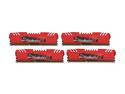
G.SKILL Ripjaws Z Series 16GB (4 x 4GB) DDR3 1600 (PC3 12800) Desktop Memory Model F3-12800CL9Q-16GBZL
Pros: They look stunning. All 4 stick's installed easily into My ASUS Crosshair V Formula motherboard with ease. They was out of the heatsink and matched the theme nicely. My operating system win 7 pro 64 bit posted them at 7.6 out of a 7.9 with no tweeking or O.C of cpu, ram or video card.
Cons: Nothing
Overall Review: A great product at an amazing price. I have yet to have any issue with it. Deffinatly worth the price.
3/3/2012See more detail
Stunning

LOGISYS Computer CS888CL Transparent Clear Acrylic ATX Mid Tower Computer Case Pre-Assembled
Pros: It's a very nice case in a decent price range. Comes with 3 blue led 80mm fan's with 3 and 4 pin power connector's. It glow's blue as advertised not purple as others have commented. Plenty of room.
Cons: Scratches easily. Can see finger print's easy. Side cover removal is a pain with 10 side cover screws and nothing to grab onto. It didn't come with a manual.
Overall Review: Finger print's are a bit of a pain but a little window cleaner and a cloth fixes that. I'm a bit annoyed that the side cover's have no place to grab to remove and had to use a screw driver on one of the metal fan guards to get it off. It's not a huge pain but enough of one. I had a power cable fall off of the cd drive I installed. (didn't double check My connections to make sure they was secure) I had to use a screw driver on a metal fan guard to remove the side cover. I don't see many reasons to remove the side cover once the build has been completed. Take some time and keep some window cleaner near by and sharp object's away and you will have a stunning case.
2/29/2012See more detail
works good
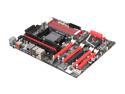
ASUS Crosshair V Formula AM3+ AMD 990FX USB 3.0 ATX AMD Gaming Motherboard with 3-Way SLI/CrossFireX Support and UEFI BIOS
Pros: it's a nice board that does all that I need and more. Simple to o.c and many ways to do so. Look's sharp and has nice features like the start button on the board for the out of case pretest. It runs My AMD FX-8120 Zambezi 3.1GHz Socket AM3+ 125W Eight-Core Desktop Processor FD8120FRGUBOX and My G.SKILL Ripjaws Z Series 16GB (4 x 4GB) 240-Pin DDR3 SDRAM DDR3 1600 (PC3 12800) Desktop Memory Model F3-12800CL9Q-16GBZL very well.
Cons: only problem I have had with it so far is when I boot up it tells Me som thing about gen 2 and then about can't find device. (not sure what it means) but it boot's up fine. once in a while a flicker of a blue screen but only for a second then it restart's and runs fine
Overall Review: I belive that the gen 2 message I see when I boot up is do to My HIS H467QR1GH Radeon HD 4670 1GB 128-bit DDR3 PCI Express 2.0 x16 HDCP Ready CrossFireX Support Video Card. I bought it about 2 year's before I got this motherboard. I see Myself buying a new video card soon along with a new hard drive.
2/29/2012See more detail