
Your Browsing History


Kendall G.
Joined on 09/29/03
0
0
product reviews
- 16
Good board!
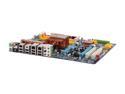
GIGABYTE GA-X48-DS4 LGA 775 Intel X48 ATX Intel Motherboard
Pros: I have been an AMD guy since 1995 so this was my first Intel self build. I chose this board because I wanted dual 16x pci-e for crossfire. All I can say is WOW. I dropped a Q6700 into this board and some crucial DDR2 1066 and it flys! Bios is pretty easy to understand. The voltage for the ram was a bit odd. You over volt it .4 to get to 2.20 volts(base with the board is 1.8v it seems). Overclocking went pretty well. This board pulls you out of the fire if you set something wrong. It will go thru about 2-3 reboots and then goes back to the stable settings. No having to pop open the case and fine the Clear Cmos jumper. Normally I am an ASUS fan but frankly Gigabyte seems to make rock solid products as well. I can recommend this board to anyone wanting to save a few bucks over those more expensive intel boards. Does overclock, runs solid, good performer. My rig right now is Q6700, 2 3870x2's in Crossfire, WD Raptor Raid 0, 4gb Crucial DDR2, Xfi Fatalty.
Cons: I'll admit the first board I got had a transister rolling around in the box. Rough shipping or a poor solder. Stuff happens. I did the RMA back to newegg and the second board was perrrrrfect! First board still worked with the tiny tiny transister missing but I wanted a correct board.
Overall Review: Seems like a good board for a light overclocker or beginner Intel builder like myself coming from years of AMD.
5/12/2008See more detail
Good, Bad, Mostly the ugly
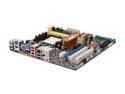
ASUS M3A78-EM AM2+/AM2 AMD 780G HDMI Micro ATX AMD Motherboard
Pros: Lots of nice features on this board. My first board seemed defective as anytime I put in a PCI-E video card(tried a 8800GT, ATI 3870) it would not post once I did. Yank the card and go back to onboard and no
Cons: PCI-E didn't work. Disabled everything I could in Bios, made sure the board was checking for PCI-E 16x before onboard in the order of graphics cards to use. RMA'd first and second had same issue. Asus's forums are amazly slow to the point of not being useable at times. Both of these are going back. Asus is offically off my list and sticking with Gigabyte boards for the time being.
Overall Review: I've never had issues with a MATX board like I have with this one. Makes me sad because it's loaded with great features but falls short in adding in a video card.
7/15/2008See more detail
Amazing little CPU
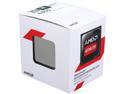
AMD Athlon 5350 - Athlon Kabini Quad-Core 2.05 GHz Socket AM1 25W AMD Radeon R3 Desktop Processor - AD5350JAHMBOX
Pros: I wanted a new low watt CPU that could run a WMC PVR and my plex server. What I got was really an impressive chip for the price. Just for kicks I ended up loading Windows Server 2012R2(I am so going to miss Technet now it's gone). I wanted to see if this chip could handle hypervisor functions and other services all at once. Sure enough it was able to support being a Hyper-V server. I created a virtual Win7 WMC machine since my TV tuners are HD Prime network based. Worked like a champ. I record shows to it and play back via Xbox 360 as my extender. Can't play back video directly on the virtual Win7 box because of the requirements for graphics cards and such for protected content. On the 2012 Server itself I loaded up my Plex Server and it ran that on top of hosting the virtual Win7 WMC box all working at the same time dishing out content. Since my motherboard has the option for an external power supply I was able to cram the whole unit into a tiny ITX case. I'll upgrade to something bigger when I want to add more drives. Build: *ASRock AM1H-ITX (has power input for laptop power brick so no power supply in pc). *Athlon 5350 *8 GB DDR3 (Gskill I think..used whatever I had on hand) *64GB Crucial SSD for boot *2 TB Seagate SATA for hosting virtual VHD file and my Plex server media files
Cons: I honestly can't think of much. Sure I'd love to have a bit more CPU speed at 25 watts. All in due time.
7/31/2014See more detail
A good keyboard overall
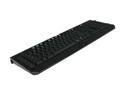
RAZER Black USB Wired BlackWidow Ultimate Mechanical Gaming Keyboard
Pros: Bought this for Christmas 2010 when it came out. Lasted a full year of solid FPS and MMO gaming. Great tactile feedback from the keys, heavy, solid keyboard. Nice pass thru for your headphones if you want to split out your soundcard mic/speaker out.
Cons: So you'd think for $120+ that the keyboard could have some sort of spill resistant design. This is for gamers no? We like to have are assorted beverage of caffinated choice on hand? Well mine finally got toppled and it was plain jane ice tea(no sugar etc). Only a tiny bit and only for a second before I flipped it over and killed the PC power. Sadly I now have a $130 brick. So buyer beware this is not spill resistant in the least. Back to Logitech for me.
12/18/2011See more detail
Great DVR card
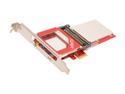
Ceton InfiniTV 4 PCIe - Quad-tuner Card for Watching Digital Cable TV on the PC, PCI-Express x1 Interface
Pros: I was a bit skeptical when I dove into making a DVR to knock out a ton of rental fee's from Wave Broadband in Washington. Picked up a HD cable card from Wave for $6/month, dropped it into the Ceton, activated it with the cable provider and presto I was assigning and recording on 4 stations on my Windows 7 media center. quality was equal to the HD DVR that was running us $15 a month or so. Have an Xbox?? You can put that on another TV and use Media Center Extender features to watch Live TV and recorded shows off your DVR computer. I figure in the end the Ceton pays itself off in the first 12 months if you rent 2 or more cable boxes from your company.
Cons: See my Other Thoughts below. Basically the only cons are related to getting enough network speed to run the HD live Streams if you want to centralize the card on say a server and share those channels out to multiple devices. You can split them out anyway you want-- 1/1/2, 2/2, 3/1, 1/1/1/1. Just depends on the number of machines you want to hook to TV's etc.
Overall Review: I tried two different setups with the card. #1) Windows Home Server 2011 sharing the tuners over the network to 3 Computers hooked to TV's and monitors. Over wifi this just ended up being a no go. I even got the latest Dlink that does the 450/450 and got a USB trendnet device the ran at 450 MBPS. Results were stuttering and some artifacts in playback of live TV streams on HD channels. SD channels worked fine. Ceton does recommend Gigabyte Wired and I am currently running Cat6 to all the rooms in the house so I can have a shoot at streaming. Build #2 Green Seagate drives(5400rpm), dual core AMD 3ghz, 4GB ram, Win 7 64bit pro, Media Center with all updates. Loaded card locally and assigned all 4 tuners to media center. Recorded shows flawlessly. Bought a few different MC remote controls(Rosewill from Newegg and some other brand off Ama-zon). You can basically have the same feel as most any Tivo/DVR solution once you get the remote though I'd also get a wireless keyboard.
12/14/2011See more detail
Not Impressed- NIC issues
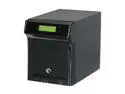
Seagate ST340005SHA10G-RK 4TB (4 x 1TB) BlackArmor NAS 440 Network Storage Server
Pros: Pros would be cheap and lots of space, small device with a lot of potential until I actually started using it for inexpensive backup storage space over the network.
Cons: Cons/Issues: I kept getting failures in my Symantec Backup Exec and would go to look at the NAS only to find I could not hit it/ping it etc until I killed the power and rebooted the device. Same issue I see others posting about. When it works I'm getting a good 200-300MB/min transfer speed over the LAN via a HP Procurve switch the server and NAS are plugged into. The NAS just nic just seems to stop responding for no apparent reason.
Overall Review: I hope Netgear sorts out this issue. It detered me from trying their larger 12TB iscsi based devices for network backups unless I get resolution from support on this unit
1/20/2011See more detail