
Your Browsing History


Dennis W.
Joined on 12/19/07
0
0
product reviews
- 9
Quiet, Good For My Needs
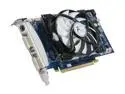
ECS GeForce 9800 GT 512MB GDDR3 PCI Express 2.0 x16 SLI Support Graphics Card N9800GTE-512MX-F
Pros: Well, I bought this card for my own reasons: My ATI HD3850 had just died, and I was in the market for a new card that would provide better performance and MUCH lower noise at the <$100 price point. Happy to say, I found it in this card! First off, the fan is quiet. My case is nothing special in terms of acoustics- very thin steel. But, no noise from this fan, even during the 3rd hour or so of TF2. Speaking of TF2, I get FANTASTIC performance in TF2, L4D, World In Conflict, Mount and Blade, and even Fallout 3. In TF2 and Left 4 Dead, I have settings maxed at 1680 x 1050, smooth as silk. I'm going to try overclocking the card a little. It can definitely handle it. The card is also ridiculously cool. Mine idles around 30c. At the 3rd hour, it's not gone above 50c. Considering my 3850 idled at 50c and load temps were around 90c-110c, this is an awesome improvement for me. This is with only two 5v fans pulling air in through a real thick filter- this thing is all
Cons: Well, it is underclocked 50 core speed from the original 9800GT, and without a 6-pin connector, overclocking is limited. But you knew that already, anyways.
Overall Review: A very nice card. But my favorite part? The drivers! I think this was just a fluke of my card, but the drivers past 8.6 CCC never worked as well. With this, I downloaded latest nVidia driver from their website and installed it right away. I don't know if you HAVE to use the CD on a new installation- I didn't even touch mine. But yes, here are some benchmarks (VSync disabled, Of Course!) System: 2.625Ghz AMD X2 4000+ 2x1Gb DDR2 800 (874) 400CX Corsair PSU TF2 with 3850: Max out at 97, avg 32, min 12 TF2 with 9800gt: Max out at 11, avg 63, min 24 Left 4 Dead with 3850: Max out at 75, avg 36, min 18 Left 4 Dead with 9800GT: Max out at 128, avg 71, min 30 But, the best part of these results? The 3850 is with no AA, no AF, and shaders on low. The 9800GT is with everything maxed. This card was a huge jump- although the lack of heat and less power was big enough itself.
10/2/2009See more detail
Basic
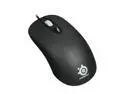
SteelSeries Kinzu 62011 Black 3 Buttons 1 x Wheel USB Wired Optical Mouse
Pros: I play RTS and FPS, so a fast mouse was a must. In short, this thing delivers. Quite well, really. The sensor will actually work on most mousepads, unlike some laser mice, and is still much faster than my old Sidewinder X5. The mouse is surprisingly elegant, and the wheel is FANTASTIC. Nothing cheap about this mouse. The cord is braided. A braided cord- it won't get damaged easily, and yet this is the first time I've seen this. Seriously, the cord is fantastic.
Cons: The only thing here is the Software and the lack of MOUSE4 and MOUSE5 buttons, but the buttons aren't claimed to be included, and hitting back isn't THAT bad anyways. But yeah, the software is slow, as in even if you open it and do nothing, it can take a few seconds- nothing worrying, just odd.
Overall Review: A great mouse for anyone who just wants a MOUSE, not some sort of lightshow or second keyboard.
11/27/2009See more detail
Excellent, But Flawed.
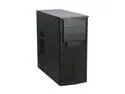
Antec VSK-2000 Black Steel ATX Mid Tower Computer Case
Pros: Well, first off, this case is no eyesore. I quite like it. It's very businesslike, while also being elegant. It's also VERY light. Made working in it a breeze. Hard drive, ATX motherboard, ODD, and fans* all installed without a hitch. Very spacious interior. Unlike the other reviewers, I found the USB cable to be of a perfect length. I did not use the audio connectors. The fan in the back is an Antec TwoCool, not a TriCool, despite having the switch. On low, I can't hear it. With the two front fans undervolted, I can't hear the case at all! Exactly what I was looking for: Spacious, Compact, Quiet, and Light.
Cons: Not everything in this case is golden. First off, the power supply support bar is kind of... useless. It's a bit of a pain to get out, and even installed, doesn't do much at all. MY Corsair 400CX Did not agree with the case's PSU support, either. The fan grill now has a small crack. A revised PSU support system would be fantastic, however. Also, light means the steel is thin. VERY thin. The stuff will bend. Be cautious with it. Now, to the most glaring con. The front two fans, one of the chief reasons I bought this case (I game and it gets hot), was flat out incompatible with my fans (120mm Vantec Stealths, 1500RPMs) When they were running at full 12v. The case made the strangest sounds- if you know what an entire scale of tuning forks is like, it was something along those lines. Strangest of all, it resonated throughout the ENTIRE case. I guess Antec also made the first musical instrument out of a computer case.
Overall Review: This is a fantastic case if you don't have any particularly long add-in cards. I'm using a 9800GT (Low Power) with an Arctic Cooling cooler, and it fits fine. The only real thing to keep in mind would be the front fans- the mounting is just AWFUL. For one, it uses only TWO screws, in a large plastic grid. The design is bad for airflow, as well as noise. However, I found undervolting the two Vantec fans to 5v made the case almost silent and no longer something to tune a string instrument by. In all, it's a fantastic case, but make sure you have the means to undervolt your fans if they start to make that noise- it WILL drive you nuts.
9/24/2009See more detail
Beware using on ATI cards!

Star Wars: Republic Commando PC Game
Pros: This is a fantastic game! Probably the most visceral Star Wars game to boot, as well. The controls take some getting used to, but otherwise almost everything is flawless. I remembered liking it so much I re-bought it this year, and it still kicks the pants off of many newer games. I remember grumbling of a Republic Commando 2, and I really hope one is on the way. ;)
Cons: I have an HD3850, and whenever I would enter gameplay, instant crash. Remembering perfect stability on my old FX5200, I wondered what was wrong. A quick Google search told me that there was a problem with bump mapping. As I slid back into my chair in dismay, I fired up the game again, went into options, and lo and behold- there was actually an option to change the bump mapping. Just set it to low, and you should be set. This is for the 38xx series of cards, no idea if the bug exists with the 4000 series.
5/31/2009See more detail
Not for the Sidewinder X5.
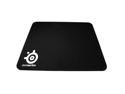
SteelSeries 63005SS QcK mini Mouse Pad
Pros: This mouse pad was a mouse pad. It was the perfect size, and adhered well to the desk.
Cons: Using the Sidewinder X5, this pad does not work well. Doing broad strokes worked quite well, as did hanging around 1000 DPI. When I kicked it up to 2000, the mouse in small movements would develop a very bad twitch on screen. After troubleshooting, I found it was the mousepad. Bottom line, avoid using very high DPI mice with this pad. A plastic pad would be a lot better for you. Also, does not stay clean. Attracts dust like a magnet, unlike the $7 pad from Wally World. That's the -1 egg.
Overall Review: I gave this mouse pad to a friend using a generic HP mouse, and all of a sudden he can hit me in TF2. I call hacks.
5/31/2009See more detail
Fantastic NIC
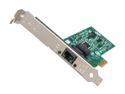
Intel EXPI9301CTBLK Network Adapter 10/100/1000Mbps PCI-Express 1 x RJ45
Pros: As a fervent TF2 player, I found my onboard NIC chewing up too much CPU. I installed this thing, after downloading the driver from Intel's webiste, and it worked flawlessly. Now, not only is my ping rock solid, but I managed to whittle out another 3 FPS. Much better than I expected! I used to lose connection many times with my NVIDIA NIC that is onboard, but this is a fantastic replacement. Definitely recommend.
Cons: I have only encountered one issue with this card, and it's actually the fault of the HD3850 it is near. The PCI-E slot on the motherboard this card occupies is one above the main GPU slot. So, there is one PCI-E slot between the NIC and the GPU. While playing TF2, the GPU was putting off so much heat, that this NIC shut the system off to preserve it's internals. If you look at the specs, this means the NIC was taking over 55C from the GPU. That's a lot of heat. So, just be careful where you put this thing. That slot right above your video card might be too close. After the crash, the internet would not connect, figuring I had killed the NIC, I removed it, reset it, and then started again. Flawless restart!
Overall Review: Although the heat crash was nothing big, I actually was actually happy it happened. It let me know that the GPU heatsink was clogged with dust. Really fantastic work, intel.
5/31/2009See more detail