
Your Browsing History


Jonathon G.
Joined on 08/31/06
0
0
product reviews
- 17
Notice to those who are novice Do-It-Yourselfers
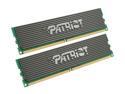
Patriot Extreme Performance 2GB (2 x 1GB) DDR2 800 (PC2 6400) Dual Channel Kit Desktop Memory Model PDC22G6400LLK
Pros: The memory runs great: I'm more a fan of latency than bandwidth, so I opted for 3-3-3-9 @ 667MHz with 2.15v going to 'em.
Cons: One stick died, but--for those of you new to the DIY scene, about 5% of computer products ship with problems, so a dual-stick package stands about 10% of having a problem, simple math--that's neither the fault of Newegg/(other e-tailer) or Patriot.
Overall Review: These sticks--like every DDR2 stick on the market to my knowlege--ship with JEDEC standard SPD settings of 5-5-5-(15 or 18) with 1.8v, so you need to know a) how to add voltage to your RAM, and b) how to set the proper options [this is the same process as over-clocking] for your RAM as well, and know--what--settings to change. If you don't know how to do these things: learn, or buy something that isn't low latency.
1/19/2007See more detail
Perfectly adequate processor, once you get past hiccups.
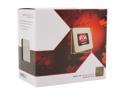
AMD FX-4170 - FX-Series Zambezi Quad-Core 4.2GHz (4.3GHz Turbo) Socket AM3+ 125W Desktop Processor - FD4170FRGUBOX
Pros: 4.2-4.3GHz from an AMD chip out of the box is rather nice for the price point. With my old Zalman CNPS9500 fan, idle temps are usually 9-11ºC with the fan throttled as low as it will go; under max load, temps stay at ~58-60ºC. Rather good budget gaming option, given that the CPU and motherboard will likely run you half that of comparable Intel parts. Budget being the key.
Cons: Will likely require a motherboard BIOS update with the new architecture working its kinks out. If, for instance, you want to play Portal 2, Saints Row the Third, Deus Ex: HR, or a handful of other Steam games, you'll need to get your motherboard manufacturer's March 2012 (or later) BIOS in order to prevent your CPU from freezing and requiring a hard reset due to outdated AGESA code. What this means, then, is that you absolutely should make sure that whatever AM3+ motherboard you're buying HAS a March 2012 or newer BIOS. To that extent, you might also consider if the manufacturer has any BIOS updating software to make updating the BIOS easier, like Gigabyte's @BIOS which allows you to update the BIOS from within Windows--it's as difficult as updating drivers.
Overall Review: Seriously, if you're going to buy the FX-4170 as a budget gaming CPU, I highly recommend a Gigabyte board if only so you can use @BIOS.
4/29/2012See more detail
Great fan.
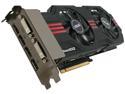
ASUS Radeon HD 6950 1GB GDDR5 PCI Express 2.1 x16 CrossFireX Support Graphics Card EAH6950 DCII/2DI4S/1GD5
Pros: With the reasonably large heat sink and copper piping that directly touches the core, this card always stays cool, even without the fans running (much).
Cons: Bought one of these open-box, which I assume, based on appearance, was from the anonymous reviewer on 21 May; the card also had fan controller issues in that (one of) the fan(s) would run at 100% regardless of Catalyst/Smart Doctor settings. I assume this is because the 4-pin splitter has one 4-pin plug and one 3-pin plug. Overall, not a problem, though, as whichever fan is plugged in to the 4-pin works just fine and the card, even under full load overclocked to 900 w/1.2 vcore, never gets above 80ºC; idles at 45ºC.
Overall Review: I can only imagine how many people would have returned this for a refund (as you cannot RMA open-box items); people should seriously be more contented with items that work more than sufficiently fine. Realistically, I would have given this 4 eggs, but I'm inflating the rating for the fact that I got what I paid for; a deep discount for one fan not working properly in a card that says mighty cool is absolutely appropriate.
6/13/2011See more detail
Works.
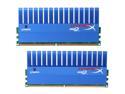
HyperX T1 Series 4GB (2 x 2GB) DDR2 1066 (PC2 8500) Dual Channel Kit Desktop Memory Model KHX8500D2T1K2/4G
Pros: Nice heatsinks. Not 800MHz.
Cons: $/GB is higher than DDR3, especially without rebate.
6/13/2011See more detail
Great card. Launch BIOS sucks.
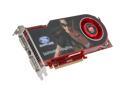
SAPPHIRE Radeon HD 4870 512MB GDDR5 PCI Express 2.0 x16 CrossFireX Support Graphics Card 100243L
Pros: Great architecture. Good clocks. Good cooling*. Good enough price. Fan is quite powerful even at 50%; almost silent at 30%. 54ºC idle (30%); 64ºC under load (40%).
Cons: Fan is quite loud when at 50%. Think hairdryer behind a closed bathroom door. Up it to 60% and you've just opened said door. The attached video attempts to demonstrate this. Moderate price to performance ratio: the 4850 is better in that regard. ...not the 4870 x2? (c:
Overall Review: *if you fix the fan speed. I won't post details, as I know that my review wouldn't be posted, but you can manually adjust the fan speed via CCC profiles. Look it up; there are instructions at both TPU and GPUreview, it really does help, obviously.
7/1/2008See more detail
Good chip, bad thermal reporting.
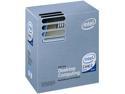
Intel Core 2 Duo E8400 - Core 2 Duo Wolfdale Dual-Core 3.0 GHz LGA 775 65W None Integrated Graphics Processor - BX80570E8400
Pros: I purchased one of these about 2m ago; this thing has numerous reports of being able to stably run at 4GHz safely, and it can. In fact...
Cons: ...the limit I hit OCing it while stable was 4.3GHz air. According to Speedfan (read: the motherboards temperature reporting) I never pushed it above 70ºC. This would be lovely... if it were accurate. Apparently not only will some chips ship with a 'stuck' temp sensor, others will also not be read properly by the board. There's debate whether Speedfan/yourboard should be accurate, or whether something like CoreTemp is accurate, but, really, that the conversation comes up is a fault all in itself. So, obviously, I damaged my chip; it still works at 3.0, but I bought it for at least 4.0 and, due to the awesome 55ºC I was getting under load, thought I could push it. Can't really fault the chip or Intel for that, since they obviously know; why the heck else would you release this chip with a stock FSB of 333x9 if it is fully capable of doing 400x9 or even 444x9? Why else--there's problems with ***something***.
Overall Review: Be careful when overclocking it--and why wouldn't you? If you buy this and don't intend to OC it, you should seriously just pick up an e68xx and save yourself some money--as the temp sensors are a bit odd at best, and there's also reports that you can easily over-volt it. I imagine this would occur somewhere around 1.475v or 1.5v, but it's not like I'm going to go out and test this... too.
4/24/2008See more detail