
Your Browsing History


Dan V.
Joined on 01/03/08
0
0
product reviews
- 20
Killer value! Well future proofed!
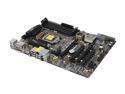
ASRock Z77 Extreme4 LGA 1155 Intel Z77 HDMI USB 3.0 ATX Intel Motherboard
Pros: All the connections I could want/need. All my new hardware running at full speed. - 2 SATA 6Gb for my SSDs + 2 more, and 4 SATA 3Gb - Int USB 3.0 header for cases with USB 3.0 connectivity in front - Dual PCI-e (x16/0 solo or x8/x8 in CF/SLI) which is future proofed. 2.0 with Sandy Bridge and 3.0 with Ivy Bridge (2x faster than 2.0) - eSATA 6Gb in the rear for ext hdd/hdd dock Good layout. None of ram slots overlapped by tower cooler. Can access everything on the board w/o need to remove any part, with my current set up at least Lucid VirtuMVP: "Free" performance for having a processor with onboard graphics, a bigger plus if you have Ivy Bridge High end onboard LAN and audio chips. 898 has the best SNR among onboard audio Great labeling throughout, especially with the IO shield Manual has nice front panel header guide, inside the front cover Good overclock utility that automatically sets max turbo speed Decent fan control Fast booting! 2-3 secs from power on
Cons: DIMM sockets not as well labeled as competition. Not color coded. Use DIMM furthest from CPU first and skip a slot for dual channel with 2 RAM sticks. USB3.0 internal header was a bit loose Case/mobo IO shield doesn't mesh perfectly with my case and the DVI/VGA inputs are cut a little narrow. My monitor plugs make the shield bow inwards. Hard to access some SATA locking cables with video card installed in slot furthest away from CPU Some questionable software. - Instant Boot = restarts your PC and then goes into hibernation, when you click shut down. At least it automatically goes through "Force Shut Down" dialogs. - Smart Connect = useless to me. Keeps things updated while idle. - FastUSB = forces you to disconnect and reconnect USB devices to enable turbo. I don't notice any speed boost. - FastLAN = overlay can get in the way if you have only 1 monitor.
Overall Review: Overall, I'm glad I paid the extra money to get this board, over a budget board. I'm happy with its overclocking (4.6 GHz stable without touching the voltage), its BIOS, its boot speed, its performance, and its looks. Why buy a premium mobo with features you don't need, when HQ mobos like this exist. It's compatible with the XMS3 RAM profiles too, able to pick a profile that sacrifices speed for tighter timing. It also has no problems with my G15 keyboard and G9 mouse being connected to my Dell 2311H's built in USB hub, and lets me enter and navigate bios as soon as I start up. Antec P280 case with 6 standoffs installed--mobo flexes as much as any other, trying to install components into it. 2600k and Hyper212 installed painlessly, though the heatsink can still be twisted. Room for RAM with tall heat spreaders. OCZ Fatality 750W. Short cables make for a tedious install process, if tidiness is a priority. Corsair XMS3 1333 9-9-9-24 1.5V Mushkin Chronos DX 240GB XFX Double
5/3/2012See more detail
Not as good as Zojirushi
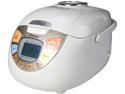
Rosewill RHRC-13001 - Fuzzy Logic Rice Cooker - 5.5 Cups Uncooked / 11 Cups Cooked
Pros: Non-stick pan coating seems like ceramic Good quality rice scooper and holder.
Cons: Keep Warm function dries 2 cups of rice out after 1 hour
Overall Review: My Zojirushi basic 10-cup rice cooker got jacked by my roomie since he became a fan of brown rice. He has a habit of cooking a lot and leaving it on keep warm for days on, so I wanted another one for cooking rice (which I like) for myself and this was on sale for cheaper than a new reputable Asian brand model. Can't complain about the design except that the Keep Warm function seems a little too hot. It's so hot that I wonder if it is still going full cooking power. I have not verified with a Kill-A-Watt, but it really makes my rice dry compared to what I used to use. Can't use the rice after it beeps, since it's still a bit wet and slimy, so I usually try and wait 30 mins after, but usually wind up waiting longer than usual, esp if I find something to pass the time while waiting.
6/21/2014See more detail
Excellent SSD
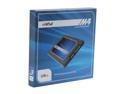
Crucial M4 2.5" 128GB SATA III MLC Internal Solid State Drive (SSD) CT128M4SSD2
Pros: Comparable performance to other high end SSDs Mainstream pricing A tiny bit more capacity than comparable Sandforce based SSD
Cons: Needs a little TLC to bring out it's performance (upgrade firmware, ensure AHCI is on, upgrade to Win7 for TRIM, turning off restore, indexing, defrag sched, hibernate, page file, etc.)
Overall Review: I stuck this in my PC and was getting relatively low benchmark scores in my old AM3+ mobo with SATA2 and IDE. 215-245 MB/s seq/512 read 140-170 MB/s seq/512 write 25 MB/s 4k and 4k QD32 read 16-17 MB/s 4k and 4k QD32 write I've since upgrading to a z77 mobo, Sandy Bridge CPU, and did a bunch of optimizing performance. Now I get: Seq 500 MB/s read, 200 write 512k 370 MB/s read, 200 write 4k 28 MB/s read, 87 write 4k QD32 315 MB/s read, 185 write That's very close to tier 1 SSD performance and sure beats my old traditional HD, which has 75 MB/s seq read/write and *TERRIBLE* random read/write at 0.6 MB/s read/write. One of the biggest upgrades I've made.
5/5/2012See more detail
Quiet
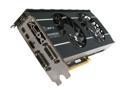
XFX Double D Radeon HD 6870 1GB GDDR5 PCI Express 2.1 x16 CrossFireX Support Graphics Card HD-687A-ZDFC
Pros: Quiet
Cons: None
Overall Review: Huge difference in quiet operation, coming from a 4870. My 4870 didn't support hardware video trans/encode acceleration, but not sure if this does, as I refuse to use it, since I hear it causes additional quality loss. I'm not a big gamer, but the games I do play currently, LoL and SupCom FA, run very smoothly.
5/5/2012See more detail
Not ideal for bottom mount cases
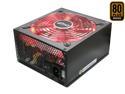
PC Power & Cooling Fatal1ty Gaming Series 750 Watt 80+ Bronze Semi-Modular Active PFC Performance Grade ATX PC Power Supply (OCZ750FTY)
Pros: Relatively quiet fan 80 Plus Bronze 5 Year OCZ Warranty SLI/CF friendly More style than competing PSU
Cons: One extra 8 pin (or 4+4) CPU connector permanently wired that I didn't use Relatively short and rigid cables, causes problem in large cases, esp if bottom mounted SATA power cables are "upside down" when in bottom mounted case Expensive, esp with competing PSU running sales and/or rebates Not stylish when bottom mounted
Overall Review: I installed this in an Antec P280 case, which has great cable management, is super roomy for a mid tower, and has a bottom mounted PSU slot. I have a ASRock Extreme4 z77 board, 3 traditional HDs, 2 SSDs, 1 DVD-RW, 1 6870, and a fan controller being directly powered by this PSU. My setup only uses 1 8-pin CPU connector; I used the 4+4 connector, since it was slightly longer and *just barely* reached, routing the cable behind the mobo tray and fitting it through the mobo cutout. The 20+4 ATX connector also just barely reached, also using the mobo cutout as a short cut. The SATA cables caused a little trouble for me, preventing me from using the top most 2.5 HDD slot and bowing enough from well spaced HDDs that I had to force the side panel closed. Since there's only 2 SATA cables, I had to order a molex to SATA cable adapter to power my DVD-RW drive. Don't buy if it will be bottom mounted. It seems to be designed to work best when top mounted. It can work, but it'll be unideal.
5/5/2012See more detail
Virtually silent, but doesn't move much air
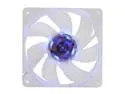
SilenX EFX-08-15B 80mm Blue LED Effizio Quiet Case Fan
Pros: * Near silent * Nice blue LED * Optional molex connector
Cons: * Questionable CFM rating--seems to blow air in random directions with spotty strength * Optional molex connector adds clutter (thinking about cutting it off, but a wire stub is kind of a sore sight as well) * Makes you want to buy other quiet parts
Overall Review: Bought 4 to replace the noisy case fans in my 10 year old Lian Li PC-60. I had unplugged a few noisy ones and my system was still very cool. 3 worked fine as soon as I hooked them up, but I had 1 fan light up, but not spin (tested on other 3 pins and the molex. Was starting to fill out RMA, but it started spinning out and seems to be working fine. Now the noisiest fans in my case are the CPU cooler (ZeroTherm FZ120 Zen) and power supply (OCZ ModXStream 500). My XFX Double D 6870 is very quiet. I'd complain about the odd air current profile these fans make, but it's not like they're blowing onto any parts really. As long as they circulate air, they do their job as case fans. Blowing over a heatsink is another story.
4/13/2012See more detail