


Your Browsing History


Linda L.
Joined on 12/02/12
0
0
product reviews
- 17
Ahead of the curve
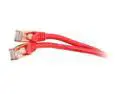
Rosewill RCNC-11044 10 ft. Cat 7 Red Shielded Twisted Pair (S/STP) Networking Cable
Pros: I use this Cat 7 for my home network. It is overkill. I can rule out my ethernet cable ever being the problem with the SPEED of my network. I use this with an ASUS RT-AC66U router, and an "Insight" modem, it goes to the XBOX and to an LED HDTV. Everything works great. It is backward compatible with all other Cat ports around today.
Cons: None.
1/19/2013See more detail
Eggsellent
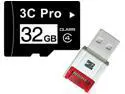
3C Pro 32GB 32G microSD microSDHC micro SD Class 4 C4 Memory Card +R10w Reader
Pros: Shipped faster than estimate. Handy Dandy Gadget! Works great. Drivers installed 1st time used. It works with 32GB card.
Cons: None.
Overall Review: Using WinXP Pro and external 10-port 2.0 USB Hub. Wish it had a Chain or Pouch with it.
1/25/2013See more detail
Works Well
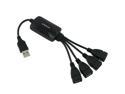
USB Hub 2.0 4-port/4 port hub USB 2.0 Speed Cute Octopus Design - BLACK for Sony Playstation 3 PS3 Slim Xbox 360 Nintendo Wii
Pros: This 4 port HUB works well. Supports up to 4 USB devices. I use it with my Acer Laptop. 1 for a wireless mouse, 1 for a wireless touchpad, 1 for USB to mini-USB adapter for card reader HUB, and the 4th for 64GB flash drive.
Cons: It can weigh on your female port. Also the, the wires are kind of upside-down-ish, but with it's design, its not a problem.
1/19/2013See more detail
Camera Cable
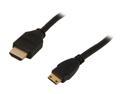
Nippon Labs MHDMI-6 6 ft. Premium HDMI Male to Mini HDMI Male Adapter Cable, Black
Pros: This cable allows me to hook up my digital camera directly to my TV through an HDMI cable! Full video and audio support. Works as intended.
Cons: None so far.
1/19/2013See more detail
The Best Router
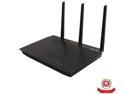
ASUS RT-AC66U Dual-Band Wireless-AC1750 Gigabit Router IEEE 802.11ac, IEEE 802.11a/b/g/n, IEEE 802.3/3u/3ab
Pros: 1 WAN port. 2 USB 3.0 Ports. 3 Detachable, Long, Fat, Black, Adjustable, Antennas. 4 LAN Ports. 8 LAN 'Guest Accounts' supported in basic set-up. AP and Station modes available. Software options galore. Fastest 'wireless-N' speeds ever seen in home networks. WiFi (tablet and iphone), AiCloud, Gigabit Ethernet Dual Band 2.4 & 5 Ghz speeds. HDD, SAMBA, FTP, DDNS server, and printer sharing available. Use 2 of these routers in one network to open an additional level of wirelessness! P2P, L2P, VPN, whatever ... it all works with this one. Easy to set-up. Start with installing only ONE PC on the network, set-up software and drivers on THAT ONE PC from the install CD. All it takes to set-up network. Then, add to network.
Cons: None so far.
Overall Review: I'm pretty sure many who buy this product are more novice with hardware and networks than they believe themselves to be. Make sure you have the correct hardware to use with your new hardware! You either need to hook-up (RJ45 aka Ethernet aka LAN cables aka Cat-5, Cat-5e, aka Cat, aka network cables) cables from your modem to your router, then from your router to your NIC (ethernet, network) card on your PC, AND/or the (ethernet, network) port on your DVR (whether it be yours, or the cable company's), AND/OR HDTV (or SmartTV), AND/OR XBOX, AND/OR Playstation, AND/OR WII (I believe all 3 gaming stations have consoles with wireless options available, if yours is not wireless, you will need a network cable going to the network port on the console) [if you need more than 4 LAN ports, get a SWITCH (cheap and ez) or another router]. Tablets, Smart Phones, and WII-Us, Printers, and other wireless devices, will pick up the WiFi network from your router automatically--as long as the router is configured correctly. The router will see them automatically as well. If the wireless device (not router), does not have 5 Ghz capability on it, you will not be able to use that "BAND" on the router for that device, you will have to use the 2.4 Ghz channel.
1/19/2013See more detail
HHMmmmmm
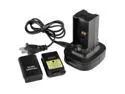
Black Dual Battery Charger Charging Station For Xbox360
Pros: Makes me wonder... It works as intended. I received a 250 volt power cord instead of a 240 volt. What in the world! I happened to have 240 volt cord with the same port fitting. It is a fooler, for us at least, the power LED, along with any other LED, does not work! So we have never known whether or not it is on, or charging, or anything else.!>? But, it apparently works -- every time we change out the battery pack, it has a full charge. A bit odd.
Cons: LED (s) have never worked. Shipped with wrong power cord.
Overall Review: I cannot take an egg off for the wrong cord. Although, under the wrong circumstances, such a mistake could result in much larger problems than many other mistakes that may be made...
1/19/2013See more detail