
Your Browsing History


Tim P.
Joined on 12/11/22
0
1
product reviews
- 3
The Ryzen 7 5800XT CPU, is it worth it for those wanting more life out of thier older AM4 platform motherboards especially for gaming!?
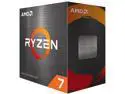
AMD Ryzen 7 5800XT - Ryzen 7 5000 Series Vermeer (Zen 3) 8-Core 3.8 GHz Socket AM4 105W None Integrated Graphics Desktop CPU Processor - 100-100001582BOX
Pros: -Zen 3 Architecure with a unified CCD for it's combined Cache memory -36MB combined Cache Memory (L1 = 512KB, L2 = 4MB, L3 = 32MB) -Base Clock at 3.8Ghz with a Boost clock up to 4.8Ghz -If you cannot get a hold of or afford a 5700X3D, a 5800X3D, a 5900X, or a 5950X then this 5800XT or even the 5800X is The CPU to get for those who want more life out of thier AM4 Platform Motherboards! -Best Value for Price to performance at this price range for AM4 CPU's due to AMD Discontinuing the 5000 series X3D chips causing their prices to skyrocket!
Cons: -Hotter than you would expect but not bad if you have a good enough cooler. the cooler it comes with is not enough to cool it properly. I knew this and wanted the cooler for my brother's Ryzen 5 3600 CPU. I already had a 240mm MSI Mag Coreliquid P240 AIO and that works nicely to cool it. The only time I ever get near 80c is during prolonged Cinebench r23 multicore stress tests. During gaming I have never seen it go higher than 70c but it is usually in the mid to late 60's Celsius range. I get 30c to 45c on idle. if i have discord and mabe a graphic design image app open it might hit 60c. -Not an X3D Chip, but is that really a con for a Non X3D Chip? -You will still get good 1% lows FPS in most games and if you have a good GPU to pair it with you could play just about anything these days.
Overall Review: The Ryzen 7 5800XT or Even the 5800X is a Great Budget Choice to get more life out of your AM4 Platform Motherboard! At just $158 USD there isn't much bad I can say about this powerful Zen 3 5000 series CPU! If you have an adequate cooler and cant afford at least a 5700X3D, 5800X3D, 5900X, or 5950X, then definitley buy this! Also I must mention it came for free with a really awesome Wired ASUS TUF M3 GEN II optical Gaming Mouse and a Premium ASUS ROG Scabbard II Mouse Pad(a standard size $44 mouse pad btw!). I have no regrets about my purchase and would gladly do it again!
9/6/2025See more detail
The ASUS TUF GAMING M3 GEN II optical mouse worth it if you don't mind being wired!
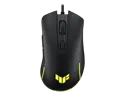
ASUS TUF Gaming M3 Gen II ultralight 59-gram wired gaming mouse, IP56 dust and water resistance, 8000 dpi sensor, six programmable buttons, Black
Pros: -Very Smooth and accurate movement and feel -1000hz polling rate is amazing compared to my previous Mouse which was about 50Hz. -This has made my graphic Design artwork much easier to do -The length of the wire is nice. It was much longer than my previous mouse, the "Skytech M1000". -Only Costs $22! For this price there is no reason not to buy it!
Cons: -To get the full DPI and RGB control you have to install armoury crate which I don't Recommend; although the dpi you do get is more than enough without the software. -It's wired, but is that really a con for a "wired" mouse? -It is a little small in size, so it may not have the perfect grip, but I really can't complain as it hasn't really affected my work or gaming in any negative way. -It says you have 6 programmable buttons, but the 6th button is the DPI button and cannot be programmed without installing the overbloated armoury crate software. My suggestion would be: just don't install armoury crate if you can help it.
Overall Review: Overall this is a really sweet RGB wired Optical Gaming Mouse with nice side buttons and a very smooth feel. The fact that they force you to use armoury crate to get the full DPI settings, light control, and the ability to program the 6th programmable button to something other than the "dpi function" is a bummer. I understand needing it to control the lights, But for programming the 6th button and not allowing us to have full DPI without the software is devious lol. But Don't let that keep you from buying it. It is a really great $22 mouse that I got for free with the Ryzen 7 5800XT CPU i bought. Even if I had to pay the full $22 for it, I would for sure! Totally worth the very fair price for a very nice 1000hz polling rate optical Gaming Mouse!
9/6/2025See more detail
The ROG Scabbard II Standard Size Mouse Pad worth $44?

ASUS ROG Scabbard II Gaming Mouse Pad - Protective Nano Coating Surface Repels Water-Oil-Dust, Anti-Fray Flat Stitched Edges, Non-Slip Rubber Base, Optimized Surface for Smooth Glide and Comfort
Pros: -Smooth -Good size -super high quality material -Great Look -Awesome Military Grade Oil, Dust, and Water repellant Nano-coating -Best of the Best for it's size
Cons: -who would spend $44 on a mousepad? -Is it really worth $44 just to have a water, dust, and oil repellant nano coating?
Overall Review: I would definitley recommend this product. It rocks. But keep in mind it came for free with the Ryzen 7 5800XT CPU I bought. I would never spend $44 on a mousepad of that size. It also came with a nice wired ASUS TUF Gaming M3 Gen II Optical Mouse which costs less than the mouse pad. If you don't mind $44 for the ROG Brand Tax Then definitley buy this. it is literally a Top of the Line Mousepad!
9/6/2025See more detail