

Your Browsing History


Big C.
Joined on 08/15/05
0
1


product reviews
- 4
Cool and Creative!
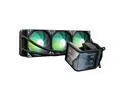
TRYX Panorama SE 360 ARGB 360mm AIO Rotatable 6.67'' AMOLED Curved Screen 3D Anamorphic Effect Customizable AIO Cooler 360mm Asetek Adela 280w TDP ARGB Fan Intel LGA 1851/1700/1200/115X AMD AM5/AM4
Pros: 6 Year Warranty on AIO 2 Year Warranty on Screen 3x 120mm Cooling fans Rotatable, Magnetic screen Pre-installed videos Create Custom videos for screen set up Options for Full screen and split screen Easy to install and Use.
Overall Review: I got this for my Ebony PC. Would definitely get for my Ivory PC.
4/23/2025See more detail
Flexible. Made For Artists/Content Creators
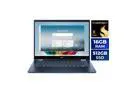
Acer Swift Spin 14 AI 2-in-1 Convertible Laptop - Snapdragon X2 Elite X2E-78-100 - 16GB RAM - 512GB SSD - Windows 11 Home SFSP14-Q51T-X867
Pros: - HDMI 2.1 port - 2 USB-A 3.2 & 2 USB4-C ports - 120Hz IPS Touchscreen - Precision Corning Gorilla Glass Touchpad - Flexible: can switch from Laptop to Tablet - Fast Boot - Fingerprint reader, Facial recognition - Small and light - Battery lasts a LONG time - Runs quietly - Can run light weight games. - Responsive Stylus - Wi-Fi 7 - Bluetooth 6.0 - Camera Privacy Shutter - Copilot+ - 3 Month Xbox Game Pass
Cons: - Memory is soldered to system board. Cannot upgrade - No Ethernet Port. Have to invest in USB-A or C to ethernet or connect Wi-Fi only - No SD / MicroSD Card Reader - SSD is 512GB. Can upgrade but would need an M.2 duplicator - 300-nit display is good for indoors. If you use outdoors,
Overall Review: This Acer Swift Spin 14 AI is versatile, flexible and light, it's recommend this for light gaming and artists/content creators. You can upgrade the M2 drive. In order to do so, you would need a T4 star bit. Memory is soldered but 16GB should be enough for this laptop. The batter power is amazing and can last up to 24 hours depending on usage. Unfortunate that it doesn't have an SD or MicroSD slot. I like to edit a lot.
9/18/2026See more detail
Great For Gaming & Video Editing
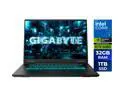
GIGABYTE - GAMING A16 PRO 2-in-1 Gaming Laptop - 165Hz 2560x1600 WQXGA - NVIDIA GeForce RTX 5080 - Intel Core 7 240H - 1TB SSD with 32GB LPDDR5X RAM - Windows 11 Home (GAMING A16 PRO DYHG5USCC4SH)
Pros: - 16-inch IPS 16:10 Display - 2560 x 1600 Resolution - Super-slim Bezels Design - Flexible.180° - Intel Core 7 240H Processor - NVIDIA GeForce RTX 5080 - 32GB Ram - 1TB SSD Drive - 1 Month Xbox Gamepass - MUX Switch - 165hz Refresh Rate - Windforce Infinity EX Cooling - Charger is small. Don't a big backpack to place laptop and charger in - 2 M.2 SSD Slots to add more space. - Smooth Keyboard
Cons: - Does not have Thunderbolt - An additional USB-C would have been great - Fans get slightly loud when playing games (Expected if playing at MAX settings)
Overall Review: From gamers to content creators. This laptop is definitely for you. As a multi-tasker, I like to record my gaming footage, edit and render in it's highest quality. I had no issues doing either of them with this laptop. The display is beautiful. While testing the display and playing games like Hades II, Lumines Arise and Tetris Effect: Connected, the colors are so vibrant and so with the 165hz refresh rate, it plays so smooth! While there is a RTX 5080 inside the laptop, the MUX switch is important to learn. You can switch from energy saving to high performance. Definitely Invest in a 2nd M.2 Drive for content and games. With all of the games out today, the 1TB will not hold them all. Especially if you record at it's highest quality. The RAM is upgradable to 64GB. 32GB is good but 64GB is GREAT. I love this laptop and cannot wait to create great things with it.
12/25/2025See more detail
Great for Overclockers
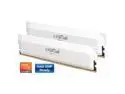
Crucial Pro Overclocking 32GB (2 x 16GB) DDR5 6400 (PC5 51200) Desktop Memory Model CP2K16G64C38U5W
Pros: - Intel 12th to 14th gen CPU compatibility - AMD Ryzen 7000 Series CPU Compatibility - 6400 MT/s - UDIMM Kit - Enabled for overclocking
Overall Review: Works right out of the package. You can scan the QR code on the packet to set up or go to we site and follow steps. Overclocking is pretty easy once you learn your Motherboard settings. Great for gaming or multi-tasking.
11/21/2025See more detail