
Your Browsing History


Steven O.
Joined on 09/22/03
0
0
product reviews
- 11
Works perfect
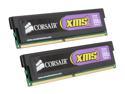
CORSAIR XMS2 2GB (2 x 1GB) DDR2 1066 (PC2 8500) Dual Channel Kit Desktop Memory Model TWIN2X2048-8500C5
Pros: Installed them in to an Asus Maximus Forumla. Without needing to change a single setting, it was immediately recognized as 1066. My system has been running rock-solid and stable.
Cons: Some of the previous reviews make me nervous, I guess, but I've never had anything but good ram (and luck ?) from Corsair.
2/2/2008See more detail
Artifacting
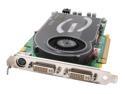
EVGA 256-P2-N516 GeForce 7800GT 256MB 256-bit GDDR3 PCI Express x16 SLI Supported Video Card
Pros: It's fast.
Cons: Like a couple of the recent reviews, I too am getting artifacting/corruption. I've updated my mb BIOS and the card's BIOS. Tried the evga drivers, nvidia drivers, and beta drivers. Turning back the core/mem clocks helped a little, but I didn't buy this card to do that.
Overall Review: I guess it's time to RMA. I understand defects happen, but I'm very unhappy.
1/14/2006See more detail
Good addon.
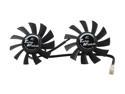
Turbo Module
Pros: Easy to install. Light weight. Very quiet (so much quieter than the stock fan's insane whining). Honestly, I can't hear it. Helps move heat off the fins, dropping temps even more.
Cons: Just a minor complaint: I would have prefered being able to plug it in to the video card's empty fan plug, rather than having to use a motherboard connection.
Overall Review: I think people are confusing "purposefully light" and "cheap/flimsy". It's designed to not add any extra unnecessary weight to an already huge heat-sink.
6/10/2008See more detail
Well worth it.
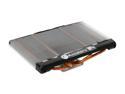
ARCTIC COOLING Accelero S1 Rev.2 VGA Cooler
Pros: Very easy to install. Dropped my temps from idle/load 58c/75-85c+ (depending on the game) to 41/49-56c (with Turbo Module fans addon)! Memory heat-sinks stuck perfectly in place. Excellent value.
Cons: It's huge. Make sure it'll fit your case when you put the side panel back on. While you can make slight adjustments to the part that attaches to the core (raising/lower the fins' placement), it may still cause an issue in slim cases. As others have noted, the instructions aren't very good, but it's very easy to figure out with a little common sense.
Overall Review: Others have complained about the memory heat-sinks not sticking very well, but I didn't have any issue with that. I made very sure to properly clean the memory (and core for that matter) before applying the new heat-sinks. Putting this on my card has made me realize how much the stock cooler really sucks. 8800GT core/mem 660/950mhz.
6/10/2008See more detail
If motherboards could laugh...
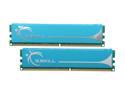
G.SKILL 2GB (2 x 1GB) DDR2 1066 (PC2 8500) Dual Channel Kit Desktop Memory Model F2-8500CL5D-2GBPK
Pros: ...my Maximus Forumula would have bust a gut when I set the ram to 1066 @ 2.0v as recommended by pdf guide (linked by a g.skill rep in these reviews). Even at 2.1v, I swear I heard a little giggle. At 2.14v, my motherboard screamed "yes!" To the point... give it a little more juice and this ram runs rock solid. No errors in memtest. Everything is nice and stable.
Cons: It didn't set itself up? Not really the ram's fault, I guess.
Overall Review: Great value, and once you goose the voltage a bit, runs perfect.
5/2/2008See more detail
Review Update
CORSAIR XMS2 2GB (2 x 1GB) DDR2 1066 (PC2 8500) Dual Channel Kit Desktop Memory Model TWIN2X2048-8500C5
Pros: It was detected at 1066 and worked perfectly...
Cons: ...for about 3 months.
Overall Review: In the 3rd month I started getting game crashes. I ran stress tests, trying to find the problem. It seemed all was cool and stable. But, something odd I noticed in CPUz was the RAM's SPD reporting a max of PC2-6400 (800), even though the timing table did show the 1066 option. So, I threw memtest86 at it. Virtually non-stop errors. I put the RAM down to PC2-6400 settings, and most the errors when away (I still got about 10 errors per pass). I can no longer recommend this RAM.
4/28/2008See more detail