
Your Browsing History


Michael D.
Joined on 04/05/01
0
0
product reviews
- 8
Last of the Mohicans
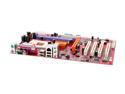
PC CHIPS M848A (V5.0) 462(A) SiS 746FX ATX AMD Motherboard
Pros: These comments are just to help people get this board up and running. First throw away the Motherboard driver disc but keep the sleeve, you'll need it for the new driver disc you'll burn. These suggestions are only if you're installing XP sp2 Home or Pro. 1st go to sis.com and click on download. Place a check in the box & click Agree. Click the following. 1st box Win XP,2nd box scroll down to AGP (Gart)Driver,3rd box is the same. Click Go, Note that the driver supports SiS746FX which is what this board uses. The specs list this board as having VIA VT6103L for the Lan, that comes from PCChips & its wrong. The lan is actually the SiS900, part of the South Bridge SiS 963L and XP sp2 will load the drivers for it as it's installed.
Cons: When loading XP sp2 it will seem to take an excessive amount of time for the files to be loaded, (sometimes looking as if it locked up) before the framilier loading screen comes up telling you about the features of XP while in installs. Don't get impatient and restart, that will mess XP up big time. Just relax as it will speed up about 3/4's of the way through. Your patients will be rewarded because it's not that bad of a board.
Overall Review: I went to Realtek for the Realtek ALC655 audio drivers. The easy way is to Google Realtek, then under the first listing for Realtek you'll see Downloads click there & that will take you to the right spot. Click on the 1st listing AC97 Audio Codecs (Software) & download the 1st driver listed using any of the three Download sites. Extract the SiS and Realtek drivers & burn them to a C/D. Once XP is loaded open the AGP Gart driver from your C/D and install that 1st by double clickin on setup.exe, Install this driver before you install any new drivers for you video card. Thats a must! Then install the Realtek driver WDM_A401.EXE now you can install your updated video card drivers. Note: if you are going to install a sound card then do not install the realtek drivers.
8/31/2007See more detail
The best
ESET NOD32 Antivirus 2026 - 1 Device / 2 Years - Download
Overall Review: Over the years I have found Nod32 to be the very best A/V on the market
12/13/2025See more detail
Awesome Case
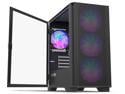
Montech AIR 100 ARGB MICRO-ATX Tower with Four ARGB Fans Pre Installed, Ultra-Minimalist Design, Fine Mesh Front Panel, High Airflow, Unique Side Swivel Tempered Glass, Dust Protection, Black
Pros: A bargain case with excellent cable management and RGB fans. This case includes 4 fans. Unusual at this price point. I love the tempered glass side panel that opens like a door.
Cons: None whatsoever. Excellent mid sized case!
Overall Review: I highly recommend this case.
7/2/2024See more detail
Use 120 x 20 Case Fans
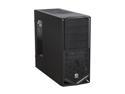
Thermaltake V4 Black Edition Gaming Chassis Mid Tower Steel Computer Case Fully Black Powdered Interior VM30001W2Z
Pros: Light and with good ventillation
Cons: Standard 120mm case fans are 120mm x 25mm and this makes life miserable for memory tabs and even some CPU coolers. The solution is to buy 120mm x 20mm fans they are just narrow enough to make things fit.
Overall Review: Unfortunetly I haven't found any 120mm x 20mm thick fans at newegg, instead I had to shop FrozenCPU. They only have one brand that thin: Yate Loon 120mm x 20mm Slim Fan and they come in low and medium speed no high speed but that's ok heat rises anyway right?
2/13/2012See more detail
Colone
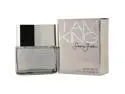
Sean John I Am King by Sean John EDT Spray 1 Oz for Men
Pros: Smells great to me.
Cons: The lady doesn't care for it
12/25/2011See more detail
IBM T23 Installation
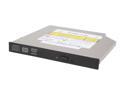
NEC Black 8X DVD+R 8X DVD+RW 4X DVD+R DL 8X DVD-R 6X DVD-RW 8X DVD-ROM 24X CD-R 24X CD-RW 24X CD-ROM 2M Cache IDE/ATAPI Slim DVD Burner
Pros: Installation: Click once on the green arrow near the clock on your taskbar and then click once to stop your D: drive. Now as you look at the drive push the little slide lever on the right side below the display screen, to the right, this will free your drive. Use a quality screwdriver #0 Phillips and use firm pressure when unscrewing because they have a small amount of loctite on them and you could strip the Phillips head otherwise. On the rear of the drive (the end that goes into the laptop) unscrew the outer 2 screws (leave the 2 by the connector alone) one screw will be longer than the other. Pull off the connector plate and make sure to lay the screw that’s longer on the right side of the plate so you remember its orientation. Take off the right and left side plates and place them on the right and left side to keep the orientation the same. Continued on the cons section.
Cons: None at all, excellent drive! Installation continued from Pros: Note the little metal spring clip that protrudes from the one side plate so you can be sure to replace it when installing that plate on the NEC drive. Now install the side plates then the rear, making sure the rear covers the side plate tabs at the back. Push the drive back in. Wait a few minutes for the laptop to reconize the NEC 6750A then install your favorite burning software.
Overall Review: This brand of drives have been the most reliable drives I have used and I have installed many different brands over the years.
2/28/2006See more detail
seller reviews
- 3
Awesome
Super Flower is a Premium dependable power supply company.
On-time
Delivery
Product
Accuracy
Customer Service
Satisfactory
12/3/2024See more detail
Awesome Desktop
This puppy is fast. It came with a SSD drive so boot time is minimal and response to requests like opening word is satisfyingly quick as well. Well worth the money.
On-time
Delivery
Product
Accuracy
Customer Service
Satisfactory
1/26/2015See more detail
I am King colone
Great Price, Super Fast Delivery. I recommend FragranceNet to everyone.
On-time
Delivery
Product
Accuracy
Customer Service
Satisfactory
12/25/2011See more detail