




 here!
here!
I’m your shopping assistant for PC builds, upgrades, and everything tech.
Got questions? Ask away!
Start a conversation
here!
I’m your shopping assistant for PC builds, upgrades, and everything tech.
Got questions? Ask away!
Start a conversation

Joined on 06/03/04
Great little board
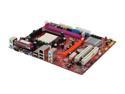
Pros: Inexpensive, decent quality, upgradeable to faster processor
Cons: Could have come with better manual. No free shipping
Overall Review: I bought this motherboard based on price (and acceptable reviews) to rebuild my Dad’s dead (Intel based) eMachines. As part of the rebuild I bought it with a Sempron LE-1250, 2GB of DDR2-800 Kingston ValueRAM (dual channel kit) and a new 300 Watt power supply (20 pin connector). After assembly it all worked great, much peppier than the eMachines was originally with a Celeron D, also a lot quieter and better onboard video. I used an old Rocket100 PCI IDE controller I had laying around so I could reuse the two IDE drives my Dad had and used the A15G’s onboard IDE for the DVD burner. I was also concerned about using a 20-pin power supply (board has 24 pin connector), but it worked out fine because the Sempron uses only 45W and I did not use an add-on video card. I ran a 24 hour Prime95 stress test and it did awesome, very stable system for over two weeks now. Out of the box everything worked. I only had a minor snag with audio drivers, but that turned out to be an XP Pro issu
Look elsewhere!!!
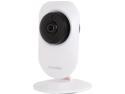
Pros: *The cameras themselves seem to work pretty well (when they work). *The image is fisheye, so you can see 180+ degrees in all directions (185 degrees actually). This provides the ability to have a single camera monitor a larger area, that would require multiple cameras with narrower fields of view. The view is like one of those door peep holes. *Low cost of these cameras *Free 3-days of cloud storage *Ability to save recordings to an FTP server (a local NAS device or online FTP service)
Cons: *The LaView Pano app appears to work, however the cameras are constantly loosing connection with the server, so the app is useless since I cannot see the camera feeds via the app. Cameras will go offline and require resetting and reconfiguring often. *The motion detection is overly sensitive with no way to adjust sensitivity or block out areas it should ignore in the frame. *With overly sensitive motion alarm, your phone will be constantly alerting to motion, becoming the boy who cried wolf. You will end up needing to turn off the motion alarm. *The app V1.00.01R has not been updated since 19 January 2017, and no signs it ever will be...
Overall Review: *I have tried several brands of IPCAMS, including Foscam, D-Link, Amcrest and now LaView. I used D-Link the longest, they worked okay for what they were (640x480) OLD cameras that were tough to set up, but were pretty reliable. Recently tried Foscam PTZ which was DOA out of the box. These LaView cams, which are very hit-miss and ultimately unreliable. The most reliable have beem Amcrest PTZ, which are very reliable, offer a boatload of features and are reasonably priced. These LaView cameras are probably rebranded and its possible that with a lot of tinkering I could get them working with another app other than the Pano app. I will investigate further.
Nice SSD for the price
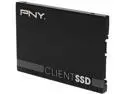
Pros: There are faster SSD drives, but they cost a lot more. This is affordable and is a quality drive with solid construction, features and memory type (MLC). The warranty is also pretty lengthy in comparison to other drives in this price range.
Cons: Not the fastest, however I did not notice any "seat of the pants" performance penalty compared to the Samsung 830 (120GB) drive I replaced. I've done benchmark comparisons between both drives and "on paper" the Samsung 830 is faster, but all I can say is the computer boots up just as fast, loads programs, downloads and transfers files just as quickly as it did with the Samsung 830... Honestly it is like comparing two Formula 1 race cars... If you're upgrading from a HDD, any SSD will give you a super performance boost, if you are a benchmark rating snob, then look elsewhere. For under sixty bucks, I'm more than pleased.
Overall Review: Get one, it's worth it, but if you need the bragging rights for benchmark comparison forums, look elsewhere.
Nice alternative if a Samsung Pro is not available!
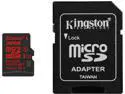
Pros: Speedy, roomy, cheap and available. Durable so far, and I don't expect issues, as I've had good luck with Kingston in the past. Currently in service in my Microsoft Lumia 640 smartphone.
Cons: Could always be cheaper?
Overall Review: Its a fast little card, it's a brand name you can trust, it won't break the bank, is reliable, just order one already!
Fantastic, feature-rich wireless router!!!
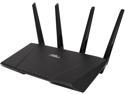
Pros: Having been a loyal Linksys user for many years, then a Netgear user, I can honestly say that this ASUS RT-AC87U is head and shoulders better than ANY router I've ever used. The multitude of features, ease of use, user interface, speed, range, all are top drawer. I lucked out and got this as a refurb for approximately 25% off the going retail/Newegg price shortly Christmas 2015. It had the latest firmware out of the box, and has been rock solid stable for 10 days of very heavy use. Routinely having 17 clients beating on it. I certainly hope that it continues this way for a good long time. Initial reviews on a small netbuilder website reported some issues, which appear to have been resolved with ASUS' regular firmware updates. It is currently the top ranked 2350AC router on that same website.
Cons: It is large, although not huge, its a pity they did not add in some extra ethernet ports to sweeten the deal and make use of the extra real estate... The buttons and indicator lights clearly are trying to fill a "cool design" motif so sacrifice some ease of use and aesthetics, but nothing anyone cannot get over.
Overall Review: A free ASUS cap would have been nice...
Nice Gig Switch
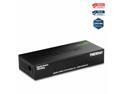
Pros: * Easy peasy plug and play * Metal body feels sturdy * Runs cool * Wall mountable * Jumbo frame support * GREEN * Newegg's fast shipping
Cons: None
Overall Review: Could have been a little cheaper, on sale etc., but still cheaper than more well known brands, so not complaning. I liked this so much I also bought the TEG-S50G version as well.


