

Your Browsing History


Kyle R.
Joined on 09/21/07
0
0
product reviews
- 5
First Impressions
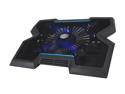
Cooler Master NotePal X3 - Gaming Laptop Cooling Pad with 200 mm Blue LED Fan
Pros: - Huge 200mm fan. - Fan speed control, as well as a button to completely shut it off. - Blue LED lights with a button to shut them off too. - 10 to 15°C (80 or 85°C (depending on the specific game and OC used) --> 70°C) reduction in temperature while playing intensive video games, and 7°C reduction in idle temperature (40°C --> 33°C). Note that this is with already having replaced the OEM thermal compound on the laptop with good stuff, this machine really is a beast... - Pretty quiet. 1/2 fan speed is quieter than plenty of other noises around the house, and at full speed it can be a little noisy but when running it full speed I've got sound effects from whatever video game I'm playing to drown out the fan with ease. - Doesn't take up a USB port, doesn't add any either though. At least it doesn't have the weird pass-thru connector that other, probably older, CM laptop coolers had. That thing was pretty sharp, could easily cut a finger on it.
Cons: - Didn't move as much air as I thought it would, however the temperature reduction is better than I thought it would be. I'd personally be fine - Blue LEDs aren't really visible from the front, it's more of a show-off thing for behind the cooler if anything. I didn't buy this cooler for the LEDs so it isn't a big deal to me, and it might just be my laptop (it's 15.6" but is quite thick and heavy). - Uses Mini USB instead of Micro USB. I'd like to see something that uses Micro USB as it locks into place very well and puts the wear and tear on the cable rather than the device like Mini USB does. - USB plugin is on the left of the cooler instead of the right. This might not be a problem for everybody, but the left of my laptop has 2 USB 3.0 ports while the right has 2 USB 2.0 ports, and taking up a USB 3.0 port would suck. Fortunately the cable provided is barely long enough to reach underneath the cooler all the way over to the right side of my laptop. - Where the cooler has the angular cut-ins, my laptop has a vent underneath the GPU's heatsink. It does still have some air moving around there, but it's nothing like if it sat on the vented metal top. Again, this is just my laptop, and the temps are still greatly improved despite this.
Overall Review: The cooler stays running while my laptop is closed and/or in sleep-mode, not sure if all laptops will do that, but it really works nicely with shutting the fan off and turning the LEDs on to have a cool little light at night. Something else I'd like to see is maybe a way to control the fan speed right from the computer via the USB connection. It could allow for dynamically adjusting to the temperature of the laptop rather than having to use the dial manually.
3/7/2014See more detail
Good Gain, Sub-Par Build Quality
Rosewill RNX-AD7 - High Power / Gain True 7dBi Dual Band Network Omni Directional Antenna, Range Extender for Your Routers
Pros: - Good gain, can't do much better than these if you need to support both 5GHz and 2.4GHz bands unless you go for directional antennas. - Looks pretty, not exorbitantly-sized.
Cons: - The build quality of this antenna is atrocious for this price point. The threads are plastic, the hinge is small and flimsy, and there are various fit-and-finish problems. This is polar-opposite to Rosewill's other antennas, especially in regards to the plastic threads. ALL of their other antennas have metal threads with beefier hinges. - 2.4GHz gain isn't superb, but this is just common to dual-band antennas in general, not this one specifically.
Overall Review: I paired this with an RNX-AD5 to have something with a little more gain to go with it at the expense of a more directional beam. I have two external antenna connections on my laptop (added by me) which are used with a Killer-N 1202 WLAN card, and it works absolutely phenomenal. Looks pretty 'killer' too. Because I disconnect the antennas to transport the laptop in my bag, the build quality of the antenna is very important to me. If you're going to be sticking this on something stationary and just setting it and forgetting it then build quality isn't really a big deal for you, plastic threads and a flimsy hinge will get the job done for you. If you are looking to upgrade a router's antennas, these are probably your best non-directional choice if you need 5GHz support. Be warned that, unless you're replacing little dinky rubber-ducky antennas, you may not notice enough of a difference to justify the cost of these antennas. If your router or WiFi chip is only 2.4GHz, you should look at antennas that offer high gain on 2.4GHz only, like Rosewill's RNX-A9-EX or RNX-A5LX-EX.
10/3/2015See more detail
First Impressions
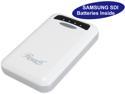
Rosewill Powerbank RCBR-13030-WH - White, 13,000 mAh External Backup Battery Charger for Smartphone, iPhone, iPad, & iPod
Pros: - Enormous 13000mAh capacity. - Handy bright LED light. - Nice, useful charge indicator, also flashes to tell you when a device connects/disconnects, among other things. - More portable than I thought it would be. - 2A input support via your everyday microUSB. - 2A and 1A USB outputs. - Got mine for a ShellShocker deal of about $30.
Cons: - As others have stated, the included microUSB cord is a joke. You can pull off the end cover plastic things with just the normal force of inserting and removing the cable, but chances are if you're buying this you already have at least one or two with you all the time anyway.
Overall Review: The spec sheet lists it as only supporting 1A input, but the unit itself says 2A. I've discharged and recharged mine completely, 2 times now, and it charged up without any issues. Not sure what the issue other reviewers are having is, could just be the cable?
4/17/2014See more detail
First Impressions
Coboc HS-10 10 ft. HDMI High Speed with Ethernet - Type A to Type A
Pros: - 10 feet long. - Cheap. - Gold-plated connectors, always a nice touch! - Works great. - Doesn't seem like it'll break (e.x. connector detachment) easily.
Cons: - Not as thick as I hoped it would be, but certainly better than those little tiny "UltraSlim" etc. cables. If you actually need a slimish cable though, I'd say this is the way to go, as it's maneuverable and with those super slim cables you still have to fit the connector part through whatever you're trying to fit it through anyway.
Overall Review: It's a cable... there's not a whole lot that can go wrong as long as you don't yank it out of whatever it's plugged into. Plus at this price you could buy 10 of these for what just 1 would cost at a big box retailer, and without the annoying clamshell packaging too.
4/5/2014See more detail
First Impressions
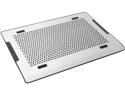
Cooler Master NotePal A200 - Ultra Slim Laptop Cooling Pad with Dual 140 mm Fans and Aluminum Surface
Pros: - Huge fans, move a decent amount of air. - QUIET. Even my refrigerator is louder than this. Plus, with this cooler, my laptop fan stays pretty silent, and that was at least as loud as the cooler. - Adjustable speed. - Rather than taking up a USB port it adds 1, and without that sharp thing that stuck out on previous CM coolers. - Aluminum surface matches my laptop's finish.
Cons: - Uses Mini USB instead of Micro USB. I'd like to see something that uses Micro USB as it locks into place very well and puts the wear and tear on the cable rather than the device like Mini USB does.
Overall Review: Something else I'd like to see is maybe a way to control the fan speed right from the computer via the USB connection. It could allow for dynamically adjusting to the temperature of the laptop rather than having to use the dial manually. Previous reviews mentioned concern at the amount of plastic and that the aluminum was only the surface, it appears CM or NewEgg listened to this and corrected the item description to better reflect this. Nice job on their part.
3/5/2014See more detail