




 here!
here!
I’m your shopping assistant for PC builds, upgrades, and everything tech.
Got questions? Ask away!
Start a conversation
here!
I’m your shopping assistant for PC builds, upgrades, and everything tech.
Got questions? Ask away!
Start a conversation

Joined on 06/02/05
works, but you can't reach tech support ... and it's a stripped down unit
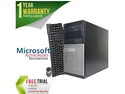
Pros: It seemed like a good buy at the time and it does boot!
Cons: Looks good, but it's not the bargain it seems. Specs seem attractive, but it's a stripped down unit with limitations. First problem - the side door did not unlatch. I had noticed that it wasn't packed properly, which might have contributed. So, I called their tech support number ... many times. No one ever answers. No one ever returns phone calls. So, you can't depend on AST (the anonymous 'rebuilder'). I started making up extensions and finally got a human, but she transferred me to voicemail and I still never heard back. Next, there are only 3 SATA power connectors in the entire box (only 1 is available after powering the hard drive and DVD). Finally, there is only a small 275w power supply, so it's a pretty stripped down computer. If you want to add drives, etc., you'll need SATA power converters and extenders and maybe another power supply (that's probably just because it's a Dell ... I don't know if the rebuilder substitutes a new small power supply).
Overall Review: Wouldn't purchase this product again and certainly don't want to purchase from a supplier that can't answer the phone and won't provide support. I finally used some brute strength to force open the chassis. I'm not looking forward to putting it back together ... and wonder what it will take to undo the panel in the future.
Looks nice on the outside, but ...
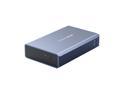
Pros: Nice, small looking package with good features.
Cons: Case is rectangular extruded aluminum - looks nice. A plastic tray holds the drives and slides into the aluminum case. 2 of the 4 drilled screw holes (to secure the drives) did not align with my SSD's mounting holes ... they were off-center, so the screw couldn't get through the plastic and to the SSD. I squeezed and flexed the plastic, but no help. I finally went to my shop and found a very small round file. Filing out the plastic to become oblong allowed the screws to line up with SSD mounting holes. I didn't use a hammer ... but, I did want to. I assume this is a molding problem, rather than a drilling problem at the factory. If so, you might want to buy a very small file to make it work. I haven't plugged it in, yet, but I assume it works. If not, I'll be back!
Overall Review: It's cheap, but does look very nice from the outside. IF my problem is typical, you may have to do a little filing to make it work.
Think twice before buying ... then, think again

Pros: It did seem to make some things faster
Cons: It damaged my Windows profile and key parts of Adobe CS6 stopped working (they had worked for a year). I spent hours on the phone with Adobe and they concluded my profile was damaged when Iolo "cleaned" my registry. Also, the program dies every day with an error message. I tried IOLO tech support - they admitted they have a bug they cannot fix ... maybe in next year's version. Do yourself a favor and wait 2 years to see if they fix it and make it stable. But, if you choose to buy it, make sure you have a complete backup on another computer (read other posts that claim IOLO deletes system restore files, so you can't reclaim a good install through that method) so you can do a reinstall.
Overall Review: I've looked at owner/user reviews on Newegg and other sites ... there are a lot of very angry owners. Don't become one!
Doesn't work with large hard drives and RAID
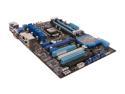
Pros: Nice UEFI BIOS, seems well designed and laid out.
Cons: First, 2 DIMM slots were dead - wouldn't boot with DIMM installed. Everyone has some bad boards, but ... Will not install the new large SATA-III hard drives (over 2TB) using the motherboard RAID. All you see is 2.0TB - the rest shows as unavailable. (Might be the same without RAID - I didn't check.) I have used updated Intel drivers, updated drivers from the ASUS website, and the drivers on the enclosed CD. I have followed all their instructions and spent a week talking with their tech support - on the few times I have gotten through. Their tech support is terrible - you almost never get through and they can't fix this problem. Nice board other than this RAID/large hard drive problem, though - and my fluke DIMM problem.
Overall Review: ASUS ALMOST NEVER answers the tech support line. When you leave a message, they never call back. When you do get through and spend 15 minutes with them (without fixing the problem), you may also be told, 'my supervisor won't let me spend this much time with a customer. Try calling back later.' Then they hang up. I have literally gotten through to them only 3 times, ... out of 100+ calls. ASUS tech support people are all VERY nice and knowledgeable ... and one admitted to me that "the Z77 boards are not ready for prime time. We're having a lot of RAID problems with them." I really appreciated that honesty - it's a good board otherwise. I just wish they would say this up front. If you want to run large SATA drives in RAID, skip this board until they fix their problems. Even if you don't want to use RAID, you should think twice before pairing it with a large hard drive (3 or 4 TB).
Don't buy this for RAID using 3.0TB drives
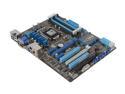
Pros: Nice UEFI BIOS, seems well built and laid out.
Cons: Will not install the new large SATA-III hard drives (over 2TB) using the motherboard RAID. All you see is 2.0TB - the rest shows as unavailable. I have used updated Intel drivers, updated drivers from the ASUS website, and the drivers on the enclosed CD. I have followed all their instructions and spent a week talking with their tech support - on the few times I have gotten through. Their tech support is terrible - you almost never get through and they can't fix this problem. Nice board other than this RAID/large hard drive problem, though.
Overall Review: This is the most problematic build I have had in 10+ years and I have wasted 6 days trying to make it work. (Reminds me of 1990 era build problems :-). ASUS ALMOST NEVER answers the tech support line. When you leave a message, they never call back. When you do get through and spend 15 minutes with them (without fixing the problem), you may also be told, 'my supervisor won't let me spend this much time with a customer. Try calling back later.' Then they hang up. I have literally gotten through to them only 3 times, ... out of 100+ calls. ASUS tech support people are all VERY nice and knowledgeable ... and one admitted to me that "the Z77 boards are not ready for prime time. We're having a lot of RAID problems with them." I really appreciated that honesty - it's a good board otherwise. I just wish they would say this up front. If you want to run large SATA drives in RAID, skip this board until they fix their problems. Even if you don't want to use RAID, you should think twice before pairing it with a large hard drive.
Not a good choice
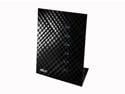
Pros: looks great
Cons: Continually loses wireless connection - very flaky. Wired computers work fine, though - a bit ironic for a wireless router. ASUS tech support is very nice, but they cannot make it work.
Overall Review: I've jumped through hoops for ASUS tech support - always very nice, but they can't make it work. Stick with ASUS motherboards and video cards ... but, take a pass on this wireless router. It's just not worth the trouble - just keep reading the reviews. Poor Jeremy from ASUS tech support does his best, but no one seems able to make this router work reliably.


