
Your Browsing History


Moniko M.
Joined on 08/14/05
0
0
product reviews
- 8
very good for the buck
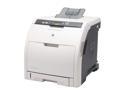
HP Color LaserJet 3600N Q5987A Personal Up to 17 ppm Color Ethernet (RJ-45) / USB Laser Printer
Pros: Fast in B&W and Color, excellent quality for the money. Setup was very easy. You have to appreciate the override function down the road when the toner in the individual cartridges finishes. Kudos to HP for selling the printer with full toners. Had a good experience with the HP Customer support as well (see cons) I rate it 4 start only because of the initial defect. Apart from that the printer is greate.
Cons: The first printer had something wrong with the manual feed (Tray 1). It is designed poorly anyway and was very crooked, couldn't close easily. Most importantly, it always showed that the paper was jammed. Returned it for a replacement. newegg was great, sent me a new one very fast.
Overall Review: The ownership cost should be low compared to others. One of the criteria for choosing this printer was the cost of the toner cartridges.
10/9/2007See more detail
4 ATA error out of the box
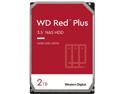
WD Red Plus 2TB NAS Hard Disk Drive - 5400 RPM Class SATA 6Gb/s, CMR, 64MB Cache, 3.5 Inch - WD20EFRX
Pros: inexpensive, good performance
Cons: 4 ATA errors on the first try
Overall Review: This is my second drive, replacing another failed NAS drive. The first one has been working for about 1 year with no problems/errors. The first time I installed it the NAS detected 4 ATA errors and refused to use it. Removed and installed again and the checks succeeded. This got me worried a little and will keep an eye for more errors. May be newegg got a bad batch or something, seems people are complaining of DOA a lot lately. On a different note, newegg absolutely rock. I ordered yesterday morning, and the disk arrived at noon today on a 3 day delivery option.
3/26/2014See more detail
Create little keyboard/mouse combo
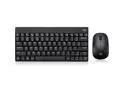
ADESSO WKB-1100CB 2.4GHZ WIRELESS MINI KEYBOARD & MOUSE COMBO
Pros: Small, sturdy feel of the keys, smooth action.
Overall Review: I have not tried the spill resistant feature yet, but by the key action it feels the keys and the bottom part is protected. Worked right out of the box, usb dongle doesn't seem to have big range, though. The mouse has a sleep feature that saves battery (wakes up by a click), the keyboard probably has it too, but don't know how to verify. Overall am very pleased, small form factor- hope it lasts which from the construction and the feel seems like it will
5/8/2020See more detail
Quality control may be lacking

ASRock Z390 PHANTOM GAMING 7 LGA 1151 (300 Series) Intel Z390 ATX Intel Motherboard
Pros: Tons of features Stable Overclocking is a breeze Cooling options for the M2 sockets, chipset
Cons: My only issue is with manufacturing quality. Board was supposed to be brand new, but came with missing/broken latch of one of the memory sockets. Not a big deal, it's not functional, just gives an extra security/support for the dim, but was disappointing to see. Same with the plastic latch of PCI-e 1 socket- it came right off
Overall Review: Giving overall 2 starts due to the quality issues I mentioned in the Cons. It's not a big deal for me personally, but hope to get attention and make Asrock do something. Been a fan of Asrock for some time, this is my second motherboard in couple of years. Very good price for the features. Other than the issues mentioned above, no complains. Don't know about long term performance, may update if something changes. My other motherboard has been working flawlessly for 2+ years now.
4/29/2020See more detail
Can't have better quality for that price
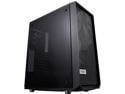
Fractal Design Meshify C Black ATX High-Airflow Compact Dark Tint Tempered Glass Window Mid Tower Computer Case
Pros: Excellent cable management Excellent quality Features nice back plate for 2.5" SSD Top, bottom filters, and the mesh in front keep the dust out Good air flow
Cons: none
Overall Review: Comes with 2 120mm fans front and back, very quite. I installed another Noctua NF-A14 PWM, Premium Quiet Fan, 4-Pin (140mm, Brown) in front, using Noctua NH-D15S for the CPU and my system is very cool and quite.
4/29/2020See more detail
Solid performance
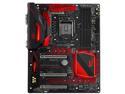
ASRock Fatal1ty Z270 Gaming K6 LGA 1151 Intel Z270 HDMI USB 3.1 ATX Motherboards - Intel
Pros: - full of features - download and install flash from the BIOS directly- this is a real time saver - 3 M.2 sockets, 2 for SSD & 1 for WiFi - easy overclocking w/ the preset values, voltages very helpful, safe time and rebooting.
Cons: none
Overall Review: Overall this is very solid board. The reason I give it 4/5 starts is that the M.2 socket WiFi is in at really tight place on top left and took me a while to install the card and the the antennas (those I bought separately, they didn't come with the board). If you don't care about the WiFi/Bluetooth card, shouldn't be a problem for you. Also, the BIOS version it came with didn't initially recognize all memory and didn't post. I had to try stick by stick (pairs actually) until it booted by recognized only one of the sticks. After the quick update of the flash, it all went very smoothly. The fact that you can update the flash from the BIOS directly without bothering with USB flash drives and all is huge plus. Overclocking was really simple with the presets- I was able to get 4.9 on the CPU and 3733 on the memory. Memory can get to 3866 but you will need to go to 5.0 on the CPU. All that was without water cooling. I have "Cooler Master Hyper 212 EVO - CPU Cooler with 120 mm PWM Fan" and all the temperatures were good, but my case has of 6 additional fans. My system is MB: ASRock Fatal1ty Z270 Gaming K6 LGA 1151 Intel Z270 HDMI SATA 6Gb/s USB 3.1 USB 3.0 ATX CPU: Intel Core i7-7700K Kaby Lake Quad-Core 4.2 GHz LGA 1151 91W BX80677I77700K Memory: G.SKILL TridentZ RGB Series 32GB (4 x 8GB) 288-Pin DDR4 SDRAM DDR4 3866 (PC4 30900) GPU: EVGA GeForce GTX 1070 FTW GAMING ACX 3.0, 08G-P4-6276-KR, 8GB GDDR5, RGB LED
3/29/2017See more detail