
Your Browsing History


Kevin F.
Joined on 03/10/06
0
0
product reviews
- 9
Great Card
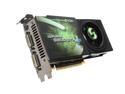
EVGA GeForce 9800 GTX+ 512MB DDR3 PCI Express 2.0 x16 SLI Support Graphics Card 512-P3-N871-AR
Pros: As soon as I plugged it in ans set up my Vista video rates went from 4.3/4.6 to 5.9/5.9. Play WoW and graphics are awsome.
Cons: Big video card, had to relocate hard drives to different bays above and below the card so the HD wouldn't hit the video card. Space between mounting plate and PCI-E tabs seemed like it was too much and had a hard time getting it to fit in place.
Overall Review: Thermaltake Soprano Case Thermaltake Toughpower Modular 650W PS AMD Phenom 9950 M3N72-D G-Skill 1066 8 GB (4X2GB) Running @ 800 Because of AMD processor limitations Seagate 640GB Sata X2 Mirror RAID Windows Vista 64
1/28/2010See more detail
Takes Some Getting Used To
Microsoft Windows Vista Home Premium SP1 64-bit for System Builders
Pros: Overall look is a huge improvement over XP. Desktop images and windows are crisp and clear as long as you are using the Aero theme. I Like the sidebar where you can customize it to show weather, pictures, news highlights, etc. Recovery tools and stability with the setup I have has not been an issue, not at all. Not as likely to see the blue screen of death compared to XP.
Cons: The permissions are horrible which is why this gets 3 eggs. I really don't need to be asked 2 or three times if I want to run a program or open a specific file folder. Vista runs slower for some reason that I haven't figured out. In XP the task manager shows high CPU, pagefile and low memory when things slow down but in Vista resources are high and some processes take much longer to load.
Overall Review: Control panel takes a while to figure out when you first start using this because the menu structure is a little different. No big deal. I went from XP Pro the Home Premium, what a mistake that was for me. I expected this to have everything I needed because I never used Pro to it's full potential. For an average user Home Premium would be great but if you have multiple PC's or a server you should really be using Business or Ultimate versions of Vista.
1/25/2009See more detail
Works great after some adjustments.
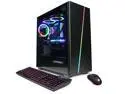
CyberpowerPC Gaming Desktop Gamer Xtreme GX60360LQ Intel Core i7-13700KF 16GB DDR5 2TB PCIe SSD GeForce RTX 4060 Ti Windows 11 Home 64-bit
Overall Review: Overall happy with the purchase. Build quality is ok, nothing special, but everything works as expected. There were 2 issues which I didn't bother contacting tech support about and just fixed it. First, when I unpacked the PC and took the covers off, the LED module for the case & fan lights had come loose from the double-sided tape and was just dangling. Power to the module came unplugged but just had to plug it back in. No bracket to hold it in place just a piece of thick double-sided tape and the module wouldn't stick to the tape. The second issue was one of the fans on the CPU cooler radiator was rubbing on the wiring harness plugged into the main board. Had to remove the radiator and reroute the wire harness. Bought this from Newegg as a pre-built PC and not directly from the website so I wasn't able to make any changes. I did have a question for tech support about the RAM. PC was built with 16GB of RAM, they have 1 X 16GB installed so I reached out to them hoping to be able to purchase another matching stick of RAM. Answer I got is they don't sell individual components. Would have thought they would build it using 2 X 8GB and I could just purchase another 16GB (2 X 8GB) to give me the amount of RAM I ultimately wanted for the PC. Unfortunately, I can't just buy another stick of 1 X 16 as they are sold in sets. When I do increase the amount of RAM, the installed module is going to basically become useless, not too thrilled about that.
8/6/2023See more detail
Nice!!!
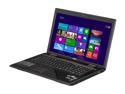
MSI GE Series - 17.3" - Intel Core i7-3630QM - NVIDIA GeForce GTX 660M - 8GB Memory DDR3 1600 - - Windows 8 (9S7-175611-213 )
Pros: Has the mSATA slot, Full HD 1920X1080p screen and a WD Black 7200rpm HDD. When I was looking at buying a laptop I read a lot of reviews about this and other similar laptops. I couldn't find a definite answer whether this particular model had the mSATA or not. It does. The procedure to migrate is pretty simple. This comes with the MSI BurnRecovery software which makes recovery DVD's that restores your HDD image. I needed 5 DVD-R's to do this. After I made those I removed the stock HDD (Western Digital Black 7200rpm) and installed a Mushkin Enhanced Atlas Series MKNSSDAT120GB-DX mSATA 120GB SATA III MLC Internal Solid State Drive (SSD) drive. Need to find a screw to secure the mSATA because the drive does not come with one and you cannot install without it. It’s the same screw that would secure a mini card like a wireless card, modem or Bluetooth. Important!-Get into the bios by pressing Del when the MSI logo pops up and disable the secure boot option in the Bios. Booted from the recovery DVD's and restored the image to the mSATA drive. This puts 5 partitions onto that drive-EFI boot sector, Windows recovery, OS partition, Data partition and Recovery partition. Opened computer management after reboot and removed the data partition. I also removed the recovery partition which is about 17 GB because I have the backup DVD's. Extend the OS partition to the unallocated space. This gives you about 100GB for your OS. Get back into the Bios and enable the secure boot option again and boot into your OS. Shut down, reinstall the HDD and reboot. Go to Settings, Change PC Settings, General and select Advanced Startup. When it restarts get to the command prompt. Type in "DISKPART", enter, "list disk", enter. Find the disk that is 698GB (should be disk 0) then type in "select disk 0", enter, "clean", enter, "Y" because yes you are sure you want to wipe the drive. Reboot, get into computer management, activate disk and make the partitions you want. I moved all of the library file folders to the single "Data" partition I made on that drive. Music, Videos, Documents and Downloads. Installed 'most' programs on the OS drive and still have about 20GB left. Takes seconds to boot now with no stability issues at all.
Cons: A lot of reviews say this laptop is a little flimsy or fragile and does not seem durable. If you live your life with a broken screen on your cell phone I would not recommend this laptop for you. It is, however, thin and light which is why I chose this particular one. Take care of your stuff and it will last! If not, buy the extended warranty. You cannot set up the mSATA as a Cache drive on this laptop due to the Bios not being able to create a RAID array so a 32GB or 64GB mSATA purchase will result in nothing but hate and discontent because you will only get 32 or 64GB of additional storage out of it. Or, a compacted Windows install with the need to buy aftermarket file management software to store system and program files on the Data drive. If you do this and have to wait for the transfer rate of the spin drive what is point of going to mSATA in the first place?
Overall Review: I’ve had this for about a month now and love it. When I bought this I also bought the mSATA drive and 16GB of ram (this is manufacturers limit) G.SKILL 16GB (2 x 8G) 204-Pin DDR3 SO-DIMM DDR3 1600 (PC3 12800) Laptop Memory Model F3-1600C10D-16GSQ the entire process to do the upgrades took me about two weeks because there isn’t much info on migrating the OS without an OEM Windows install disk or some software that doesn’t work because of the EFI partitions. I refused to buy another OS when the laptop I just bought has one. There is very little bloatware on this laptop, MS Office setup, MSI BurnRecovery, Battery Calibration and SuperCharger. That’s about it. No additional toolbars or ads as you would get with other manufacturers. If you duplicate my procedure the process should take you no more than an hour or two unless you have already put your own stuff on the laptop. In that case you just have to back up your files and then put them back on when you wipe the drive. If you don’t want to wipe the drive you can just delete the OS partition but then you end up with dynamic instead of a basic partition because when you extend your Data partition you extend it to the left instead of the right. One last item-performance and graphics. I use this to play WoW and I have the graphics set to Ultra settings. The lowest frame rate I recall seeing is 27fps but definitely no performance issues even at the ultra setting.
2/15/2013See more detail
Great Card
EVGA GeForce 9800 GTX+ 512MB DDR3 PCI Express 2.0 x16 SLI Support Graphics Card 512-P3-N871-AR
Pros: I started out with one of these two years and added a second one on SLI 6 months later. These have run flawless for the entire time. I play WOW and even now (2012) I can run in Ultra at about 45 FPS, 50-55 on high and maintains 60 on medium (Anything higher than 60 your eyes wouldn't be able to tell the difference)
Cons: Heats a small office. Not so sold on SLI. The majority of motherboards, especially when I built my PC, will support PCIe X16 on two slots but running in SLI they drop down down to X8. This limits your gain you would get running both at X16. I know it's the limitation of the MB but my gain was only about 20%. Next time I'll stick with a single more powerful card.
Overall Review: There are mixed reviews about all Evga video cards and of course they have their occasional DOA stuff but overall the quality and reliability is top notch. When it's time to upgrade, probably the first of next year (my PC is now 4 years old) it's going to have another Evga card in it. Most likely the GTX 680 when they get all the bugs worked out and the motherboards support it.
4/9/2012See more detail
Faster than expected
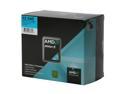
AMD Athlon II X2 240 - Athlon II X2 Regor Dual-Core 2.8 GHz Socket AM3 65W Processor - ADX240OCGQBOX
Pros: Faster than expected. Heat sink fan is very quiet. Install of Windows 7 was a breeze without a single problem.
Cons: It wasn't free.
Overall Review: On this build I was building on a tight budget. I didn't expect much but was surprized when I ran the set up of Windows 7. The speed of this processor almost matches another build I did last year with a quad core processor (Phenom 9950). It's cheep and does the job, a great job. MB-ASUS M4A785TD-V EVO CPU-AMD ATHLON II X2 240 AM3 2.8G MEMORY-4GB 2x2 GSKILL RIPJAWS F3-10666CL8D-4GBRM HD-WESTERN DIGITAL Caviar GP WD7500AACS 750GB 5400 to 7200 RPM 16MB Cache SATA 3.0Gb/s WINDOWS 7 HOME PREMIUM
11/14/2009See more detail