
Your Browsing History


Sheldon C.
Joined on 04/29/05
0
0
product reviews
- 5
Good Graphics
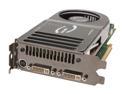
EVGA GeForce 8800 GTS 320MB GDDR3 PCI Express x16 SLI Support Graphics Card 320-P2-N811-AR
Pros: This is a great card, Runs all my current games on very high settings with no trouble. (Half-life 2, Elder Scrolls Oblivion, Medieval 2 Total War, etc.) It also handles my 3d work apps like 3dstudio max just fine. I don't notice any slowdowns unless I populate huge seens with tons of geometry. Even then its not bad. Runs Vista Aero just fine. I think it gets a 5.9 rating for Graphics and Aero IIRC. Oh, and no problems installing it and Windows Vista even had the drivers for it from Nvidia in Windows update so I just had to do my critical updates to get the most up to date drivers for my Video Card Automatically. It also handles dual monitors flawlessly both at their highest native resolution. (IIRC its 1650 by 1080) oh, and no fits, no problems, no incompatability issues. Its been running fine for over a month.
Cons: I had to make a scene in max that went for 3 miles in all directions, and populated it with a forest of medium to high polly trees using an array to even make the card hiccup (and then I was rotating the scene fairly fast to get to the other side). Most people aren't going to make a scene that inefficiently, and game designs certainly don't. This is a good powerful card. When I installed it, I did have to bend the tabs just a little bit to get it to slide all the way in, Though that could have been a problem with my case just as well, but they visually looked a little bent and my other cards went in fine so I'll bank that the slender metal got bent a bit during packaging or something. Its really minor, just one of those things where if it isnt' going in easily right way, you have to stop and look and think rather than just push harder. That goes with any component really.
Overall Review: This card does everything I want it to do and more, and the price isn't that bad. Sure you can go more powerful, and its going to cost you through the nose, but you can go a heck of a lot wimpier, and not save much money at all. Its at a great price point per value. Also, if you haven't messed with these type of cards before, this thing is big. The pictures fool you because proportionately they look like other video cards, but realizing that they take up two slots instead of just one... They are as long as the full length of the motherboard. When you plug the power in, they're longer. If you plug two of them into your PCIx16 slots then congratulations you just turned the bottom half of your motherboard into one solid chunk of heat-producing airflow-restricting circuitry. Not that its bad, just be prepared. The boards look a lot bigger installed than they do on a pic on the internet.
3/30/2007See more detail
Good Memory
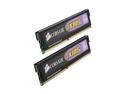
CORSAIR XMS2 2GB (2 x 1GB) DDR2 800 (PC2 6400) Dual Channel Kit Desktop Memory Model TWIN2X2048-6400C4
Pros: Great memory, I have been running it for a month now, 4 sticks, at 2.1 v and 4-4-4-12 timing, and have had no problems, conflicts, crashes. Memtest running all night when I installed, and just the other day and 0 errors. Also, this memory will run at 1.9v 5-5-5-15 and be happy as well, so you shouldn't have any problems with putting it in a new machine and it not posting or booting.
Cons: My Mobo has the Nforce 590 chipset, so it was supposed to automatically detect and configure the memory since its EPP and SLI ready. That was not the case and I had to manually configure the timings. So far thats my only beef.
Overall Review: A couple things of Note: The instructions clearly state that you need to plug in your powersupply but leave it in the off position and touch an unpainted part of the case Each Time You Move while handling these parts. The heatspreader subconsciously makes me think these modules are heftier and more durable but I don't wonder if since its metal it allows Static discharge to conduct and fry the modules just that much easier. Regardless, a lot of people seem to fry these modules. I was very careful and all 4 of mine work fine. Note 2: 32bit OS's can only address a max of 4GB of Memory, now after your controllers for your HD's and your Video Card's memory is taken into account, your OS will probably only see around 3.5 gig or less, so unless you are using a 64bit OS, there's no reason to load up on all of these unless you count "just for the heck of it" as a reason. Also, My Gigabyte GA-M59SLI-S5 gets along great with 4 sticks of this memory.
3/30/2007See more detail
Great Speakers
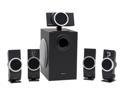
Creative Inspire T6100 76 Watts 5.1 Speakers
Pros: Sound quality is very good. They look nice. Setup and installation is straightforward and easy.
Cons: A fall from the height of the kitchen table is enough to knock the solder loose on the inside of one of them. Opening them up and getting out a soldergun is easy enough, but come on, if you have kids or dogs that run around the house, and speaker wires along the floor you need durability.
Overall Review: Just a peave really, They do have cords, and not very long ones, which for true surround sound doesn't make much sense. I know that they had cords, but the box in all of its pictures has conveniently erased all the cords so their setup would look clean and neat and not like the spagetti that is reality, also they dont' mention anywhere the actual length of the cords. So please note, your front speakers only have about 5 ft of usable cord, so only expect to place them within 3 to 4 feet of the subwoofer, and your rear speakers only have about 10 to 12 feet... so rather than being rear speakers they're kinda more-off-to-the-side speakers, because if you try to run the cord to disguise it and avoid tripping hazards but have the speakers behind you, you start running out of it pretty fast. That all being said, the sound quality is really nice. They do their job well.
3/30/2007See more detail
Solid MoBo
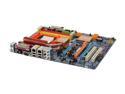
GIGABYTE GA-M59SLI-S5 AM2 NVIDIA nForce 590 SLI MCP ATX AMD Motherboard
Pros: Mother Board Installed with out a hitch, I installed Vista on it and it detected everything. Windows Update even had the newest versions of all of the Nvidia chipset drivers so I didn't even need the drivers on the disk, which was good for me (see cons). The dual-Bios is a really good and unique idea. And I can't say this enough. It ran flawlessly right out of the box. I didn't have to tweak any settings or really have any serious compatibility issues.
Cons: the CD that shipped with the MoBo would not run on Vista. I had to go online for the drivers, but as I said, at least everything was detected automatically so I could go online. My memory was Corsair XMS2 C4, which is supposed to be EPP and the mobo being nforce 590 was supposed to in my understanding automatically detect the memory and set it to 2.1v 4-4-4 12... It didn't, it treated it like plain old 1.9v 5-5-5 15. The memory didn't mind, it still booted wonderfully and memtest said everything got along great. no conflicts. I just had to manually in the bios change the memory timings and voltage. the Mobo warned me that I could fry the memory. But the manufacturer says thats what it was supposed to run at, thats what its been running at for over a month. No conflicts, no crashes, everything is running fine. Memtest even detected all 4 gigs, even though my 32bit OS can't address them all. The Mobo is running happy.
Overall Review: The mother board is slick, easy to use, and has a lot of nice features. It has a backup bios, How cool is that!? also a Geforce 8800 doesn't block anything important, which is good Mobo layout design. The driver disk that ships with it is incompatible with Vista, but Vista detects everything on the board so you are still up and running, It did not detect my memory correctly through EPP, but it still booted fine anyways and I could manually change the timings in the Bios with little trouble. Ctrl + F1 is what is supposed to get you into the advanced bios features for overclocking and the like, and its <Del> to enter setup. Oh, and fyi the firewire pluggin on the back is the small kind, its kind of hard to see in the pictures. Did I already say that this thing ran right out of the box and has given me no headaches for over a month and took very little effort to tweak? Well I'll say it again. This Mobo is running happily, which makes me happy! :)
3/30/2007See more detail
Sturdy Case
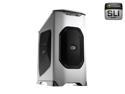
COOLER MASTER Stacker 830 RC-830-SSN3-GP Silver Aluminum ATX Full Tower Computer Case
Pros: Strong, Durable, roomy (understatement), looks good. Slide out Mobo tray. The location of everything inside made it real easy to install all of my components. The fan slots are all tool-less as well, and it comes with sleds and faceplates for turning 2 of the 5.25's into 3.5's if you have an FDD or media card reader you want to install. I honestly wasn't expecting that plus because it doesn't come out and mention it, It is a very versatile case.
Cons: It seems fabricated instead of engineered. For example, in a lot of the corners you can see daylight through in the seems. Not everything lines up in that perfect way that only precision engineering can deliver. My one side door bound up, I had to reshape it with a rubber mallet in order to get it to slide smoothly like the other one.
Overall Review: Those are all 120mm fans, even the side door with the 4. It was really easy for me to look at the pictures online, look over at my midtower with 80mm fans, and totally underestimate the size. 120mm is almost 5 inches. that 2x2 fan bracket is about a square foot! I think it is because this case is proportionally like a mid-tower that it's so easy to underestimate its shear size.
3/19/2007See more detail