

Your Browsing History


Erik B.
Joined on 02/26/03
0
0
100%
product reviews
- 77
My third Agility 3
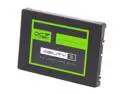
Manufacturer Recertified OCZ Agility 3 2.5" 120GB SATA III MLC Internal Solid State Drive (SSD) AGT3-25SAT3-120G
Pros: Fairly fast, and if it's like the seven other OCZ SSD's in my computers, it should be reliable. Software tools downloadable from OCZ website for updating firmware. This refurbished SSD came with the latest firmware installed.
Cons: None so far with the drive itself. The PC Bootable version of the firmware update toolbox failed to connect with my network, but the desktop version had no problem.
Overall Review: I would usually wait longer to write a review, but in light of how many problems owners have reported, I feel I should report that mine was not DOA and has been running reliably 18 hours per day for a week in a RAID configuration with another Agility 3 that I've been using for about a year (I have another Agility 3 I've owned for a while that I'm keeping as a spare). This is my eighth OCZ SSD (in three computers) but my first refurbished one. The extremely negative reviews about the refurbished ones made me nervous about buying this, so I purchased the extended warranty (something I never do!), though I'm not sure it was really necessary. More on that later. If you buy this SSD, go to the OCZ website and look for firmware updates. They have toolboxes that are PC bootable or run on a Windows or Mac desktop. For some reason, the PC bootable version would not connect with my network, so used the desktop version. The Agility 3 can erroneously report excessive temperatures under SMART. The PC Bootable toolbox has a fix for this. About the warranty: I felt extremely nervous about buying this after reading all the negative reviews, so I bought a two year warranty. After reading the warranty, I think one year would be enough and maybe unnecessart. The warranty coverage is based on the value of the SSD at the time of repair. Considering how the price will drop, in two years the warranty probably won't be worth much. In any case, most problems are likely to occur in the first six months, which the standard warranty covers. Only one of my OCZ drives has ever failed, and it was within the first few months. OCZ was prompt in sending a replacement.
5/7/2013See more detail
Almost superb... but not
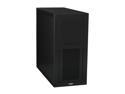
LIAN LI Lancool PC-K7B Black Aluminum/ SECC ATX Mid Tower Computer Case
Pros: I love this case, which is why giving it only three stars is so painful, but it's the little things that bug me. More about those below. Here's some of what I love about this case: - The best finish of any case I've ever owned (I've owned computers since 1986 and currently have four desktop computers) - Removable motherboard tray - Excellent toolless hdd and odd mounting - Ready for water cooling (I don't have it yet but might add it) - Three 120mm fans - Cable management ties - Removable fan filters
Cons: - Top cover doesn't fit properly against front cover. It sticks up above the front over on both sides. If had bought this case to take to LAN parties, I would have returned it immediately for this annoying cosmetic flaw. It really irks me, but I'm only using it for a server, so I don't have to see it often. - No CPU access hole in the motherboard tray. How can a case this good omit something so basic? - The hdd cage blocks some cooling and should be rotated 90 degrees, but this isn't possible. - The directions are terrible - The directions say to attach the PSU with four thumb screws, but only one is provided. I don't see a need for thumbscrews on a PSU, but if the directions say to use them, they should be provided. Why provide only one if four are recommended?
Overall Review: This is a very nice case, one of the nicest I've owned. I usually buy Antec cases, but bought the Lian Li this time because I'm tired of paying for electricity to power fan LEDs in my Antec cases. The Lian Li is such a nice case that its shortcomings are all the more noticeable. I bought this for a server, but if I had bought it to take to LAN parties, I'd have returned it because of the sloppy fit between the top and front cover. It's just one of the shortcomings that frustrate me on this case that in so many other ways is exceptionally well done.
5/29/2011See more detail
fast but cheaply made
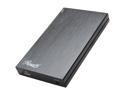
Rosewill RDEE-12002 Aluminum 2.5" SATA I/II/III USB 3.0 SSD/ HDD Aluminum Screwless External Enclosure support up to 12.7mm
Pros: USB 3.0 speeds - in three tests my sequential read and write speeds were in the 81-89MB/sec range, about four times what I was getting with my WD Scorpio Black in my old Rosewill USB2.0 case. Decent looking (but not great) Reasonably easy to assemble (but could be easier) Drive runs 1C cooler than in former enclosure, maybe because this enclosure is slightly thicker and so has a little more air space.
Cons: The case feels cheap. I have a half dozen other Rosewill external enclosures (both 2.5: and 3.5"). This is the first tone that feels cheap. It doesn't look cheap, but it also is not as good looking as the others. I was very disappointed that although the case is aluminum, the drive mounts on plastic. It doesn't seem to raise the temps any, however. They are actually 1C lower than my old enclosure. The connector for the USB cable isn't deep enough. I've tried this enclosure with both the supplied Rosewill cable and a non-Rosewill cable. Both cables had the same problem, so the problem is in the enclosure. I wouldn't want to use this enclosure for daily moving around. The cable is too short - I replaced it with a 6' cable so I can place the drive in a location with better air flow for cooling.
Overall Review: USB transfer speeds were exactly the same with the supplied Rosewill cable and a 6' non-Rosewill cable. The tool-less design is harder to figure out than my other Rosewill toolless 2.5" enclosure, though once you see how it's done, it's pretty easy. The other enclosure is also much better looking than this one. I wouldn't hesitate to use the other one in a business meeting, but but don't feel that way about this one. It's not bad looking, just not as sharp looking as my other Rosewill enclosures.
10/24/2013See more detail
amazing
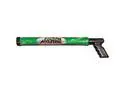
Water Sports 600001 24 in. Water Machine 750
Pros: Shoots strong blast of water about 40 feet (with practice it probably can shoot further than this) Simple - not much to go wrong Quick reloading
Cons: None
Overall Review: This might be the first time someone has bought a water gun for the reason I bought mine - for a traditional Native American ceremonial roundhouse. No, it's not for water fights or for any ceremonial purpose. It's for fire prevention. From years of keeping large, hot fires going inside the roundhouse, the ceiling's support beams are at risk of catching fire. It almost happened last summer. We don't have any running water at the roundhouse and a conventional fire extinguisher couldn't reach the problem area without the person operating it stepping into a very large, extremely hot fire. Originally I was going to buy a traditional Super Soaker type water gun, but they all share a common problem: they need to be reloaded when they run out of water. This could be catastrophic in a fire. Then I discovered the Stream Machine. It's the perfect solution. I've owned it for about a year and have only used it a few times, for testing, so I can't attest to its durability, but its operation is impressive I don't expect it to reach the 70 feet the manufacturer claims, but mine sends a very powerful stream of water about forty feet effortlessly. That's more than enough for me. The big advantage of the Stream Machine for me is that if one of those high beams does catch fire, as long as I have a container of water handy, I can keep reloading the Stream Machine, with each reload taking just seconds. Judging from other reviews, the main risk to the Stream Machine's durability is when sand gets mixed in with the water. This shouldn't be a problem for my situation. It will be kept handy for emergency use in the roundhouse, but will never go anywhere near a beach or river (unless I decide to take it out and have some fun with it someday!).
4/24/2013See more detail
great little camera but some annoying faults
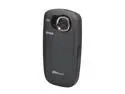
Kodak ZX5 Playsport HD Waterproof Pocket Video Camera. Black
Pros: - It's a rugged camera I can carry in places I would not carry my dSLR's or point-and-shoot: mountain biking, trail running, at the beach or in the desert (where sand can ruin other cameras), and in the rain. - It takes surprisingly good pictures, at least in sunshine, and adequate pictures indoors. - Battery life is good: 2 hours 9 minutes when shooting full HD and 2 hours 30 minutes when shooting WVGA with a 32GB SDHC card (with a 8GB card, full HD recording stops at 1 hour 28 minutes even though the SDHC card is only about 60% full) - Locking doors for USB/HDMI and SD card are cleverly and effectively designed (but apparently too clever for some owners, who resort to breaking them to open them) - Simple, intuitive user interface - Bright LCD screen that is usable even in direct sunlight - Nice, functional feel to the camera's body
Cons: - Non-removable battery - Digital zoom only - No lens cap - No live view - you can't send a feed over an HDMI or USB cable to an external monitor - No external audio port
Overall Review: In researching this camera, the most common complaint I read about it is locking up; however this was fixed with a firmware update. My ZX5, which I bought in April 2013, came with the firmware update already installed. You can tell which version of the firmware your ZX5 has by clicking Setup and selecting "About". If the Camera Firmware Version is 1.06, you have the updated firmware. A surprisingly common complaint is people not being able to open the USB/HDMI and SD card doors. Kodak made a design error here. They should have put arrows on the case showing which way to slide the locks to open them. It's not obvious, but if you know how to do it, it does work very well, far better than the doors on my waterproof Pantech Element tablet. The first ZX5 I received was defective - it wouldn't install Kodak's Arcsoft software and wouldn't let me view the contents of the folder where it was supposed to be installed (using Windows Explorer). I don't intend to use the software, but I was concerned that it might indicate other problems that might surface later, so I got a replacement, which is fine. I decided that the ZX5's faults were serious enough that I couldn't use it for the purposes for which I bought it (conducting field interviews), so I ordered a Panasonic DMC-SZ7 to replace it, but I liked the Kodak so much that I kept it to use as a portable camera that I can carry with me no matter what the conditions. I love this camera. It has its faults and limitations, but overall it's a great camera for anyone who wants to be able to carry a camera while mountain biking, trail running, and under conditions that would menace most other cameras.
4/24/2013See more detail
Five year warranty
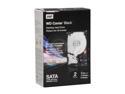
WD Caviar Black WDBAAZ0020HNC-NRSN 2TB 7200 RPM 32MB Cache SATA 3.5" Internal Hard Drive -Retail kit
Pros: Five year warranty, should be very durable if it's like my other WD Caviar Black drives, reasonably quiet. I bought this drive for my my video work, which consumes ever more storage space. I have it mounted in an external eSATA enclosure. I've only had it a few weeks. I don't expect problems but will post an update if any problems occur. I haven't had a problem with a WD drive since the mid 1990s, so I don't anticipate any trouble.
Cons: None
Overall Review: I have five desktop computers and have bought quite a few hard drives over the last nearly 25 years. It's becoming harder to find a good hard drive. Ten years ago I bought mostly Seagate drives, but they have gone downhill. Five year warranties used to be common, now they are much shorter. WD's Caviar Black is one of the few still carrying a five year warranty, and it's now the only hdd I buy other than WD Velociraptors when they come on sale. I wanted to buy WD's Caviar Green model, but it has a major design flaw: the energy-saving logic causes it to park its heads too often, which many people feel dramatically shortens the life of the drive. Google "wd green problem" or "wd green wdidle3" for more information. The DOS executable wdidle3.exe can be downloaded from the wd website and may alleviate the problem. It only affects the Green drives, not Black. My video files represent too much of an investment of time and work creating them. I can't afford losing them, and the Caviar Black drive appears to me to be the most cost-effective way of getting long term reliability.
11/29/2012See more detail