
Your Browsing History


Marty P.
Joined on 04/18/04
0
0

product reviews
- 11
Upgraded from a 8700K, WOW, what a upgrade, love this thing
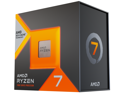
AMD Ryzen 7 7800X3D - Ryzen 7 7000 Series Zen 4 8-Core 4.2 GHz - Socket AM5 120W - AMD Radeon Graphics Desktop Processor - 100-100000910WOF
Pros: This is also my first AMD system since the FX days. Was excited to check out AMD again. Been about 3 weeks and I'm super happy. Got a Samsung 980 Pro 2 TB to take advantage of the move from PCI-E 3.0 to 5.0/4.0 (wanted 2TB and a 2TB PCI-E 5.0 drive was a little to pricy for me). And a 32 GB (2x 16GB) DDR5 6000 EXPO memory kit (F5-6000J3036F16GX2-TZ5NRW). EXPO works perfectly. This thing is fast, silent running with my dark rock pro 4 and fast as heck. And I know AMD isn't changing sockets next generation or every two gens, so my motherboard isn't a upgrade dead end!
Cons: Genuinely can't think of any.
Overall Review: Would recommend 100%. Love seeing how long AMD has kept AM4 alive and have no doubt AM5 will have just as long or longer a lifecycle. Great CPU.
1/14/2024See more detail
Extremely buggy BIOS version pulled, no notice given
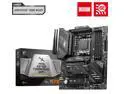
MSI MAG X670E TOMAHAWK WIFI AM5 AMD X670E ATX Motherboard
Pros: My first AMD system since the FX days. Upgraded from 8700K so huge upgrade all around. New 7800X3D CPU, PCI-E Gen 5 and 4 instead of 3, DDR5 etc. It's a noticeable difference. Using a dark rock pro 4 with fan curve at BIOS defaults and it's silent. During 3D Mark, or BG3 clock frequency rarely drops below ~4.8-5.0Ghz.
Cons: Thanks MSI. I ended up flashing a BIOS version that's so buggy you pulled it (the one with AGESA ComboPI 1.1.0.1) But you didn't put any notice of any kind on the page to let people know you pulled it. If you had I wouldn't have ended up flashing it. RAID doesn't work (BIOS menu where you pick what RAID level you want is broken) EXPO is broken. Turning on EXPO will cause a black screen (no signal) and the RAM debug LED to light up yellow. I tried letting it sit there for 10+ mins multiple times but no luck. Always end up having to pull power, remove battery and clear BIOS settings to boot again. There are MANY reports of this online you can easily find. Esp regarding EXPO/XMP not working, super slower post times (as in minutes, hasn't been that bad for me but slower than my 8700K board I upgraded from). If a BIOS is so bad and buggy you have to pull it in a matter of days, PUT A NOTICE FOR PEOPLE THAT MAY HAVE DOWNLOADED ALREADY. I've read bugs of M.2 drives no longer working (the board doesn't detect them) on the previous BIOS version (AGESA 1.0.8.0) Specifically WD drives and one of my SSD's is a WD SN 750. So I'm changed to try to downgrade to the previous BIOS version. I'll just wait till MSI releases the next version and hope it fixes the bugs and doesn't just make things worse. Maybe next they will somehow cause the power switch pins for the case to not work so you can't even turn it on... *sigh* Well assuming those issues get fixed, and I feel fairly confident at least the more severe (EXPO) will. But MSI needs to let people know when a BIOS is so bad it's pulled from the public in days. Audio quality is pretty mediocre as well. My 8700K board had better onboard audio. This one doesn't even have that "pop protection" to prevent that popping sound when you boot your PC. Gonna get a Creative AE-5 probably. 2.5Gb Ethernet (Realtek) seems fine. Don't use Wi-Fi, Bluetooth works fine for my Xbox controller. Really just hope MSI cleans up their BIOS.
Overall Review: MSI needs to put an alert on the BIOS download page when a version is so buggy they have to pull it from download within days, please! But since they don't the version I'm running (AGESA ComboPI 1.1.0.1) is quite buggy (see cons). But assuming that stuff (mainly EXPO and RAID) gets fixed then it's a fine motherboard. Nothing special, just ok.
12/26/2023See more detail
Works perfect

G.SKILL Trident Z5 Neo Series 32GB (2 x 16GB) 288-Pin PC RAM DDR5 6000 (PC5 48000) Desktop Memory Model F5-6000J3036F16GX2-TZ5NRW
Pros: Update: Wow, the price of RAM now! I bought this kit December, 2023 for $129. Right now as I type this it's $379! Upgraded from a 8700K to a 7800X3D so obv needed new DDR5 RAM. Normally I wouldn't bother with RBG RAM but this kit was on sale for a really good price. So I figured why not. But what matters is it works perfectly. I have a MSI MAG X670E TOMAHAWK WIFI. I flashed the latest BIOS, and enabled EXPO and that was it. Been working perfectly for ~3 weeks since. MSI Mystic Light controls the RGB of the RAM no problem as well.
Cons: The current price of RAM right now.
Overall Review: Completely happy with my purchase.
11/21/2025See more detail
Love it, super high build quailty, great features, looks great
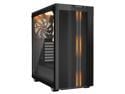
be quiet! Pure Base 500DX ATX Mid Tower PC case | ARGB | 3 Pre-Installed Pure Wings 2 Fans | Tempered Glass Window | Black
Pros: This case is exactly what I was looking for. An attractive case, with great airflow, and support for 2 internal HDD's (I use two HDD's in RAID 0 for older games / games that don't benefit much from being on my NVME PCI-E SSD's). My Z370 does not have the 4 pin RGB header so I can't control the case lighting through software but using the button works fine. Build quality is fantastic. All the screws are thumb screws and the kind that come loose without falling from the hole they are in (forget the term for that). The movable and removable HDD cage has rubber bumpers for vibration. Comes with 3 beQuiet fans. They are 3 pin instead of 4 pin PWM but still work great. I just run them at max speed because they are so quiet (max speed seems to be about 1,000 RPM. I did change the default fan layout from one in front, one rear exhaust, one top exhaust. To two front intake and one rear exhaust. I'm using a DeepCool Assassin III CPU cooler which fits no problem, and a EVGA RTX 3080 FTW3 Ultra which also fits no problem. Plenty of options for cable management. Includes a few cable ties on the backside of case. Plenty of holes from PSU shroud to route cables through cleanly. Right side panel has noise dampening foam on it.
Cons: None honestly. Case looks fantastic IMO. Build quality is fantastic, no complaints there. The included 3 fans are great. I can barely hear them with all 3 at max speed so I just leave them at max speed. Temps are fantastic for me with my 8700K running at 4.6 Ghz all core, and my EVGA RTX 3080 FTW3 Ultra.
Overall Review: Would highly recommend, and will def look at be quiet next time I'm looking for a new case again.
11/20/2021See more detail
Silent, super compact, brand known for quality
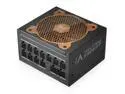
Super Flower Leadex V Gold PRO 850W ATX 80 PLUS GOLD Certified Power Supply, Smallest 130mm 850W ATX PSU, 10 Years Warranty, Patent Super Connectors, Full Modular , SF-850F14TG
Pros: I bought the 850W Leadex V Gold Pro to replace a awful "Gamemax" 850W RGB PSU which began getting as loud as a jet engine within 1 min of launching a game as soon as I finally got my hands on a RTX 3080 (specifically the EVGA RTX 3080 FTW3 Ultra) to replace my GTX 1080. In Red Dead 2 it would crash in 10-15 mins unless I used afterburner to lower the power limit from 100 to 90 and underclock it to 3080 FE clocks (basically remove the factor overclock from EVGA). With this PSU it's silent, I can't hear it at all. And the crashing in Red Dead 2 is no longer a thing and I don't have to lower the power limit and underclock my GPU to stop it from crashing any more. Love how compact this PSU is, and the universal plugs are nice.
Cons: Really can't think of any. Got it on sale at a great price. Has a 10 year warranty. Quality components / design. Super super quiet.
Overall Review: Would def recommend. Had some people tell me I needed a 1000W PSU which I just didn't buy. Maybe if I was doing something on my PC that had the CPU and GPU both pulling as much power as they can at the same time for long periods of time sure. But gaming which is the only thing I use this system for (that and just browsing the web / watching videos) dose not even come close to doing that.
11/4/2021See more detail
Excellent 1440p IPS monitor, Amazing value esp when on sale, Beware: certain features removed in later manufacturing revision it seems
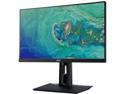
Acer CB271HU bmidprx 27" WQHD 2560 x 1440 2K Resolution 60Hz DVI HDMI DisplayPort 100%sRGB Bule Light Filter Built-in Speakers Backlit LED IPS Monitor
Pros: Update: I gotta add something I didn't know/understand till recently. Another review here talks about the bottom right corner of the panel having bad backlight bleed. I didn't realize my monitor had this till recently, I thought it had something to do with viewing angle, but yeah. The bottom right has very noticeable backlight bleeding which is super noticeable viewing something dark. It's not a deal breaker for me but it's a bummer and loosing a egg/star for that. I do not notice the shifting of white to off white/blue from left to right this other review mentions so I guess I got lucky there. But the backlight bleed is not a one off thing as mine has it as well in the same exact area (bottom right corner). Edit: See my "Other" section for very important info about certain pretty major features that no longer apply to this model for new buyers. New 01-15-2019: Now supports "G-sync compatible" mode on Nvidia Pascal and newer GPU's with recent Nvidia Driver update. I enabled G-sync compatible mode as soon as I got the new driver from Nvidia and it works perfectly. The sync range is 40-75 Hz over display port but I was able to easily change the range to 30-75 Hz using CRU (Custom Resolution Utility). You also get LFC or Low Framerate Compensation feature since the requirement for that is to have a sync range where the highest value is at least 1.5x the lowest value (I've read its 2x some places but newest info says it was lowered to 1.5x, either way you can easily change the range to 30-75 Hz using CRU to get you LFC for sure) . But this probably is not available on the currently shipping revision of this model. See my "Other" section for more info. Amazing value. Got this for $220. Was $240 with a $20 instant discount promo code. For that price its a incredible value. Picture quality is fantastic. Colors look beautiful, viewing angle is excellent. I installed the monitors "drivers" and ICC profile and made sure to set its ICC profile as the active one for windows. Then set the monitor to SRGB mode for as accurate color as possible. After doing that it look fantastic. The monitor actually supports 75 Hz at 1440p using displayport (displayport cable IS included!) if you use 8 bit color mode instead of 10 bit (8 is the default). Very very few apps make use of the 10 bit color support (they have to be designed to explicitly make use of it to see any difference) so its probably worth it if you're gaming. If you have a nvidia GPU, go into the NV control panel > Click change resolution on the left. First make sure you set "output color format" to "RGB" and "dynamic range" to "Full" and hit apply. This can sometimes get reset when installing a new GPU driver BTW so check it sometimes because things will look washed out if its not set to RGB FULL. Anyways try switching between 8 and 10 bpc on "Output color depth" mode to see if you can tell a dif. When it's set to 8bpc you can set the refresh rate to 75 Hz. This monitor also supports AMD Freesync if you have a AMD GPU. It actually supports the VESA standard for dynamic refresh rate but sadly Nvidia won't support that because of their investment into G-sync. I have no dead or messed up pixels on mine. My panel is perfect. The monitor stand is really nice, and extremely solid/sturdy. Love how easily it is adjusted anyway you want. Slides up and down, turns left and right, and tilts back and forth super easy. Can also be turned completely vertical for a super tall portrait display. Overall very solidly built and super easy to put together. My old Asus monitor wobbled like crazy but this one is super solid. Couldn't recommend it anymore. So happy I found this monitor esp at the price I did. Going from a 27 in 1080p monitor to 27in 1440p was a even bigger difference than I expected. It's esp nice when doing desktop work like web browsing etc. So much extra room to work with and so much sharper. Just make sure your GPU can handle the extra load from the increase in pixels when gaming. My GTX 1080 (regular non Ti) is handling it no problem. Just got done playing through Shadow of the Tomb Raider on ultra settings and got a solid 60 FPS at 1440p. Looked amazing.
Cons: None I can think of. If I have any minor complaint its how bright the blue power on LED is. But that can easily be fixed with black tape. Also the monitor by default is a little slow to start up from a cold boot (not from standby). It shows the Energy Star logo for a few seconds first, but you can fix this in the menus by turning on a option called "quick start" or something similar. After that it turns on super fast.
Overall Review: Edit: It apperars that Acer has decided to remove some features that used to be available on this monitor (most likely by simply disabling them in firmware). They no longer mention 10 bit per pixel color anywhere on the product page (available on mine, and was a listed feature when I bought it) and according to at least one newer review its no longer available on currently shipping units. Also this monitor, at least in its original launch version that I have dose support 75 Hz at 1440p over display port as well as "Adaptive Sync" / Freesync. That seems to no longer be the case with the currently shipping version being limited to 60 Hz regardless of input method. So do not purchase it if you want it for any of those features. They seemed to have been removed at some point during manufacturing. However on my model from Sept 2018 I am able to fully enable "Gsync Compatible mode" thanks to Nvidia deciding to support VESA Adaptive Sync (which is the same thing as Freesync). It's not a "certified" monitor for Gsync compatible mode simply meaning Nvidia has not tested it, but it dose work perfectly. No flickering, or display problems of any kind with it enabled. But like I said these features seem to be gone from the currently manufactured version. Shame on Acer for simply removing those features for seemingly no reason since they work perfectly on earlier revisions. Kind of slimy thing to do IMO, should have sold the newer revision that has less features under a different model number than the one that launched with far more features. Now there are reviews and comments that come up on the internet when you search for info about this model that talk about features this monitor no longer has for new buyers despite being the same model number. Would completely recommend. Fantastic value for a 27 in 1440p IPS display. Works perfectly fine for gaming. Supports 75 Hz (unless using the 10 bit color mode but VERY few apps will even make use of that). Supports freesync for AMD GPU's. Includes Displayport cable. Amazing value esp if you catch on sale like I did.
10/27/2019See more detail