
Your Browsing History


Alex G.
Joined on 03/26/07
0
0
product reviews
- 10
got power?
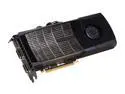
EVGA 015-P3-1485-AR GeForce GTX 480 (Fermi) SuperClocked+ 1536MB 384-bit GDDR5 PCI Express 2.0 x16 HDCP Ready SLI Support Video Card
Pros: FAST! This card is FANTASTIC! Using MSI afterburner I was easily able to OC the card to 800/1600/1000 without trying. Linked up with a stock i7 930 I’m able to push 24,000 points out of Vantage (20800 GPU, 56000 CPU). I play a lot of 32 player team rush in BFBC2 and only expect the very best,.. with this card, DX11 at max settings and 1920x1080 res + v-sync the frames never drop below 60fps. It runs crysis warhead with realism mod, all enthusiast settings, v-sync, 16xAA @ 1920x1080 res without dropping below 24fps!!! Those same settings without the AA the game runs at a solid 50fps (crysis lowers the refresh rate to 50 which becomes the fps cap when v-sync is enabled)
Cons: This card is big and draws a lot of power, make sure you have a worthy power supply. The fan at 80% + starts to sound like a small hair drier. Do not touch the heat pipes or front plate of the card until it has cooled down. It is part of the heat sink and gets very hot.
Overall Review: I have read a lot of complaints about the heat and noise that emanate from the 480. With my setup this is not an issue. Using the Silverstone fortress FT02 case, and a custom fan profile set up in afterburner, my card (while gaming) averages at 75c and NEVER gets hotter than 80c…And that’s with the OC applied. Airflow is EVERYTHING. The back plate and high flow bracket do help as well. Fan Profile; Speed vs. Temp. 40% 0-40c 41-45% 41-50c 46-50% 51-60c 51-60% 61-70c 61-70% 71-80c 71-80% 81-90c 80-80% 91c +
8/5/2010See more detail
Fast!
D-Link Whole Home Router 1000 (DIR-645) Wireless N300, SmartBeam Coverage, Gigabit, USB SharePort
Pros: Fast! 5ms Ping, 36mbps download and 6mbps upload using comcast highspeed. Could not be happier with this thing. Range is also excellent! oh and It doesn't even physically look that bad !
Cons: N/A
Overall Review: Worthy Product!
3/6/2012See more detail
fast!
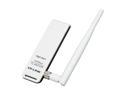
TP-LINK TL-WN722N Wireless N150 High Gain USB Adapter, 150Mbps, w/4 dBi High Gain Detachable Antenna, IEEE 802.11b/g/n, WEP, WPA/WPA2
Pros: crazy fast! 36mps on the download and 5mps on the upload! Through wireless comcast high speed. Very happy with performance. Very Strong connection, never drops below 5 bars and that is with the router physically being a floor above!
Cons: I don't know if this is an issue with my headset or the device, but i get some sort of interference through my headset when data is being sent/received that comes through as static. It can be covered up with music or game sound effects just fine but still... very annoying. Due to the fact that there was absolutely no feedback with my older wireless card i'm subtracting one egg.
Overall Review: It looks kinda cool i guess. Its got a nice blinky green light that lets you know its doing things. A lot of the negative reviews i have read for this product seem to be from basic lack of hardware/driver understanding.
3/6/2012See more detail
The Black Beast
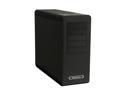
SilverStone Fortress Series FT02B-W Black Aluminum / Steel Computer Case
Pros: This is by far the best computer case i have ever owned. When searching for case it came down to a decision between this case and the Corsair Obsidian 800D. I undoubtedly believe that i made the correct decision. The thermal dynamics of this case are simply amazing! As heat rises the three 180mm fans at the bottom create a positive pressure in the case which forces that hot air out through the top. The configuration of the motherboard also takes advantage of this principle. By flipping the video cards (in my case 480GTX) to a vertical orientation it places the intake vent directly above a 180mm fan which then feeds the card cool air.
Cons: Cable management can be a pain. There is just less then a half inch of clearance between the back panel and the motherboard tray. Make sure you spread those cables out, if they get bunched up it will create a bulge when you put the panel back on. I used 21 zip-ties and 6 zip-tie anchors on my setup. Patients here is everything. Do not rush and TAKE YOUR TIME...everything will turn out beautifully in the end! Oh if you plan on using a modular power supply make sure you get one with long 6pin/8pin cables. This is a large case and cables have a lot of ground to cover.
Overall Review: I have read some concerns about the sturdiness of the case.., and well rest assured this thing is built like a rock! There is NO flex or flimsiness anywhere. Very high quality craftsmanship. Fully built this thing is HEAVY. Even though most of the components are at the top of the case the wait is distributed evenly. The only way this case will tip over is if you push it over. Bumping into it wont even move it. Silverstone cares about their products and it shows. This case screams quality and innovation and in my opinion is the best case on the market.
7/24/2010See more detail
Great MB, runs alittle hot though
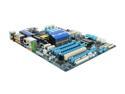
GIGABYTE GA-X58A-UD3R LGA 1366 Intel X58 USB 3.0 ATX Intel Motherboard
Pros: This board has everything! Booted up write up out of the box with no issues what so ever. I'm running a i7-930 with a h50 cooler. Two GTX 260s in SLI, and G.skill Ripjaws DDR3 1600 6GB. Have not tried overclocking yet. Want to hold on to it a bit longer, let it break in before i try overclocking her.
Cons: North-bridge runs HOT! It might be from the sli set up but Idle the little green LED turns on after about 15min letting you know the NB is between 60c and 75c. While gaming the light would go red in a matter of minutes indicating it had reached temps of 75c+... This is unacceptable, I dont know if its just the board i received or all of them.
Overall Review: I was able to find a fix though. By installing a thin 60mm fan between DIMM 1 and the NB heatsink using a small piece of double sided tape to mount it, I've been able to bring the temps down to 48c at idle and 60c under load. The fan is twice as tall as the heat sink so half the air blows through the block and the other half blows over it cooling it down very effectively.
5/8/2010See more detail
She's a beauty !
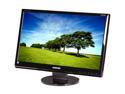
SAMSUNG 24" TN LCD Monitor 5 ms D-Sub, DVI-D 2494SW
Pros: Upgraded from a LG Flatron 19in and all i can say is... WOW this thing is freaking huge!
Cons: Bright blinking blue light when in standby.
Overall Review: If your video card can handle it playing games on this thing is a totally new experience.
5/8/2010See more detail