
Your Browsing History


Donald T.
Joined on 08/07/05
0
0

product reviews
- 40
Very Nice!
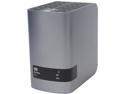
WD 12TB My Book Duo Desktop RAID External Hard Drive - USB 3.0 - WDBLWE0120JCH-NESN
Pros: It's exceedingly rare for me to ever give a glowing, two-thumbs up review on anything. But with this item, I pretty much have to. Capacity--I received the 12-Terabyte model that came equipped with two six-Terabyte drives in RAID 0 configuration. That's pretty amazing, considering that the first hard drive I ever bought, back in the 1980s, had ten Megabytes of capacity, and was about the same physical size as this unit. Linux Compatibility--I have no idea why Western Digital isn't advertising this. When I plugged this unit into my Lubuntu 13.10 machine, it was recognized immediately, and was automatically mounted under the "/media" directory. Lubuntu has the built-in capability of reading and writing to NTFS formatted drives, so there was no need to reformat the unit to use it with Linux. In fact, I now have backup files from the Linux machine peacefully co-existing with backup files from my Windows machines. (The only other Linux distro that I tried this with was Clonezilla, and it also worked perfectly.) Speed--All of my Windows machines are so old that they all have the old USB 2.0 hubs. So, when I plugged the unit into them, I found that it was no faster than using a regular, cheap hard drive in a cheap enclosure. However, when I plugged the unit into my Lubuntu machine, the only one in the house that's new enough to have USB 3.0, I was blown away by the speed. When I did an "rsync" of a rather large directory, I was totally unprepared for how fast the operation would complete. (You need USB 3.0 to take advantage of RAID 0 write speeds.) Backup Software Compatibility--The unit comes with its own backup software, but I also had it working perfectly with the backup utility that's built into Windows 7. As I type this, I'm using Clonezilla to create a backup image of a Windows XP drive on this unit. Clonezilla also recognized the unit immediately, and auto-mounted it as "/dev/sdb1". Ease of Use--I've tried it with Windows Vista, Windows 7, and Lubuntu Linux. It's just an easy plug-and-play with all of them. (Note that if you plug it into a Windows XP machine, it will automatically install the drivers, but it still won't work. That's okay, because Western Digital doesn't advertise the 12-Terabyte model as being XP-compatible. Besides, there's still Clonezilla.) Flexibility--The unit comes configured as RAID 0. However, you can easily change it to either RAID 1, or to use both drives independently
Cons: So far, none. Of course, I haven't had it long enough to evaluate the durability of the drives, but I have found in the past that Western Digital's warranty service is absolutely superb.
Overall Review: The software that comes with this unit is nice, and does have nice features. Once you install it on a Windows Vista, 7, or 8 computer, it will automatically backup your data files as you write them to the computer's hard drive. However, be aware that you can only install the software on one computer at a time. According to the owner's manual, if you want to install the software on another computer, you have to completely erase everything from the unit's drives, and then download a fresh copy of the software from the Western Digital site. However, installing the software on one computer does not prevent you from moving the unit to another computer, and using a different backup program. For hard-drive backup, you can download the Acronis software for free. But, I found that it actually only gives the options to backup individual partitions, rather than the whoe drive. So, rather than use Acronis, I'll just stick to Clonezilla.
8/11/2014See more detail
Cheap, and not just in the good way
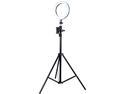
Rosewill 2-in-1 Portable Streaming Tripod with Ring Light and Phone Holder | 3 Light Modes, 10 Brightness Levels, 360 Degree Rotation, USB Powered (RABH-20018)
Pros: It's lightweight, and easy to carry around. The light seems to be good quality, and seems to work well.
Cons: Very cheap, flimsy construction. To begin with, when I first pulled out the tripod and and loosened the screw to adjust the legs, the screw came out of what should be a captive slot, and now I'm problems getting it back in. This is the only tripod I've ever seen in my life that allows you to accidentally remove the adjustment screws. The light works well, except that I don't understand the concept of setting up a portable device to obtain its power from a USB port. This means that I now have to carry around some external power source, such as a laptop or a portable USB charging unit, to power the light. Wouldn't it have been better to just include a rechargable battery unit with the light? The phone clip is just barely wide enough to mount my Samsung Galaxy A20 when it's in its case. And, if you're not careful when you mount the phone, you will pinch your fingers.
Overall Review: It's a good idea, but not well executed.
4/19/2021See more detail
Good overall, with a few design flaws
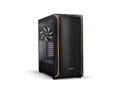
be quiet! Shadow Base 800 DX - ARGB - Mid-Tower PC Gaming Case - 420mm radiators or E-ATX motherboards Support - Black
Pros: 1. Plenty of room. 2. Great cable management. 3. Easy-to-clean air filter over the power supply air intake. (The power supply bay is at the bottom of the case, which is normally a "con" for me because it causes the power supply to suck up dust and cat hair. The air filter does away with that problem.) 4. Good air flow, which will help to keep things cool. 5. Captive thumb screws for the side panels, which can help prevent losing the screws.
Cons: I'm not crazy about the drive mounting options, because they're just more complex than they need to be. I would rather see a completely tool-less drive mounting cage like those that come with most other high-end computer cases. Also, because of these drive-mount options, the number of drives that you can have in this case is rather limited as compared to other cases of similar size. So, this case wouldn't be the best choice for setting up a NAS system, for example. Also, it appears that some parts are missing. There's supposed to be a drive cage that you can mount behind the power supply, but the only part of it that came with my case was just a front plate that's useless without the actual cage. Also, the drive mounting bracket that's directly behind the motherboard area requires you to insert some rubber bushings into holes on the bracket in order to mount a drive there. There are eight holes in the bracket, but there are only four rubber bushings to fill them. There was one slight quality control problem with my case. That is, the thumb screws for the side panels are supposed to be captive screws, but one of the four screws actually did come all the way out with hardly any effort.
Overall Review: Overall it's a great case. The only reason I don't give it a full five stars is because of the drive mounting options and missing parts. But, if you're okay with these mounting options, then it might be a good buy for you.
12/13/2023See more detail
Good build quality, nice features
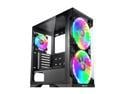
RAIJINTEK SILENOS PRO, ATX Tower with Clean Transparent Front and Side Tempered Glass (4.0mm) Design, Comes with Pre-installed 2pcs ARGB 200mm Fans at Front and 1pcs 120mm ARGB fan at Rear
Pros: Good build quality, with easy access on both sides. Having easy access on the back side means having easy access to cable runs, in order to properly route cables. For storage, it has three easily accessible trays for three 2.5" SSDs, and a tray at the bottom for mounting up to two normal 3.5" hard drives. For ventilation, it has a pair of 7" fans on the front of the case. (Large fans mean lower fan speeds, which means less noise.) Handy, easy-to-clean dust filter over power supply air intake. (It's held in place by magnets, so it's also very easy to remove for cleaning.) It's very attractive, with tempered glass side panels on both sides. It's not a "tool-less" case, but the only tool you'll need is a simple screwdriver.
Cons: Power switch and USB ports are on top of the case, instead of on the front. That makes it easy to spill something in the USB ports, and it makes it easy for my cats to turn the computer on or off by jumping up on the switch. (And yes, the cat issue is a real consideration around my place.) There's no bay to mount a CD/DVD drive. Okay, to be fair, that might not be such a big deal to most people nowadays, but to some people it might be.
Overall Review: Overall, it's a nice case at a nice price. The only reason I'm taking off one egg is because of having the power switch and USB ports on top instead of on the front. (But to be fair, that's my preference, and it might be okay with someone else.)
3/26/2020See more detail
Very nice, and Linux-compatible
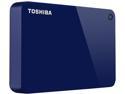
Toshiba Canvio Advance 3TB Portable External Hard Drive USB 3.0 Blue - HDTC930XL3CA
Pros: It's a nice, quiet, compact unit that's perfect for transporting along with your laptop. Even though it's a rather low-speed 5400-rpm drive, transfer speeds seem to be adequate for most uses. Since I am primarily a Linux power user, I wanted to try it with a Linux machine. Here on this Fedora 28 machine, it was recognized as soon as I plugged it in. Of course, with the NTFS filesystem, any files that you transfer from a Linux machine will have full read/write/execute privileges for everybody, but that's just an idiosyncrasy of using Linux with NTFS. I could, if I wanted to, refornat the drive to a Linux filesystem, but I'd rather leave it as is so that I can also use it with my Windows machines. (Fixing file permissions on a Linux machine after doing a restore operation is a simple task.) I've also plugged the drive into one of my Windows 10 machines, and again, it was recognized immediately.
Cons: I haven't tried the software, mainly due to the fact that other reviewers have already told me everything I need to know about it. For backup purposes on Windows machines, I'd rather just use the backup utility that's built into Windows. For my Linux machines, I'll just use rsync. For encryption, I actually don't like the idea of using closed-source, proprietary software in any case. For best security, you want to be able to audit encryption code for back doors, etc. With something like VeraCrypt, a Free Open-Source product with auditable code, I would be able to create encrypted containers that I can share between my Linux and Windows machines.
Overall Review: Overall, I like the drive, as most reviewers seem to. I've found the other reviews to be very useful, and I didn't want to totally repeat what they said. Hopefully, my write-up about this drive's Linux compatibility will be useful to someone. The one bad thing about reviewing drives is that the two weeks given to us to write the review isn't near enough time to gauge the drive's durability. So far so good with this one, and I hope that the drive will last long-term.
6/1/2018See more detail
Works well, Windows 10 Did Activate
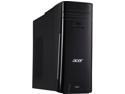
Acer Desktop Computer Aspire TC-780-AMZKi5 Intel Core i5-7400 8GB DDR4 2TB HDD Intel HD Graphics 630 Windows 10 Home 64-Bit
Pros: Large capacity 2-TB harddrive. Fast CPU. Runs well, and runs quietly. Eight GB of RAM, upgradable to 32 GB. And yes, Windows 10 did activate properly, with no issues. For home or office work, surfing the web, watching videos, or listening to music, this machine will definitely do the job.
Cons: The keyboard that comes with it is a dinky compact model that looks more like a laptop keyboard than a desktop keyboard. I guess that it would work well once a person gets used to it, but I'd much prefer a full-sized desktop model. (In fact, I will be swapping this keyboard out for a full-sized model.)
Overall Review: The Core i5 CPU that comes with this machine is great for most work and most users. However, if you have to work with VirtualBox virtual machines as I sometimes have to do, the Core i5 CPU presents a bit of a problem. That is, even though the Core i3 and Core i5 CPUs are 64-bit architecture, they lack the hardware acceleration that's needed to run 64-bit virtual machines. So, my complaint here isn't really with Acer, but with Intel for having so seriously crippled their lower priced CPUs. But, for anyone who just needs a general-purpose computer and doesn't have to worry about running 64-bit virtual machines, this computer will get the job done. So yes, I can recommend it.
4/12/2018See more detail
seller reviews
- 2
It's all good
Fast, courteous service. Item was as advertised. Many thanks!
On-time
Delivery
Product
Accuracy
Customer Service
Satisfactory
9/26/2022See more detail
Excellent Service
The item was priced very reasonably, with free shipping and very fast service.
On-time
Delivery
Product
Accuracy
Customer Service
Satisfactory
2/27/2014See more detail