




 here!
here!
I’m your shopping assistant for PC builds, upgrades, and everything tech.
Got questions? Ask away!
Start a conversation
here!
I’m your shopping assistant for PC builds, upgrades, and everything tech.
Got questions? Ask away!
Start a conversation

Joined on 11/02/02
Mostly Okay...
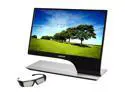
Pros: 120hz Refresh Three inputs: HDMI, DVI, Displayport Bright with vivid colors LED backlight Interesting Design Audio jack for passing through HDMI audio Supports TriDef 3D with Radeon HD3D Works with Playstation 3 3D 3D glasses allow more light through than Nvidia 3D Vision, allowing for a brighter image 3D depth seems better than Nvidia 3D Vision
Cons: No wall mount options Bulky base *and* a power brick Some very slight light bleed toward the botton sides Glossy screen
Overall Review: At first I had mixed feelings about this monitor, I was purposely downsizing from a 27" display to gain 3D and 120hz refresh. I honestly don't see a difference with the higher refresh, and 3D was not supported in Radeon Crossfire mode at the time. On a positive note, my Playstation 3 detected 3D without any issues and looked great. Two weeks later, AMD announced a "preview" release of the Catalyst 12.1 driver set, which has allowed Crossfire to be used in HD3D mode, and now I feel better about my purchase. Some users have mentioned light bleed, and yes, there does appear to be some brighter areas along the bottom sides when viewing a black screen, but if I wasn't looking for them, I would not have noticed. The glossy screen also does tend to reflect some light from your enviornment, but not any worse than any other glossy screen. Compared to an Asus 3D display I was able to use previously, this is much brighter and vivid.
RAID issues
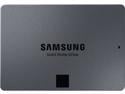
Pros: Not terribly expensive, higher capacity.
Cons: RAID setup issues, if that's your thing.
Overall Review: Buyer beware - two out of three systems I tried these on with RAID 0 had issues. Loaded up a Linux system with software RAID, it would freeze up every few minutes. Try to install Windows with "fake" RAID? Kept getting an error that the drive was no longer present, couldn't even get the OS loaded. Went as far as to update the firmware, same issue. Finally got them working with a latest / greatest Z590 motherboard, but wasn't happy that I was swapping drives around and rebuilding systems.
Nice Card from an Unknown Company
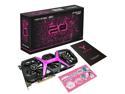
Pros: Twice the frame rate than the RX5700 it is replacing, solid build, no compatibility or performance issues so far. Pretty black and pink / purple color combination, both with card colors and fans. ...and, stickers!
Cons: Price, long length.
Overall Review: I have no comments about Windows installations, but this is working quite well with my eGPU box and an Intel Mac Mini. Minus the load-time limitations of Thunderbolt, the card rocks with almost maxed-out settings in Rise of the Tomb Raider at 65 FPS, on a 3840 x 1600 ultra wide monitor, making it faster than even a new maxed out Mac Studio system. Stays quiet until a heavy load is put on it, and even then it's not that bad, considering it's sitting on my desk in plain sight. Fans pulse a pink / purple shade that can be turned off via a switch. This card **barely** fit in the Sonnet eGPU box, literally only two or three millimeters of clearance. Very nice surprise quality and performance from a company I have never heard from before.
It's okay...
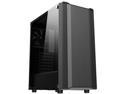
Pros: Nice look. Big enough to fit a standard 9 or 10 pin standoff ATX motherboard without any space issues, no other alignment issues when inserting cards, fans, and drives. Plenty of room to insert a two fan radiator on the top, or one fan radiator on the rear. No sharp edges. Good positioning of holes around motherboard for hidden cable routing.
Cons: Thin metal frame and backside door, motherboard side door is tinted transparent plastic, won't be able to mount a 3-fan radiator in the front (only enough cutout room for slipping in a bottom 3rd fan), front cover is plastic even though it looks metallic, rear card slot covers have to be popped out, no filler panels if you remove one by mistake.
Overall Review: Don't get me wrong. For the price, it is a decent case. I'm just spoiled by real glass and metal panels now days, although I understand that would add to the cost. Plastic stuff scuffs up too easily. Metal frame is thin, but not thin enough to bend / loose shape. No external drive bays, but who uses those any more? Otherwise, plenty of room to insert plenty of parts, no issues with mounting or hiding cables.
Beautiful, smaller PC case...
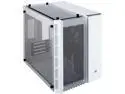
Pros: It's a very nice looking case. If you go with the model that includes RGB fans (saw one at a local store), it just looks that much more awesome. Was able to mount an older video card in the lowest slot (for Physx); as long as the card backplane is for a single slot, there was just enough room to fit in the card's oversized fan. The case should be long enough for any video card; even with a front mount radiator, you could get a 11-1/2 inch card to fit. Able to permanently remove the 2.5-inch drive bay to make room for easier cable management. Tempered glass, so you don't have to worry about the windows scratching as easily as the plexiglass.
Cons: Not happy with the magnetic air filters, at least when 140mm fans are installed. The magnets will most likely be on top of the fan screws, causing the filter to appear warped and bulged if you look close enough. Also, this gets worse on the front filter when the case cover is placed back on; I ended up trimming about 1/8 of an inch from each side to get it to fit better. This doesn't seem to be a problem with the included 120mm fans. There is no fan for the hard drives, so now I'm worried about them overheating and failing faster than normal; I might be able to squeeze a thin 70mm fan or smaller behind them. Not a lot of room for cable management, at least for me; I ended up permanently removing the 2.5-inch drive bay to make routing cables to the 3.5-inch drives easier. Not a lot of wiggle room to install components; I have a radiator on the top, and it is touching the fans mounted in the front of the case. Similarly, the radiator and fans are hanging over the motherboard, leaving very little room to squeeze in fan connectors and power cables from the top. Unless you're mounting a Mini-ITX board, or don't plan to use the lower slots on your Micro-ATX, I don't see how you could mount fans on the bottom of this case. No mounting point for rear exhaust fans. And, no hard drive LED status light.
Overall Review: For all the negatives that I list, I still would recommend this case just for how stunning it looks. Although a little more difficult than a normal case build, I managed to get everything installed with a bit of patience. Be aware that there are no externally accessible bays, for something like an optical drive.
I like it...
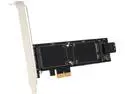
Pros: The thing actually works, speeding up boot time by combining SSD and HDD. Options allow you to use SSD as just cache (less chance of data loss), or combined to increase overall capacity (chance of data loss if a drive fails). I have two mSATA cards and one HDD set up as a single volume. Software console allows you the option to choose specific folders to stay in cache, instead of letting the system randomly determine what should be there. Has a header for the HDD LED indicator light on your case.
Cons: I had issues getting the software to work properly under Windows 8. If memory serves me correctly, I ended up loading just the driver from the web, and just the console software from the included disk. There are only two SATA ports. Wish it supported RAID 5. Card requires an uncommon x2 PCIe slot, which means you're most likely going to put it into a x4 or x16 slot. That could interfere with video cards requiring those slots.
Overall Review: A pain in the behind to get set up due to issues with the software, but once working, it's fast. Recommended.


