
Your Browsing History


Clifford W.
Joined on 10/17/04
0
0
product reviews
- 13
Great Board - Wrong Specs
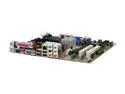
ASUS A8R-MX/SI 939 ATI Radeon Xpress 200 Micro ATX AMD Motherboard
Pros: This is a great board for the price. I am glad that NewEgg is now offering OEM motherboards from ASUS.
Cons: Audio Drivers didn't install from driver disc, had to track down the drivers for the ALI/ULI Integrated 220 chipset (found them on nvidia.com). Power LED for Front Panel is undocumented, but present on the unmarked portion of the Front Panel connector. SATA is not 3.0Gb/s but 150 MB/s. And RAID on the one I got supports 1/0/0+1/JBOD (no 5 as in specs).
Overall Review: Great board for the price, be ware of specs listed. Track down the ULi_Integrated220.zip drivers for the southbridge (on nvidia.com "Download Drivers> ULi Drivers> under Integrated220 click Download") and update the drivers once you have the OS installed. Overall a good board for someone with average or better experience building computers.
12/18/2006See more detail
Failure and Warranty Problems
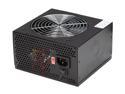
COOLMAX CX-400B 400 W ATX v2.01 Power Supply
Pros: This power supply looks good. It has a nice black finish and large fan. I like the air outlet grill on the back. Plenty of power connectors. Provides voltage within +/-0.5v on all channels and passed our high current load testing. Those that don't develop problems work well for up to or over 2 years.
Cons: We have built over 20 computers with this power supply and about three (15%) of them developed the same problem. They would randomly turn themselves off (latch). The problem started to show after a few months (customer support call records show this) and the problem got worse. If the problem starts it only lasts about 1 year or less. RMA if this PSU starts to latch on you.
Overall Review: If you have this power supply there are a few things you can do to improve the life expectancy. Use the current provided. I beleive the voltage regulation circuits become over sensitive or the power supply cannot maintain voltage at low currents. One PSU worked fine with extra DVD-ROM drives connected but if they were removed it would latch in less than one minute. Also keep it cool, set the fan on High instead of Auto or Low. This problem is worsened by >25C ambient temp. We have swapped to Rosewill PSUs for our custom builds.
8/12/2006See more detail
Inexpensive but Disappointing
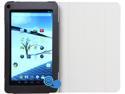
iView SupraPad i700 Tablet - Intel Dual Core 2 GB RAM / 16GB Flash Memory 7.0" Touchscreen Android 4.4 (KitKat) with Case, Google Certified - GMS
Pros: Inexpensive for what you get. Keep in mind the price when reading the cons below. This is a descent little tablet for the price. I would recommend it for someone's first tablet, especially a teenager. It is not high enough quality and lacks features for business use. Good storage capacity. Streams video, audio, etc fine. Would make a good multimedia tablet if you don't plan to use bluetooth, or a 4-pin headset. Speed of processor and amount of memory are fine. The dual-core chip is responsive.
Cons: We purchased it to use for card processing, but it does not have a headset port. I should have noticed that in the specs, but I did not. Not compatible with Square or other headset port card readers. The screen has one blue stuck pixel. It comes with some kind of coating, possibly a built-in screen protector. Mine has two pieces of dirt behind it, making two bubbles on the screen. I may be able to fix it by replacing the screen protector, but I don't know at this point. The stuck pixel is just annoying. 2.0 MP camera has a very noisy CCD. Makes it impossible to scan any barcode other than QR style. UPC, EAN, 128, etc all fail to ever register. Focal depth is too far away, blurry up close and too small when in focus. When we couldn't use it for card processing we decided to try using it for inventory control, not a good fit unless you have already converted to QR style barcodes for inventory. Bluetooth headphones seems to work well, but two-way headset is choppy and unusable. Not sure if it is a processor or resource issue, or bluetooth chipset issue, either way it is not good for voice/video chat or VOIP use if you plan to use a bluetooth headset. Also, if you don't use a bluetooth headset you are forced to use headphones and the built-in mic, because it does not have a 4-pin headset or mic input of any kind. SD card is hard to insert and remove when cover is on.
Overall Review: Since it doesn't do payments, or scan barcodes, or bluetooth headset, we may get a miracast dongle and try using it as a media device. It streams and plays media fine. Cover is nice because it is free. Made from rubber-coated cardboard of some kind, but it is nice to at least have something to protect it.
12/17/2014See more detail
Unusable

2x Stylus Touch Screen Pen Compatible With Motorola Droid HTC ERIS
Pros: Inexpensive, Lightweight.
Cons: Did not work for intended application, or general use. On the iView suprapad i700 it is jumpy and does not maintain "contact". It seems like it is not substantial enough to register consistently. I bought it to make customers more comfortable signing their name on the touchscreen than using their hands, but it was unusable for that purpose. Scrolling involves a series of "clicks" registering, meaning everything opens when you don't expect it, icons are dragged around the screen, and other random issues.
Overall Review: It may work on other hardware.
12/17/2014See more detail
Fastest MicroSD I've used
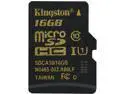
Kingston 16GB MicroSDHC UHS-I/U1 Class 10 Memory Card, Speed Up to 90 MB/s (SDCA10/16GBSP)
Pros: Fast and good capacity. Probably the fastest SD card I've ever used.
Cons: None really. The thing is great.
12/17/2014See more detail
Best Basic Keyboard Money Can Buy
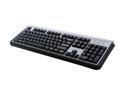
LITE-ON SK-1788/BS Black and Gray 104 Normal Keys PS/2 Wired Standard Keyboard
Pros: This keyboard has a nice feel with a hearty design. I have owned multiples of these (on multiple computers) and have used this keyboard as my standard free keyboard I give out with PCs to my customers. I used this keyboard for over 4 years on my primary desktop until the laser-etched key labels were mostly gone (it takes a LOT of typing, every day, for years). I recently upgraded to the Logitech G11 keyboard and it lasted about 6 months before I started having issues (continuity test showed micro-fractures on the membrane, but that's a story for another review). I just ordered another of these to replace the G11 since it worked so well.
Cons: If you use this keyboard every day for 3-4 years straight you will eventually not have key labels left. However, if you type that much I doubt that you used them.
Overall Review: There is no reason to buy a more expensive PS/2 keyboard than this one. The expensive Logitech keyboard I bought was a waste of money when this cheap keyboard outlasted it by 800%. I tend to destroy keyboards and this thing held up to the abuse I could throw at it. I've even spilled liquid on this thing without killing it (I wouldn't recommend doing this intentionally, and your results may vary). Also, with very minor modification to the F and J keys you can move the keys around (there is a little ridge that needs to be trimmed off to fit in the other key locations). I have remapped a few of these to the Dvorak layout. I'm not sure what that would do to your warranty, if that is important to you.
3/13/2010See more detail