
Your Browsing History


Christopher B.
Joined on 05/06/01
0
0
product reviews
- 28
Great quality, not excessively expensive.
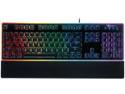
Rosewill NEON K51B Wired Mechanical Gaming Keyboard, Hybrid Membrane Mechanical Switches, 8 RGB LED Backlight Effects, 19-Key Anti-Ghosting, Ergonomic, Black
Pros: Sturdy, well built. Nice modest styling, it's not covered in gaudy graphics or weirdo bit sticking off it. It's a PC keyboard, not musical instrument from the 80's. Numerous color modes offer alot of oppurtunity for cutomization. Keyboard can be set to run in one of several "animated" modes, or just solid lit in one of various colors (I personally just like solid white light) By "Hybrid Mechanical" they really mean "Membrane key with spring reinforcement. This gives it a mechanical like feel, but is quieter and had a softer touch which I personally prefer (clacky keyboards annoy the hell out of me) removable wrist rest legs sit nice and high giving you a good angle more like a true classic keyboard (and not the uncomfortable flat ones that seem to be so popular today)
Cons: backlighting is not "intelligent', by which i mean it doesn't turn itself off and on with activity like most of my laptops with backlit keyboards too. (This may be more just incorrect expectation on my part than a "con" though) It's not obvious from the image but the lettering is NOT painted, they're clear allowing the light to go through them. It's a little hard to read at first, but you get used to it. TOTALLY not an issue in a darkened room either, but in a lit room it can be. animated
Overall Review: I typically stick to el cheapo keyboards, but in recent years most have lost that nice solid and chunky feel that older keyboards present. I just couldn't bring myself to seriously consider spending $100+ on a keyboard, so getting this thing on sale for $40 was a good compromise for me there. Modem keyboards annoy me. They've all become flat with these terrible chiclet keys like on laptops which my fingers just hate. I've got big hands, so small keyboards just infuriate me. I need full size. I like the idea of big chunky keycaps, but i freaking hate the feeling and sound of mechanical switches. Even the best of them are stupid noisy. these "Hybrid" keycaps give me a good compromise. It didn't take me long to get used to it, but I find it to work well for both gaming and general typing work.
8/30/2017See more detail
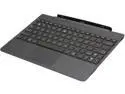
ASUS TF701T-DOCK-AD02 Keyboard Dock
Pros: familiar TF dock layout, USB 3.0, sd card slot, 2nd battery
Cons: Like many others are reporting, I too am experiencing the "floppy dock" problem. It works fine as long as you don't move the tablet, but its very frustrating to have to constantly reseat the tablet to re-establish the docking connection
12/9/2013See more detail
Great Budget choice
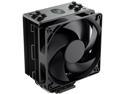
Cooler Master Hyper 212 Black Edition CPU Air Cooler, Silencio FP120 Fan, 4 CDC 2.0 Heatpipes, Anodized Gun-Metal Black, Brushed Nickel Fins for AMD Ryzen/Intel LGA2066/1151 Compatible
Pros: Lightweight Efficient Quiet Expandable by adding 2nd fan. Comes with a spare set of metal clips Proven design Highly compatible with Multiple Intel and AMD sockets
Cons: Metal clips are a PITA. Tall, might not quite fit in lower profile cases (such as HTPC's) earlier model does not have asymmetrical pipes, and may not have sufficient clearance for taller RAM Socket mounting options can be confusing
Overall Review: I've pretty much used Cooler Master HSF's exclusively for as long as I've known of them (around 20ish years). My previous System used an Hyper N520 which performed reliably for 10 years. So It was a no brainer to go with the evolutionary design for my new 10700K. While the Hyper 212 is highly compatible with numerous sockets, it requires a whole bunch of various and small component parts which are both a little confusing to assemble, and not to mention easy to damage or lose if you're not careful. What I really don't like about this thing though, is the metal fan clips. It comes with one fan preinstalled, which you do need to remove to put the socket mounting parts on. it was a little annoying getting it lined back up right before installing it into the case, but then adding/replacing fans once inside the case proved to be very, very annoying (Esp because I have huge hands). I replaced the stock fan with 2 Bgears b-PWM's (Red and Blue), and getting the clips to fit snugly was just....a trial in frustration, to put it mildly. They just wouldn't fit snugly till I made a couple of bends (outward, not inward). I didn't break out the micrometer, but while they are both standard 25mm total width, this is likely a result of slightly different design Dimensions between the Silencio Fan it came with and the BGears b-PWM's I installed in it's place which are much higher max flow rate (110CFM), but also seem to be more lightly constructed. This is NOT a negative on the Silencio fan at all, it's just that airflow capacity was more of a priority for my needs then silence (My system has sound matting installed inside to deaden the roar from the 3X140MM&1X4X120MM b-Blaster intake & exhaust fans. Yes, they are massive overkill, but for my needs it's calculated overkill. You'll just have to trust me on this trhough, because this is about the Hyper 212, not my "ode to excess" of a PC). Given a choice, I would have preferred to more b-Blasters to the Hyper 212, but they are 38mm wide, and just wouldn't fit between it and both the memory DIMM's or the VRM heatsink on the Asus Z-590 Prime board I'm using. So the b-PWM seemed like my next best option, but other brand/model's of fans may not run into the same problem I did. It depends on the exact manufactured dimensions. The good and bad news about the metal clips is that they only seem to be used on the 212 BE, while the RGB BE and other versions of it use plastic clips that screw into the fan instead. You COULD replace them with the plastic ones, which are listed on CM's webstore, but always seem to be out of stock, and can't be gotten anywhere else. Why they even use the metal clips on this model I can only conjecture (Cost savings, probably), but I suppose you could figure another way to rig them in using Wire tires or maybe even fashioning your own metal clips, or even printing your own plastic ones if you have the ability to do that. But that's probably something everyone will need to figure out for themselves.
9/15/2021See more detail
Beastly
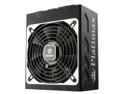
Enermax Platimax 1350W 80 Plus Platinum Certified, Full Modular, ATX12V/EPS12V SLI Ready, Server Ready, 10 Year Warranty, Power Supply, EPM1350EWT
Pros: POWERFUL - 1350W, 120V AC input Sturdy, attractive wrinkle finish. Big cooling fan Cable lock fully modular flat cables are attractive, and easy to route
Cons: No external power indicator LED Modular cables are too short for large cases, causing routing issues. combined ATX 24-pin and cpu power cable is unweildy no dedicated pci-e 12-pin modular cable available.
Overall Review: I've been a dedicated Enermax user for a long time. This PSU is replacing my trust old 1050W Revolutions 85+, which is still working perfectly, but I needed some additional efficiency and power headroom for the heavily configured PC it's been powering. First, make no mistake this PSU is not for the average PC, it's a server/high end gaming rig PSU. it's designed with multiple CPU's and GPU's in mind. The fully modular design gives you tons of cabling options, offering 8 PCI-E/CPU power connections, and 6 SATA/Molex connection so you don't need to leave a bunch of unused cables dangling around messing up your airflow. This design is unfortunately somewhat marred by the combined ATX 24-pin and 8-pin CPU power connection which lacks the aux 4-pin CPU power connector most newer CPU's require. This is great if you have 2 (or more) CPU's, but if you only have one, you're left with an extra 8-pin cable dangling around, which defeats the purpose of full modularity. The lack of available dedicated PCI-E 12-pin power cables isn't a huge negative, but leaves you needing to use the 12-pin to 2X8-pin adapters, which are just an extra unneeded point of failure. Many will not see this as a negative, but it is to me precisely because I ended up with a faulty adapter that came with my RTX 3090, which could have been completely avoided with a dedicated 12-pin cable. I plan to make my own modded cable, but it would be nice if Enermax offered one of their own. As mentioned in the "cons", I found the cables to be just a tad too short for my monstrous case (Lian Li V2120B) which caused me routing issues. Luckily, Enermax still uses the same type of flat 6-pin connectors so I was able to keep the older sleeved cables that came with the Revolutions 85+ this PSU is replacing. I will probably mod up my own extensions or longer replacements, and I'll most likely buy or make my own ATX 24-pin so I don't have to have the extra 8-pin cable hanging loose. However, you should proceed with such at your own risk, and be aware that Enermax may or may not honor warranty if you use cables not provided by them.
9/10/2021See more detail
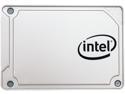
Intel 545s 2.5" 512GB SATA III 64-Layer 3D NAND TLC Internal Solid State Drive (SSD) SSDSC2KW512G8X1
Pros: Intel brand, reasonable price, good quality and performance.
Cons: does not including any screws/mounting brackets/etc, no included backup/restore software which is a common bundle in.
Overall Review: I've mostly stuck to Intel for my boot SSD's. I could have gone for a cheaper brand, or the comparably priced Samsung Evo 850, but I decided to stick with what I knew. My previous SSD was an earlier model Intel 256GB SSD which still works just fine, but was simply getting full so I wanted something bigger, but didn't need anything huge and i didn't want to spend alot, so this fit the bill. previous SSD was simply connected to the onboard SATA and ran windows in Legacy boot mode. This thing however, is connected to my LSI SAS9260-8i HW RAID card, configured as a single drive RAID 0, running windows 10 in UEFI boot mode. this gives me better performance, and the option to expand the array in the future by simply adding another ssd to it.
8/30/2017See more detail
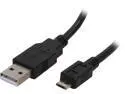
Coboc 6 ft. USB 2.0 A Male to Micro-B 5-pin Male Cable (Black)
Pros: cheap, good quality. It's a USB cable, it does everything it's supposed to, and nothing it's not.
Cons: None.
8/30/2017See more detail