
Your Browsing History


BRAD M.
Joined on 12/01/04
0
0
product reviews
- 6
HTPC Build - Not Bad
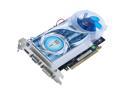
HIS Radeon HD 4670 1GB DDR3 PCI Express 2.0 x16 CrossFireX Support Graphics Card H467QS1GH
Pros: Quiet (comparable sound levels to the Sapphire HD2600XT it replaced). Onboard HDMI without a dongle. Runs off PCI-E slot without needing additional power. Decent HD video playback. Good airflow due to large fan that exhausts out the back of the PC case (the card takes up two slots, so may be a con depending on your preference).
Cons: (These are almost entirely related to ATI's awful drivers) PC sees the HDMI port as DVI (therefore no sound output) unless you power on your computer AFTER your TV or AV Receiver. 480i video has annoying, intermittent black frames. 24fps video encoded at 1080i has fairly minor issues with dropped frames.
Overall Review: I've seen alot of people say you have to disable your mobo's onboard audio to use HDMI. For me, sound over HDMI plays nice with my motherboard's onboard IDT/Sigmatel audio. Windows 7 64bit RTM, IntelDP35DP, Intel E6600, 2GB memory.
9/2/2009See more detail
Mostly Works
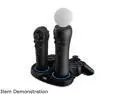
CTA Triple Port Charging Station for PlayStation Move Controllers & Sixaxis Controller
Pros: Can charge two Move controllers and one Dualshock, all at the same time. Uses an AC adapter, so you can charge while your PS3 is powered down. Build quality is actually halfway decent.
Cons: Huge, bright, retina-searing light rings around the Move charging ports are ALWAYS on, even if nothing is charging. Shines blue if a fully-charged controller is plugged in, or if no controller at all is plugged in. Shines red when charging. Also, the contact points for the charger aren't terribly reliable. On my unit, the left-side Move slot doesn't charge unless I tilt the controller forward about 10°.
2/19/2012See more detail
Refurbished? More like Used.
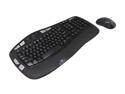
Logitech Recertified 920-002555 MK550 Black USB RF Wireless Ergonomic Wave Combo (K350 + M510)
Pros: Good quality keyboard & mouse. Wave design on keyboard is not too drastic & easy to adapt to if you're coming from a standard keyboard. Everything appears to be in perfect working condition. Comes with a USB extension cable.
Cons: Newegg is the second retailer I've bought a refurbished Logitech KB/mouse combo from. In both cases, the hardware I've received is most certainly *used*. There is visible dust between the keyboard keys (the one I got from the other retailer actually appeared to have something spilled in it -- luckily not the case with the one I got from Newegg). The pads on the bottom of the mouse also have definite signs of wear. No batteries, software, or documentation are included, and all of the serial numbers are blacked out.
Overall Review: My purchase was direct through Newegg, and not a 3rd party Marketplace vendor. It appears that Logitech's "refurbishing" process for keyboards & mice is really just a cursory check for functionality and a quick cleaning.
7/2/2014See more detail
Works Fine for Me
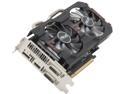
ASUS Radeon HD 7790 1GB GDDR5 PCI Express 3.0 CrossFireX Support Graphics Card HD7790-DC2OC-1GD5
Pros: Cool, quiet & fast. Markedly improved frame rates in games over the HD4670 it replaced. Skyrim on Ultra with everything enabled is silky, silky smooth. Great video & sound over HDMI on Windows 7 Media Center.
Cons: Even after using Display Driver Uninstaller to wipe my old video drivers (in Safe Mode), the 11/15/13 drivers on Asus' website didn't install correctly. Almost all of the settings were missing in Catalyst Control Center, which meant I couldn't adjust the overscan and there was a thick black border around all video output to my HDTV. However, simply installing the latest 12/18/13 (v13.12) drivers from AMD's website on top of the Asus drivers fixed everything for me.
Overall Review: Working just fine on an older Core2 HTPC which I occasionally use for Steam Big Picture gaming. Not overclocking anything (didn't even install the Asus GPU Tweak software), since I want to keep everything running cool & quiet. • Intel DP43TF Mobo • Xeon E5450 3GHz Quad-Core modded to LGA775 • 4GB Corsair Value Select DDR2 • Windows 7 Ultimate x64
1/23/2014See more detail
Trustly Little Box
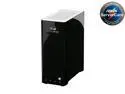
ASUS TS Mini SOHO Home Server w/ Intel Atom N280 1.66GHz 1GB DDR2 500GB HDD installed, powered by Windows Home Server
Pros: Small form factor; quiet operation; plenty of external USB & eSATA ports for external storage; easy to add another internal hard drive
Cons: 32bit CPU (can't upgrade to WHS Vail); only one spare internal HDD slot; a pain trying to access files from non-media-server devices that don't have the WHS Connector software installed (i.e. handheld devices)
Overall Review: So far, this has been a fairly trusty replacement for the LaCie NAS that recently died on me. WHS allows easier Windows 7 Library integration than a standard NAS, since indexing is performed on WHS storage. Since this device runs Windows Home Server, it's important to note that you'll want to install a jumper (not included) on the WD "Green" hard drives NewEgg likes to bundle with this machine at times. Also, you'll need to go through the initial setup BEFORE trying to add extra drives. While the low-power CPU has energy saving benefits, if I had to do it again, I'd probably get a beefier 64bit WHS device. The installed 32bit N280 tends to choke on CPU-extensive add-ons like those involving on-the-fly video conversion. Also, this device cannot be upgraded to the impressive-looking WHS Vail that's coming out eventually.
7/5/2010See more detail
Re: HTPC Build - Not Bad
HIS Radeon HD 4670 1GB DDR3 PCI Express 2.0 x16 CrossFireX Support Graphics Card H467QS1GH
Pros: See Previous Review
Cons: See Previous Review
Overall Review: This is just a follow-up to my previous review where I stated that dropped frames and flashing video were due to ATI's drivers. Per a posting from Microsoft on The Green Button, it actually turns out that these problems are due to Windows Media Center's video pipeline. Non-Media Center apps should have none of these problems. However, I'm keeping the review at 4 stars, due to the EDID problem where you must turn on your TV before your computer in order to have the HDMI connection recognized as HDMI.
9/12/2009See more detail