
Your Browsing History


Thomas L.
Joined on 11/17/03
0
0
product reviews
- 5
No Complaints Here
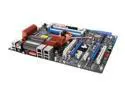
ASUS MAXIMUS FORMULA / SE <GREEN> LGA 775 Intel X38 ATX Intel Motherboard
Pros: Just having little features like the watercooling block, 300w PCIe slot, the onboard power/reset, the back panel CMOS clear, the POST display, make this nice. The included software bundle doesn't actually suck (Stalker, 3dmark06). More stable power delivery than my P5WDG2. Overclocks like a demon.
Cons: The onboard power switch doesn't work all that reliably anymore. Didn't really need the PCI audio.
Overall Review: X38 can't be beat I think. It's a fast and solid chipset with a lot of future proofed options. Take a heavy look at the Maximus Extreme with DDR3 though. I think DDR2 may be dead now.
11/20/2007See more detail
Unsafe Voltages
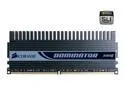
CORSAIR Dominator 2GB (2 x 1GB) DDR2 800 (PC2 6400) Dual Channel Kit Desktop Memory Model TWIN2X2048-6400C3DF
Pros: This RAM certainly does what it says it will. Low latency at 800MHz and 2.4V. The dominator heat spreader with the fan really do keep this ram tens of degrees cooler than other RAM.
Cons: Two RMAs due to memory errors in a year? This is probably due to the 2.4V and my occasional tests with Memtest86 when rebuilding the machine. RMA through Corsair is no fast process. I bought a stick of Crucial Ballistix just to tide my machine over while my RAM goes through RMA again.
Overall Review: You can get 2G of decent 800MHz DDR2 for around $50 these days. Sure, you can spend 6x as much on this stuff and what does it get you? For gamers, not much. 3dMark06 scores dropped all of 300 points with the Ballistix at 5-5-5-12 @ 2.1v versus the Corsair 3-4-3-9. Heck, my Ballistix will run 4-4-4 timings though I haven't tried that just yet. If you do get this RAM, avoid 2.4v!
11/20/2007See more detail
Cheap and feature rich but problematic
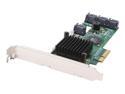
HighPoint RocketRAID 2320 PCI-Express x4 SATA II (3.0Gb/s) RAID Controller Card
Pros: A lot of features for the money. Pretty fast for a consumer grade RAID card. It is backwards compatible with some other Highpoint RAID arrays, such as the HPT1740 I upgraded from. Supposedly this has pretty good Linux support.
Cons: Its highly incompatible with my Asus P5Q3 or P5E3 motherboards. You have to flash it to disable it's ability to act as a boot device for it to work with Intel on-board RAID (tested ICH10R, ICH9R). It will NOT work in the second PCIe x16 slot but does seem to work in the first one. My biggest complaint is the lack of sleep support. My computer went to sleep during an online capacity expansion from a 2TB RAID5 to a 3TB RAID5 array (added a fourth drive). The RAID card freaked out, took itself off line, and then continued the rebuild operation after a reboot. However all data on the array was lost. You just can't use sleep with this card and Highpoint should have done a much better job of documenting the fact that if you don't disable sleep you could loose all your data. In fact, I still don't see anywhere that says it.
Overall Review: The only reason I'm not giving it a lower score is simply because I'm going to continue to keep using this controller. Even with it's compatibility problems and poor software it's still probably as good as any other cheap consumer RAID controller. Just don't be surprised if you have to fight to get it up and running.
3/22/2009See more detail
Bang for the Buck
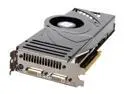
MSI GeForce 8800 Ultra 768MB GDDR3 PCI Express x16 SLI Support Graphics Card NX8800Ultra-T2D768E-HD-OC
Pros: You can't currently beat this card for the money. Ultras, even overclocked, provide almost no performance advantage over the GTX but... if an Ultra is the same price as a GTX... why not??
Cons: First one came DOA. Second worked great. This card runs HOT! 86c according to ATItool. Also, the default overclock is NOT stable. 660MHz is a bit over zealous. The card artifacts minorly at this speed. Most games/people wont care about minor glitches. Underclock it if you must.
Overall Review: Still an expensive card even if it's cheapest of the line. Expect 10-14K in 3dMark06 depending on your CPU and 60+ FPS in Unreal3 demo at 1600x1200 full eye candy.
11/20/2007See more detail
CoolGuard not so cool.
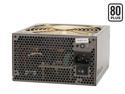
ENERMAX INFINITI EIN720AWT 720 W ATX12V/ EPS12V SLI Certified CrossFire Ready 80 PLUS Certified Modular Active PFC Power Supply
Pros: This is an excellent modular power supply. It provides very solid and reliable power. This power supply may not be compatible with all motherboards, especially newer ones.
Cons: It's all ruined by the CoolGuard feature. When you shut down power, CoolGuard leaves power flowing to your motherboard. While this does run fans as promised, it causes cold boot issues with my two modern Asus motherboards. After a 'CoolGuard' shut down, the boards just don't always start back up.
Overall Review: Avoid this. You expect a power supply to be with you for a very long time but you just can't be sure this model is going to work on your future motherboards. The Galaxy is probably a better choice but it costs a fortune and may not actually fit in your case. Hopefully Enermax will provide a way to disable this feature on newer Infinity models.
11/11/2007See more detail