


Your Browsing History


Thomas F.
Joined on 01/06/04
0
0
product reviews
- 6
Works great in a consumer build
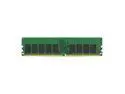
Micron DDR4-3200 32GB/4Gx72 ECC CL22 Server Memory
Pros: Works and is recognized as ECC memory in my build with an ASUS TUF Gaming x570 Plus-Wifi motherboard and Ryzen 5900x CPU. This system serves both as my workstation for projects plus casual gaming, the combination of ECC with 3200 speeds is a nice balance of both. Additionally there is no overclocking or other BIOS changes required by this server memory. Previously I had Corsair 3600 memory in which requires you to enable overclocking in the BIOS, select the overclock profile that comes with the memory and run at 1.35V, which had some instability. An advantage of this server memory is it works out of the box with the BIOS with no overclock profile required and runs at 1.2V. I started with just 2 sticks, but am now upgrading to 4 for 128GB total. Very happy this works.
Cons: This isn't an issue with the memory itself, but AMD does lock out ECC injection testing on x570 and Ryzen platforms. I could overclock it to force errors and confirm the OS is reporting correctly, but you can't run injection tests with memtest86+ or something similar. Again that's not an issue with the memory itself but AMD limiting ECC support in consumer HW.
Overall Review: By this if you want ECC memory at 3200 speeds with cooler 1.2 voltage on a consumer build.
6/14/2022See more detail
Worst drive ever
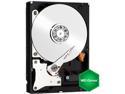
Western Digital WD Green WD20EARX 2TB 7200 RPM 64MB Cache SATA 6.0Gb/s 3.5" Internal Hard Drive Bare Drive
Pros: None
Cons: Main issue is out of 8 drives purchased 2 years ago, I've just RMA'ed the 6th and 7th one. That is almost a 100% failure rate. Secondary issues are the block sizes and fact that the drive's load cycle count skyrockets due to constantly going to sleep after every 8 seconds of inactivity (only to have windows wake them right up).
Overall Review: 7 out 8 failures, no wonder WD is switching to a 1 year warrentee, DO NOT BUY they are not low power they are cheap....
11/25/2012See more detail
Arrived defective due to missing parts
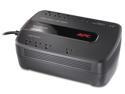
APC BE650G1 Back-UPS 650 VA 8-outlet 340 Joules Surge Energy Rating Data Line Protection -Uninterruptible Power Supply (UPS) (Replaces BE650G)
Pros: None
Cons: The APC UPS model I purchased has 8 power plugs. Of these an entire row of 4 power plugs do not function at all under battery power. Since the top row of 4 worked, I did not discover this until losing power 2 months after installing the unit, where my systems were unfortunately plugged into the non-functioning plugs and I experienced data loss. Looking inside the unit it looks as if the bottom row of power plugs are missing a metal connection the is present for the 4 top row plugs, so basically this UPS is missing key parts needed to be functional. That is simply unacceptable. Worse is APC does not have a realistic warranty program for units that arrive defective. APC requires the customer to pay shipping back to them, which in this case is 50% of the cost of the unit, and they only will return a "reconditioned" (i.e. not new) unit. For my situation this means swapping out a new battery & unit for a reconditioned/used battery at a significant cost. So it makes sense to instead not return to APC and use the 4 functioning plugs and keep the defective unit. Will never purchase APC again, they delivered a non-functional unit and will not replace with a new unit.
3/25/2014See more detail
Worst drive ever
Western Digital WD Green WD20EADS 2TB 32MB Cache SATA 3.0Gb/s 3.5" Internal Hard Drive Bare Drive
Pros: Cheap
Cons: I've had 4 out of 8 drives fail now within 2 years. There are tons of other problems with these green drives starting with incorrect block sizes.
Overall Review: I've prefered WD drives for 10+ years now, but will probably switch to seagate after my experiences with these green ones.....
11/5/2011See more detail
Don't buy these green drives
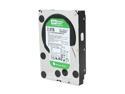
Western Digital WD Green WD20EARS 2TB 5400 RPM 64MB Cache SATA 3.0Gb/s 3.5" Internal Hard Drive Bare Drive
Pros: Large, cheap, low power
Cons: Where do I start? So, here are the problems. 1) The drive uses a non standard 4K block size vs. 512 bytes, this throughs off many OSes like OpenSolaris 2) The drives "park" the heads every 8 seconds, so they park, unpark, park, unpark over 1,000 times per day in a normal environment. I had to write a program to ping the drives every 6 seconds to stop this... 3) Failure rate 3 out of 8 have failed in 18 months, this is too high... 4) performance sucks, 2 of mine read/write at 1MB/sec, thats the worst I've seen since 1990.
Overall Review: I've been a fan of WD for a long time with good results from them, but I'm done with WD after these green WD drives. Can't believe I invested over $1,000 in 8 of them back in 2009.
9/4/2011See more detail
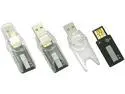
PQI 512MB Flash Drive (USB2.0 Portable) BD01-5123-0121
Comments: This thing is my favorite purchase so far this year. I've had it for just one week and already use it for just about all of my day to day files and email. I still can't belive its size, fits right in my wallet and takes up no noticable space. It's seems strong enough that I haven't bothered to use the two hard plastic cases it came with. Although they're there if you want them. The security software that came with it seemed a little light for my tastes though. The first thing I did was zero out the drive and crypt it with AES as a compressed NSFS volume.
10/1/2004See more detail