

Your Browsing History


James B.
Joined on 04/04/04
0
0
product reviews
- 17
Great Card
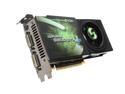
EVGA GeForce 9800 GTX+ 512MB DDR3 PCI Express 2.0 x16 SLI Support Graphics Card 512-P3-N871-AR
Pros: A dramatic improvement over my EVGA 8600gt, mostly in terms of gaming speed (enormous FPS improvement), but also noticable graphics improvement (clearly better shading and physics handling). Runs everything I throw at it on highest settings, no problem. Not running SLI but glad to know I can someday. Easy installation. As always, fast NewEgg delivery. This card may not be top-of-the-line anymore, but even if you're a hardcore gamer, as of this writing, it should do absolutely everything you want it to, and the price is right, especially compared to the newer stuff coming out, which can be double or triple this price. Stays about as cool (or even cooler??) as my 8600gt.
Cons: Requires more power than my 8600gt did. Actually blew my 500 watt power supply out within two days of install. Not good. Box says 450 watt is required. I say make that 550 to be on the safe side. Go much higher (650+ watt) if you intend to SLI. This card is a beast. Not just in terms of power, but also sheer size. As has been said numerous times before - make sure this is gonna fit in your case. I have a really large case and still had to maneuver some stuff around to get it to fit. I have absolutely no idea how I'd SLI two of these monsters. I just don't know where the room would be for it, even in a big case. Runs slightly louder than my 8600gt, I can actually hear this one working, which isn't the biggest deal in the world, since my gaming audio is usually cranked up as well.
Overall Review: For the price, I think this card will deservedly remain at the top of the list for a while yet. It's a powerhouse and it makes games, especially the newer ones, look just righteous. You will be amazed at the frames-per-second you achieve with this thing, even at super high settings. I no longer have to worry whether or not my rig can "handle" new games. With the 8600gt, running games on high settings was becoming a thing of the past. Many of the newer games were running in slow motion or I'd have to crank them down. No longer. Now I can do it all again, and for the price, I don't mind if I only use it a few years before upgrading. This should handle everything for a long while. Win 7 64 bit works great, and going from 8600gt to 9800gtx+ meant (as of this writing), I didn't even have to update the driver. I will stay with EVGA, GeForce, and NewEgg. It's a truly winning combo. Get this card. It wins awards and is at the top of the ratings list for a reason.
10/12/2009See more detail
good product, problematic service
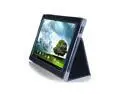
GreatShield Leather Premium Flip Stand Protective Folio Case for ASUS TF201 Eee Pad Transformer Prime 10.1-Inch 32GB / 64GB Tablet (Black)
Pros: I'm sure the product is great. I decided 3 days later that it wasn't the one I was looking for, so this review is regarding TheWireless, the NewEgg "Marketplace" partner, who sells this item.
Cons: A few things you need to know: TheWireless is apparently notorious for questionable customer service. I found this out after-the-fact. Ordered this item on a Friday, and I'm used to the NewEgg way of instant turnaround (it is one of the key reasons I use NewEgg), and constant feedback on the process of shipment. With this item, the item sat in "Verifying" mode Thursday, Friday, Saturday, Sunday - by Sunday I had decided this wasn't the item I needed - so I reviewed NewEgg's policy - if it is still in "Verifying" mode, it can be canceled. I did this (by contacting TheWireless via e-mail, the link was provided to do this). Monday and I get an e-mail showing that the item has been charged and shipped. Obviously there is no communication between TheWireless' Communication "department" and their billing/shipping "department". Now I have to do a full RMA on this item. This is aggravating. When I researched this company (as I should have done before the purchase), I found endless criticisms of this very thing. Be very aware of this before ordering anything. The cynical side of me feels like this thing would STILL be sitting in "Verifying" mode had I not tried to cancel. No way to know this.
Overall Review: Sorry this isn't a review of the product. I ordered a different product through a different company, and it was turned around in exactly two days. Be aware that when you use a "Marketplace" seller here (like TheWireless), you are no longer on NewEgg's awesome 3-day turnaround service. You are on their service, and some of these companies have truly lousy service. Many people complained about this company sending wrong items, never even receiving items but being charged, never being able to get refunds, and all manner of nightmare associated with shipping, RMA, etc. I don't see this being as big a problem with things like cases, as opposed to tech items like cables and such, but obviously even with this case purchase I ran into aggravation, so ... HEADS UP.
10/23/2012See more detail
Amazing case with one adjustment
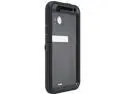
Otterbox Defender Series Case for HTC Evo 4G LTE (2012 Release) Black- Retail Packaged
Pros: Sturdy, rugged design. Fantastic drop protection (built-in silicone buffers). Really nice looking on your LTE. Very sleek. Holster is also fairly rugged and very handy.
Cons: Difficult to put on. Difficult to take off. Essentially, once it's on, it's on. You'll want to leave it on. Not a lot of accessories yet (i.e. car cradle, etc.) that work with the Otterbox. But this is the killer - Screen protector is a horrid smudge-fest.
Overall Review: This is truly the -perfect- case for your HTC EVO 4G LTE, without a doubt. It's a tank, it looks awesome, it's just a great level of insurance for your LTE. You will absolutely want to remove the included screen protector. If you don't, you will find it difficult to even see your screen after a few uses. The protector is a finger-oil collector, and very soon you will have spread the oil all around the protector. The protector is very thick (hard to even bend), and this makes removal of it a little tricky. But once it's removed, you can go screen-protector-free as I do, or you can replace it with one of the better protectors of your choosing. Just be sure to get your new protector on before you assemble the Otterbox around your phone. Once you've made this adjustment, the Otterbox Defender for the EVO 4G LTE is hands-down the best case you can get for your phone.
9/10/2012See more detail
Big, Bright, and Colorful
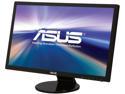
ASUS VE258Q Black 25" HDMI LED Backlight Widescreen LCD Monitor w/Display Port & Speakers 250 cd/m2 50,000,000:1 ASCR
Pros: Main Pro: Came with one tiny stuck pixel, flicked it gently with my finger - gone, never to return. So, no stuck pixels. =) Pros: Perfect size for everything from word processing to gaming. Whites can be as bright as you want them, darks are black. No noticeable back light bleed. Colors are truly spectacular. 50,000,000:1 contrast ratio is noticeable. 2ms is noticeable. Intuitive enough UI controls.
Cons: Only slight con is the base. For some reason, the screw-hole was misaligned, causing the screw-in procedure not to allow the screw to go in flush. This causes the screw to stick out further than it should, causing the whole thing to be a bit tipsy. But I've got it all set up the way I want it now, I simply re-aligned the tilt on the monitor - all is fine, and I'm not going to mess with it further. Not worth sending back or even deducting an egg, probably because I'm so overjoyed that I got no dead pixels, and I don't want to chance sending this back and getting one with dead pixels.
Overall Review: When I initially set this up, I left the monitor it is replacing (an ACER 22") plugged in, to get a comparison, and it was at that moment I knew I made a great choice. I had been very pleased with the ACER, and thought fidelity couldn't get much better (but wanted to go a bit bigger), and I was completely blown away by the difference in colors. This ASUS made my old monitor look like it was covered with a dirty veil, seriously. Colors absolutely pop.
12/20/2011See more detail
Great First Day
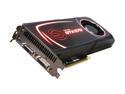
EVGA SuperClocked 012-P3-1572-AR GeForce GTX 570 (Fermi) 1280MB 320-bit GDDR5 PCI Express 2.0 x16 HDCP Ready SLI Support Video Card
Pros: Since a good many problems occur with new VGA cards upon installation, I thought I'd post a review now, after the installation process, and I will follow this up later with a review of the card after months of usage. For now, I can say that a big pro was the installation procedure. Since I went from a 9800 GTX+ to this, there was no need to uninstall/update drivers (they use the same one). This made plug and play a truly perfect experience. I had been worried about the card fitting into my case, but surprisingly, I didn't have to move anything around at all. It really wasn't much bigger than the 9800 GTX+ it replaced. However, I have a full tower. Smaller towers may require more strategy, because yep, the card is big. Ran through my more graphic-intensive games (Battlefield: BC2, Crysis, Crysis 2, COD: MW2, Oblivion, Fallout: New Vegas, Dead Island, Just Cause 2, Dragon Age 2, etc.) and EVERY game, on the highest settings possible, run flawlessly. This is all I could ask.
Cons: There is one "but..." here, and it has to do with temperatures. I've installed Precision, set the fans to "Auto," and have noticed that at idle, I'm around 45-50 C. But in graphically intensive games like Battlefield: Bad Company 2, temps shoot up to 85+ degrees. This is too high for my taste. I thought that installing Precision and setting the fan to "Auto" would correct this common problem. I'm not sure if I should be hard-setting fan speed to a certain level (70%? 80%? higher?) or leaving it at "Auto" or what. I keep reading people who have messed with the fan settings in Precision and now never have temps over the 60's. This is what I want to achieve. My case has 3 fans, and plenty of room, so this shouldn't be the problem. Wondering what I need to do differently to get temps down. I won't deduct an egg for this because I know that a powerhouse card like this is going to get hot. Just trying to find a nice workaround.
Overall Review: This is everything I had expected so far in the few days I've had the card. Games are silky smooth, have FPSs that blow me away, no artifacts, no jitters, no problems whatsoever. Granted, I'm only a few days in, but I can wipe my brow and say "whew" that I've made it past this critical stage with no problems. As always, EVGA's lifetime warranty registration process is as easy as can be, and removes all worry from spending so much on a piece of hardware. Bought this card to be ready for the next generation of games (Skyrim, Battlefield 3, Diablo 3, etc.) and I am quite sure I'm hooked up and good to go. I'll report more later when I've had a chance to break this bad boy in. Bottom line is that for the price to performance ratio, you simply cannot beat this card right now, and it will futureproof you for all your gaming needs into the foreseeable future. When requirements start getting rougher, I'll add another for SLI, or use the step-up program to upgrade. A great investment.
9/28/2011See more detail
Solid, Stable, Reliable
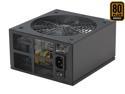
Rosewill RX750-S-B - Xtreme Series 750-Watt Active PFC Power Supply - Continuous @ 104 Deg. F (40C), 80 PLUS Bronze, ATX 12V v2.2 & EPS 12V v2.91, SLI & CrossFire-Ready, Compatible with Core i7, i5
Pros: Plenty of juice. Lots of rails. Quiet. Looks groovy with the blue light and mesh. Cables are in rugged but breathable sleeves for further cooling.
Cons: Not modular. This costs an egg because the cables are really thick and long, and there are tons of them. This makes maneuvering them around inside the case a chore. If you have a small or mid tower, it is going to take some strategy to get them to fit nicely. Even in a full sized case, these things must be tucked into a drive slot or they are in the way.
Overall Review: Wish I had gone with a bit higher voltage supply (800-1000w) to be ready for hardware upgrades down the road, but happy with this one, and aside from the mess of cables, it has been solid, stable, and reliable.
9/27/2011See more detail
seller reviews
- 1
I've read about my experience here
Ordered on Thursday, sat in "Verifying" mode Thursday, Friday, Saturday, Sunday - by Monday I realized I wanted a different product altogether so I reviewed NewEgg's policy - if an item is in "Verifying" mode, you can cancel it. So I did, the only way available - by e-mailing TheWireless. At the end of Monday, I decided to check the status, make sure my card didn't get charged and the order had been canceled and instead it had been charged and shipped. The cynical side of me wants me to suggest to you that if you want this order rushed to you, try to cancel it. I e-mailed again saying that I had canceled the order much earlier in the day and all I got was an apology "Sorry it's already been charged and shipped - do an RMA". When the left hand (order requests such as canceling) is not communicating with the right hand (charging and shipping), you are not dealing with a good company. Read all the comments here and judge for yourself. This is not a fluke.
On-time
Delivery
Product
Accuracy
Customer Service
Satisfactory
10/23/2012See more detail