




 here!
here!
I’m your shopping assistant for PC builds, upgrades, and everything tech.
Got questions? Ask away!
Start a conversation
here!
I’m your shopping assistant for PC builds, upgrades, and everything tech.
Got questions? Ask away!
Start a conversation

Joined on 09/18/03
Split this drive into two partitions
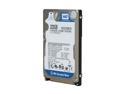
Pros: An excellent drive if you partition it correctly. If your laptop isn't 46-bit LBA compliant (like most laptops that use this Parallel ATA drive), you must make drive C no more than 128GiB (as reported by Windows explorer). Create another logical drive (E) to contain the rest of the space. Windows will let you give Drive C all 320GB, and that will seem to work fine ...until it doesn't. Often following a defrag, you will eventually be greeted with a black screen, boot sector errors, and data corruption. The recovery process is very agonizing, and you may not get your data back. None of that happens if your drive C is <128GB (reported by Windows explorer).
Cons: WD does not warn you of the 28-bit vs 46-bit LBA BIOS limitation, and the info is hard to find.
Overall Review: You'll need Windows XP SP1 or later or Win2k SP2 or later to use the drive's full capacity. EASEUS Disk Copy and an external usb case make the transfer very easy. Clone your existing drive, and then use EASEUS Partition Manager to resize drive C and create logical drive E. Laptop BIOS normally uses 28-bit addressing and can read only the first 137.4GB of space (reported by Windows as 128GiB). If you let Drive C have all 320GB of space, you will eventually get data corruption and black screens. Here's why. Windows defrag can store the OS files anywhere on the drive. If you make drive C >128GB, part of the OS will eventually be written beyond where the BIOS can read at startup. When that happens, you get missing NTLDR, missing system files, the dread black screen, damaged boot sector, and bad data corruption. None of these will happen if you make Drive C 128GiB max.
Works for some devices
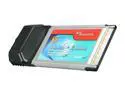
Pros: Inexpensive. I purchased this card along with the Rosewill RC-602. The SYBA card works with my Canon Digital Camcorder, whereas the Rosewill card doesn't work reliably unless I use a (not supplied) 12V DC supply.
Cons: The SYBA card does not work with my external firewire drive, whereas the Rosewill card works fine, even without the 12V supply.
Overall Review: Between the two cards, the Syba is more convenient if working with a camcorder, since it doesn't need an external supply, unless you are trying to control an external hard drive.
Works great only if split into 2 drives
Pros: This is a great drive to extend the life of an older laptop. I have used several of these drives in older P3 and P4 laptops that came with Windows XP or Windows 2000. Be sure to split the hard drive into two logical drives, and make sure Drive C has 120 GB or less (as reported by Windows Explorer).
Cons: Windows 2k and XP will let you give Drive C all 320GB -- you will be VERY SORRY if you do this. If you make Drive C 120GB (as reported by Windows Explorer) and let Drive E: have all the rest, you will have no trouble. If you let Drive C have all 320GB, you will get the major file corruption errors reported by other reviewers. WD doesn't mention the laptop BIOS 48bitLBA drive C limitation, so in many of these reviews you will read about lots of file corruption problems. These do not occur if you make Drive C 120GB and give the rest to Drive E. (This applies to the WD 160, 250, and 320GB ATA-6 drives.) Note: you also need to update Windows to the latest service pack.
Overall Review: Older laptops do not use 48-bit addressing needed for the BIOS to handle more than 120GB. Since the BIOS interacts only with Drive C, you must make Drive C 120GB or smaller (as reported by Windows Explorer); then make a second drive partition (Drive E:) with all the rest of the space. I use the free EASEUS Disk Copy and Partition Master software for these tasks. Put the new drive in an external USB case, boot to Disk Copy, copy all of Drive 0 to Drive 1. When the copying is done, turn off the computer, install the new parallel drive, and then use Partition Master to resize drive C of the new drive to <137 GB. Verify that Windows Explorer sees the drive as 120GB or less! Then use Partition Master to create a new drive E with all the rest. By the way, there are two ways to report drive capacity. That is why Partition Master will say Drive C has 137GB while windows reports the drive as only 120 GB. PS. DO NOT MAKE DRIVE C HAVE ALL 320GB, OR YOU WILL BE VERY SORRY.
Use two partitions
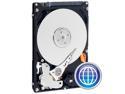
Pros: This is a very nice hard drive. It seems reliable, although I had one of three fail prematurely. You need to know a lot to install it into a laptop. If you wish to clone your old drive to this new one, try the free EASEUS Disk Copy and Partition Manager software. You'll put the new drive in an external USB EIDE 2.5" case with its own supply, use Disk Copy to clone your old drive to the new one, and then use Partition Magic to adjust the drive C partition as well as create a second drive (read the warning below).
Cons: WD Support and documentation is very lacking.
Overall Review: Laptops made before 2007 usually are not compliant with the 48-bit logical block addressing used by this large drive; instead, the laptop BIOS will use 28-bit addressing and therefore will not report the hard drive parameters correctly and also will not be able to read or write to the entire drive. If you cannot get your BIOS updated to make it 48-bit LBA compliant, the only safe way to use this drive is to partition drive C to 137.4GB (128GB as reported by Windows Explorer) or less. Windows XP started supporting 48-bit LBA drives with SP1 (Win2000, SP2), so you can partition drive C to have all 250 GB of space even when the BIOS does not support it. That is a very bad idea which will seem to work fine until one day it doesn't. You will end up with drive read errors, data corruption, and even a damaged master boot record. These problems are avoided by limiting drive C to 128GB and creating a second partition (second, logical drive) with the rest of the space. Word to the wise.
A Nice Printer with a secret
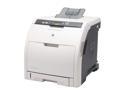
Pros: A nice printer, with great color, fast printing, and quick response. I was initially scared off by the per-page cost. The printer warns when the rated page count is getting close, and it actually stops printing when the cartridge page limit is reached and says, "purchase more cartridges." Using a postage scale, it was obvious the color cartridges were not empty at 4000 pages. Here is the printer's secret: press menu, configure device, system setup, replace supplies, and you find "override at out" conveniently tucked. When you select this feature, it gives a hilariously long warning about the "risks" of continuing past rated page limit. You literally scroll down and read some 40 lines of text telling you what a bad idea it is, and then with a few more clicks you get to "yes, use override." Next, you enter a page limit for the override, and voila, it prints. Well, for my type of printing, the color cartridges last over 20,000 pages, not 4000; the black gives out at 10,000.
Cons: I think shutting down at the rated page limit is extremely lame. I ended up returning several nearly full cartridges to HP before I found out this hidden little f"override at out" feature, which takes 41 clicks to get to. Why do these printer makers not have some means of weighing the cartridges instead of the non-reliable, simpleton method of counting pages? If you think about it, the answer is obvious -- to sell more cartridges!
Overall Review: I tried several sets of remanufactured cartridges for the HP 3600 printer marketed by Xerox. "Hey, if it's Xerox," I thought, "maybe it is just as good." Not so. The Xerox cartridge is simply a re-filled HP cartridge with a Xerox sticker on it. I don't think they change the drum. I had so many quality problems using the Xerox cartridges that I won't buy them again. The new HP cartridges do keep their print quality through the 20,000 page override, whereas the Xerox cartridges start leaking toner before they were half empty. One more tip: at a store that had both models on display, I compared the HP 3600 and the 2x more expensive HP 3800. They looked identical. Opening them up, their cartridges also look identical (except for the number). So, I swapped the cyan cartridges. The HP 3600 recognized the HP 3800 color cartridge and printed just fine, and the HP 3800 recognized the HP 3600 color cartridge and also printed just fine. They both use the same black cartridge.
Works fine, but needs 12V supply
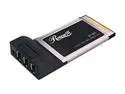
Pros: The Rosewill card worked fine with my USB/firewire combo drive, but it did not work reliably with my digital camcorder until I connected a (not supplied) 12V DC supply to the card.
Cons: Should have provided the required 12V DC supply.
Overall Review: The SYBA SD-PCB-2F worked with the camcorder without needing a 12V dc supply (there isn't a connector for it anyway). However, it did not work with the external drive.


