
Your Browsing History


Ernest K.
Joined on 02/21/04
0
0
product reviews
- 9
A Great NiMH Battery Charger..!
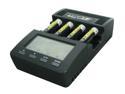
POWEREX MH-C9000 WizardOne Charger-Analyzer w/4pcs 2700mAh AA Rechargeable Batteries
Pros: This is the best charger/analyzer for AA and AAA nickel-metal hydride (NiMH) batteries that I've ever owned. At last, a charger that really helps you analyze and improve battery performance. The five modes of operation are all that you need to maintain your NiMH batteries. Within each mode, there are options you may choose. The digital display is great for displaying charge/discharge rate, times, and amount of charge in milliamp-hours (mAH). It cycles through all batteries, indicating the status of each. When a battery is done, it says DONE.
Cons: When inserting a battery, there is a 10-second time period to select a charge rate other than the default of 1000 mA if you wish to select another rate - a bit short for some people. If you miss it, just remove and reinsert the battery. A small amount of knowledge about battery charging is needed, but the instructions are excellent for explaining concepts such as charge rate and battery capacity.
Overall Review: I bought this charger because I realized that cheap "quick chargers" normally sold did not adequately condition nor charge NiMH batteries according to their use and age. I became frustrated that AA batteries in my digital camera were always too quickly discharged. Using the Refresh/Analyze mode, I was able to determine which battteries were no longer good and was able to rejuvenate some older batteries. The Break-in mode is good to condition new batteries for maximum use. As usual, NEW EGG provided excellent service... the best place to shop... period.
2/5/2010See more detail
Inexpensive, but not cable I thought
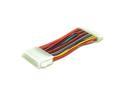
Link Depot POW-ADT-2024 Power Adapter Cable
Pros: A good cable for the money, if it's what you want.
Cons: This cable won't connect a 20-pin power supply to a 24-pin motherboard as I had thought... wrong genders. The photos are what confused me. Everyone would do well to remember that "male" refers to the metal contacts, not the Molex connector appearance. The same goes for the "female" end.
Overall Review: Not worth shipping back with postage more than it's worth. But, NewEgg needs to correct the photos.
8/10/2009See more detail
Great, Reliable 2TB SSD!
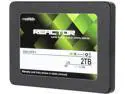
Mushkin Enhanced Reactor 2.5" 2TB SATA III MLC Internal Solid State Drive (SSD) MKNSSDRE2TB
Pros: I have used Mushkin RAM for years with no problems. Likewise, I'm sure that the reliability of this 2TB Mushkin SSD is among the best. I prefer SSDs that use MLC (2-bit) cells rather than TLC (3-bit) cells because of their greater reliability. I was happy to see the release of this 2TB version since I use it to back up my SSD C-drive. Windows 10 has a Trim function which keeps the cells ready for use.
Cons: None.
Overall Review: Monitoring the health of all drives, whether hard disk or SSD, with a program such as Crystal Disk Info is a great idea. I no longer fear losing valuable data using SSD drives. Yes, I also use external hard disk drives for backup, but that is for redundancy. It's also good to keep backups at another location.
11/19/2017See more detail
Just What I Needed
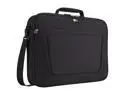
Case Logic Black 17.3" Laptop Case Model VNCI-217
Pros: I wanted a case for my new 17.3 " notebook PC that is slim in design and not bulky or heavy to carry around. I considered a sleeve, but chose this instead. It has room inside the separate front pocket for the charging brick, cords, mouse, and my external SSD. The cost and shipping from BuyVPC.com was excellent.
Cons: None
Overall Review: Highly recommend this case to anyone with one of the latest 17.3" notebooks.
7/30/2016See more detail
Outstanding External Hard Drive!
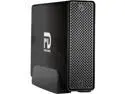
5TB FANTOM G-FORCE3 PRO USB
Pros: The best external hard drive I've ever owned! The 5TB hard drive installed in the aluminum case is a Toshiba MD04ACA500. With eSATA and USB 3.0 ports, it is very fast, reliable, and quiet. I especially like the ON/OFF switch which allows permanent connection to a PC without needing to be run whenever the PC is on. I use it for backup of personal files and with Acronis B/U software to make image backups. With the aluminum enclosure, it allows cool operation without a fan.
Cons: None.
Overall Review: My C-drive is an SSD, but my backup is this excellent external hard drive. With one or two of these for backup, you will never need to worry about losing your system or data.
7/19/2015See more detail
Crucial m4 512GB SSD is Great, but ...
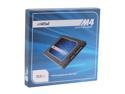
Crucial M4 2.5" 512GB SATA III MLC Internal Solid State Drive (SSD) CT512M4SSD2
Pros: This SSD provides all of the capacity you need for your operating system and greatly improves your computer's performance. My Windows 7 performance index for the hard drive went from 5.9 to 7.9. For almost six months, I have been amazed at its flawless performance, provided it has the firmware versions 000F or 040H.
Cons: My 512GB SSD worked great until I updated from firmware version 000F to 010G. After that update, the SSD failed and the computer would not boot. The SSD also DISAPPEARED from my computer's BIOS. With firmware 010G, a sudden power loss to the SSD caused it to fail (I had used a hard shutdown with the power button.)
Overall Review: To fix the problem, Crucial's website provides support: Look for 'Why did my SSD "disappear" from my system?' It involves applying power to the SSD for TWO cycles of 20 minutes on, and 30 seconds off. After performing this procedure, BE SURE TO UPDATE THE FIRMWARE of the SSD to version 040H. You'll be happy you did.
12/29/2012See more detail
seller reviews
- 1
Very nice case and excellent shipping via FedEx Ground
This Case Logic VNCI-217 is exactly what I was looking for... a light case that is more than just a sleeve, but not a big, bulky bag. Fits my new HP ENVY 17.3 laptop well and has enough room for a mouse, charging brick, and external SSD backup drive. Shipping was from Fort Worth, TX and the case was well-packaged, arriving ahead of schedule via FedEx Ground.
On-time
Delivery
Product
Accuracy
Customer Service
Satisfactory
7/25/2016See more detail