
Your Browsing History


Daniel E.
Joined on 01/09/05
0
0
product reviews
- 14
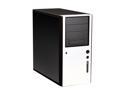
Antec Solo Black/Silver Steel ATX Mid Tower Computer Case
Pros: The finish is fantastic; reviews and pictures do not do it justice. Even the bottom of the case is done in the same mirror-black powdercoat: that screams quality. Captive thumbscrews are a big plus, the sides are easy to remove, the bezel is not as difficult to access as it may seem (the left side can slide off with just ~5deg of rotation, the bezel locks are right behind that; I can do it with the computer in a cubby). Stock cooling is adequate and quiet. Drive trays lock in very securely, and the silicone grommets are very nice. The cable-hideaway space behind the 3.5" bays IS AN ABSOLUTE DREAM. I have never had such a clean cabling job done so quickly and with so little hassle. Every case should come with one of these. Motherboard tray screw-in-points are stamped with letters to signify their standard uses; "A" for ATX, "M" for MicroATX, etc.
Cons: Slightly difficult to work in, as expected of a midtower. Not impossible if you're new to building computers, but it requires some odd hand contortions to get things into place without banging or scratching. The order of installation is not spelled out in the manual; the PSU must be installed first because it will not fit in any other way except underneath the upper strut (sideways in or through the 5.25" bays is a no-go). Front connector cables are entirely too long (almost double the entire length of the case). Useful if your motherboard is on another planet, but a small hassle to get stuffed away.
Overall Review: The maximum card length (from bracket mount to the very edge of the 3.5" bay) is 10 1/4". If you intend on installing a long video card, make sure it will fit. A 4870 X2 (at 10 5/8") did not without some work with a Dremel. The 3.5" bays affected still function perfectly (with tray) after the cut. The drive suspension system seems a bit wonky and loose; I didn't use it. I have a pair of 92mm Antec TriCool fans installed in the front fan cage; I would recommend to anyone that you purchase and install a set of front fans. The case itself does not generate any appreciable wind-noise in doing this. Removing the side to reach the front bezel air filter may seem silly, but it makes a lot of sense; if it's time to clean the filter, it's probably also time to give the rest of the system a good going-over with some canned air. That way, it becomes a part of the maintenance routine (but again, you only need about 2 inches of clearance on the left side to get at the bezel lock
10/26/2008See more detail

Microsoft Windows Vista Home Premium SP1 64-bit for System Builders
Pros: Stupidly simple to set up. I have never had such a painless install of Windows IN MY LIFE. Operating system functions well, does what it says on the tin. Many new features and operating paradigms with regard to files and user choice are well thought-out and implemented. Default driver support was very good (had my chipset/LAN drivers), and it's no longer difficult to find most manufacturers with 64-bit drivers.
Cons: Biggest disappointment so far is the default defragmenter; instead of just copy-pasta-ing the perfectly usable XP version, they've replaced it with a button and a busy donut ring. No progress bar, no estimated time remaining, nothing. In a system where they have clearly taken great pains to make the user experience easier and more powerful, this seems like a terrible backwards step. The new Control Panel is a bit bewildering, even to a Windows veteran; there are about twice as many panels as in previous iterations, and half of them useless or otherwise vestigial. Many old familiars like 'Add/Remove Programs' have completely new names (now 'Programs and Features'). Some are not as accessible ('Administrative Tools' is no longer a nice dropdown list, but a separate window from which you can choose the tool).
Overall Review: I really like Vista; it really is an improvement over XP. It's far less pushy and less intrusive into what you're doing, and it doesn't require a taming/housetraining period like XP does (trying desperately to turn off all the useless features and popup messages and unnecessary settings, etc. etc.). While they have taken a few completely inexplicable turns, the vast majority of the changes are well worth upgrading for. And make sure you've got lots of memory! I still can't make it stop chewing up ~800MB even after gutting Services.
10/26/2008See more detail
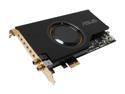
ASUS Xonar D2X 7.1 Channels 24-bit 192KHz PCI Express x1 Interface Sound Card
Pros: Straightforward installation, drivers were easy to install. Sounds are strong and solid-sounding, with nice deep bass and a clean high end. 5.1 surround performance is as expected. DS3D GX system works well, manages to fool my older games; the sound is a tad muffled when using this, almost as though it's a little further away than you might imagine. Not enough to matter to me. Comes with like, a billion RCA -> minijack cables, optical digital cable, extra terminators. The LED indicators in the connectors are moderately bright and vibrant.
Cons: Does require a floppy power connector (but then, who puts a floppy in their computer these days? No one, that's who). PCIe x1 connector is very small (I have it plugged into an x16 slot). Some crackling and popping noticed when using the DS3D GX feature with Battlefield 2; none so far noticed with 2142. Changing back to "Hardware" and "High" setting instead of "X-Fi" setting seems to cure it.
Overall Review: The rear LEDs cannot be turned off in the drivers, so fair warning to anyone who has regular habit of viewing the rear of their case (unless you're into the whole rainbow thing). Drivers are still in flux, the most recent version is still in beta (but seems to work well). Purchased for gaming in Vista, has performed absolutely flawlessly in newer games (Crysis, etc.). I am convinced the problems in BF2 are related to an older sound engine and the beta drivers rather than a fault of the card. Definitely a worthy buy if you're looking for an alternative to the Great Evil Empire C for Vista bliss.
10/26/2008See more detail
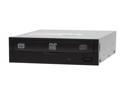
LITE-ON 20X DVD±R DVD Burner 20X DVD+R 8X DVD+RW 8X DVD+R DL 20X DVD-R 6X DVD-RW 16X DVD-ROM 48X CD-R 32X CD-RW 48X CD-ROM Black SATA Model iHAS120-08
Pros: Comes with black/white bezels to suit all tastes and creeds. Silent when playing DVD's / CD's. Very strong drive tray mechanism. Typical Lite-On quality. SATA connections makes it dead simple to set up. Burning performance is very good, on-par or better than previously owned Lite-On drives. Has not had trouble with any of the media I have given it (DVD+R, mostly).
Cons: Takes somewhat longer than previously owned Lite-On drives when ripping / burning game backups; not as much of a problem for me, but I wouldn't choose it as a primary ripper.
Overall Review: Tray mechanism is rubberband/pulley system rather than geared. Feels very strong now. I have had issues in the past with Lite-On drives and these mechanisms; the drives themselves operated flawlessly, but the rubberband would relax and become un-tacky, so that the pulleys would just spin endlessly (the tray would not pull out of the locking position), necessitating a complicated procedure to extract and revitalize it. Hopefully these new models have solved that problem.
10/26/2008See more detail
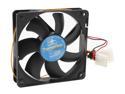
Vantec Thermoflow 120mm Double Ball BearingTemperature Controlled Case Fan - Model TF12025L
Pros: Moves a great deal of air, even at slowest speed. No noticeable motor noise or bearing ticking.
Cons: Even at slowest speed, has a very nasty wind-tunnel sound. Other fans I have rated at similar CFM (with identical bearing types) are much quieter.
Overall Review: System does not seem significantly warmer nor cooler after installing this fan.
10/26/2008See more detail
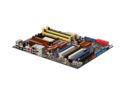
ASUS M3A79-T Deluxe AM2+/AM2 AMD 790FX ATX AMD Motherboard
Pros: Easy to install, well laid-out features and ports (especially the SATA connectors). BIOS is easy enough to use, has more settings than I know what to do with. Comes in a svelte black PCB, has tons of USB headers.
Cons: None, can't find any cons. Does not come with free girlfriend. Will not walk the dog. Cannot fly around the world backwards, reversing time and saving you from that badly-worded and very colorful "I QUIT" email to your boss.
Overall Review: Comes with a case badge. Windows-based BIOS updates a plus, drivers were fairly simple to find and install. Have not yet tried any extensive overclocking but the cornucopia of settings should more than suffice. Overall a very solid product.
10/26/2008See more detail