




 here!
here!
I’m your shopping assistant for PC builds, upgrades, and everything tech.
Got questions? Ask away!
Start a conversation
here!
I’m your shopping assistant for PC builds, upgrades, and everything tech.
Got questions? Ask away!
Start a conversation

Joined on 01/22/05

Amazing case for the cost
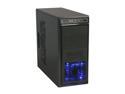
Pros: The material quality, layout, and appearance of the case is superb. The packaging includes all-black screws, cable management clips, zip ties, and additional brackets. As other reviewers have pointed out, there are a number of reasons this is one of the best cases for your money. Below are a few caveats, that just require your attention to workaround.
Cons: 1. As others have stated, the front panel is exceptionally difficult to get off. You simply need to grab it from each side and pull like hell. There are no instructions to clearly indicated this. 2. All drives come with a single mounting bracket, which faces outward. The drives needs to be secured on both sides in order for them to stay level, so take off both sides of the case and secure them. This limits the total number of drives you can mount as there are a limited number of brackets. 3. I had to squeeze a section of metal near the I/O panel for the motherboard with pliers in order to get the holes for the power supply to line up correctly. It required very little effort, and may have been specific to my case.
Overall Review: All in all, with the built in cable management slots, and the ease of assembly, I'd recommend this case to anyone.
No Frills, No Fuss
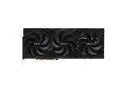
Pros: I run a blacked out build and avoid RGB, so this card is perfect for me.
Overall Review: This card is absolutely massive compared to anything I've owned in the past. I had to remove one of the front fans in my Fractal Torrent Compact because it was just barely too long. As others have said, the packaging is super minimal/basic but it's more than enough for it to not get banged up. I also immediately noticed it was far lighter than any card I had handled recently which is surprising considering its size. That said, the thermals are great (about 70c under full load in 4K RT Cyberpunk) and aside from when shaders are compiling it runs surprisingly quiet. The anti-sag bracket felt like unnecessarily included e-waste since the card is so light, but maybe it's useful in a very flimsy case (?) Super happy with the performance and I've had zero coil whine so far which is a blessing for my ears.
Exactly what I wanted, but flawed
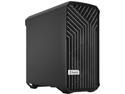
Pros: I got the solid version of this case because I didn't want to worry about matching components and wanted better airflow. On both of these marks, the case passed with flying colors. It feels and looks very premium and you can actually feel the air being taken in by the 2x 180mm fans in front.
Cons: I don't think this is realistically a full ATX case if you care about cable management or internal aesthetics at all. Because the PSU is at the top, cable routing is awkward especially with a 3.5MM drive. I had to search for a long enough SATA data cable to reach my drive which was surprising. Every power cable and connector is also going through the two side grommets, since there is no access below the motherboard to route up all of the case cables like in most ATX cases when you use a full ATX motherboard. Finally it was a challenge to get the side panel on that covered the back of the motherboard. Using a screw to hold it in place seemed like a given even though it doesn't come installed by default.
Overall Review: If you're like me and just wanted a great looking airflow case without needing to worry about how internals look, this is it. If you care at all about how things look inside, either use an MATX motherboard or look elsewhere.
Perfect shape and feel
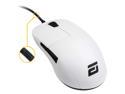
Overall Review: My hand is 19cm x 11cm and I typically use a claw/relaxed palm grip. I previously used a Finalmouse Air58. I picked up the XM1 after seeing positive reviews from some of my favorite YouTubers. I was facing some hand fatigue in intense gaming sessions and wanted to try something new. I'm very glad I got the XM1. It's unique shape gives it a noticeable bump that supports the third knuckles unlike anything else I've used before. The Mouse 1/2 buttons are also very long and makes it perfect for me to use a fingertip grip in some situations. I love the feeling of every single click whether it be Mouse 1/2, the side buttons or scroll wheel. The wheel also has a very pronounced scroll with just the right amount of tension for me. The mouse feet are also stellar. Coming from the Air58, the best thing about the cord is the fact it's angled upwards giving it less drag. Otherwise, I can't personally tell the difference between the two cords. The coating also reminds me of the Air58, but does show a little oil from my hands. Also, while it is obviously heavier than the Air58, the weight in in a good place away from the buttons and located right in the center of the mouse. My biggest criticism of the XM1 is that it has a hollow feel and sound when slamming it on my Glide38. It doesn't feel as premium as the Finalmouse and is louder probably due to its "unholy" design. Ultimately, the XM1 is my new main and I look forward to seeing more products from Endgame Gear.
Impressive case, especially for the price
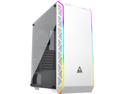
Overall Review: I really enjoyed building in this case. There's a ton of options of fan placement, and lots of good tie-down points for cable management. It's constructed in a sturdy, matte finish and the front RGB is nice touch. Even though the installed slot covers are punch-out, Montech includes two extra regular ones which almost makes up for it. If I could change anything about the case it would be the awkward tempered glass side panel. It's the kind that hangs on mounts until you attach 4 thumb screws. I'd prefer something with a hinge or shelf to rest on. All-in-all though, I'd buy this case again and recommend it to anyone looking for a more premium budget look and feel.
Works out of the box for Ryzen 2400G
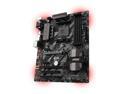
Pros: - Bought the base B350 Tomahawk because a few other reviews said it works out the of the box with the newer Ryzen 5 2400G Raven Ridge and it did! Was running an unreleased bios from 12/2017 which supported the onboard HDMI. From there I just updated to the latest using USB via the bios - Really easy overclocking via the bios too - Good placement of components and some red LEDs for fun
Cons: - Simple enough to reset CMOS with a screw driver (I black screened it using Ryzen Master), but it would have been nice to include a jumper.
Overall Review: - If you're building a budget Ryzen APU build on Raven Ridge, I'd go for this board hands down for out of the box support. Most everything else is going to require access to an older processor or a loaner from AMD/your local PC shop.


