


Your Browsing History


Bryan C.
Joined on 12/13/18
0
0
product reviews
- 4
Running great.
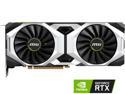
MSI GeForce RTX 2080 8GB GDDR6 PCI Express 3.0 x16 SLI Support Graphics Card RTX 2080 VENTUS 8G
Pros: Even paired with a slower CPU (i7-4790k) still saw a good 40-50 fps increase in most games over my old 980. Been using MSI cards and boards since I Got a 5870 and a 890fx Haven't had an issue with them since. And was nice that they finally released a non factory oc'ed version for cheaper got mine to boost to 2010 mhz no big deal and cooling is great.
Cons: Still more expensive than it should be for price vs. performance but it does trade blows with a 1080ti and with them being way overpriced new again not too bad.
Overall Review: Would recommend but if you do have an older cpu you will get a bottleneck, mine isn't horrible but it is there especially on cpu intensive games ofc.
12/19/2018See more detail
It's a Motherboard
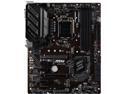
MSI PRO Z390-A PRO LGA 1151 (300 Series) Intel Z390 ATX Intel Motherboard
Pros: It's MSI so it's good quality as with all their products I have had experience with. Nothing special to the Z390-a pro UEFI is nice and easy to find your way around and handles overclocking fine. Also the inclusion of a type C port is pretty nice.
Cons: Biggest problem with this for me is coming from an older 1150 generation MSI board is WOW the lack of USB 3.0 rear ports. Even at this price range compared to my older board, Even if I went to 150 dollars I would still lose 4 ports and that is very annoying but it does line up with the whole pricing trend with everything else with the new generations of GPUs , CPUS and RAM Price-performance is just not there for anything this generation.
Overall Review: Would recommend unless you need more rear USB ports. Otherwise I would look at AsRock or just spend an extra 40 bucks, kind of wished I had but oh, well nothing really wrong with it and I do trust MSI more.
1/4/2019See more detail
It's RAM what more do you want? Oh yeah pretty colors!
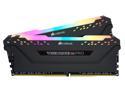
CORSAIR Vengeance RGB Pro 16GB (2 x 8GB) 288-Pin DDR4 DRAM DDR4 3000 (PC4 24000) Desktop Memory Model CMW16GX4M2D3000C16
Pros: Yea it doesn't make it faster than a simple green stick of ram clocked the same. But it sure is pretty and linking my whole system with corsair link from the ram to the fans and keyboard is very enjoyable.
Cons: As with most of every new PC part lately way more expensive than it needs to be so if you don't really want the RGB just step down down to say a Gskill ripjaws or the 2400mhz vengeance and save the $30 you won't much if any loss in performance.
Overall Review: Would recommend ONLY if you want the RGB otherwise save the $30. Also don't forget to enable the XMP profile for any of these higher clocked RAM (2400 or 3000+) and would always suggest going quad or dual channel.
1/4/2019See more detail
I7-9700k What you would expect.
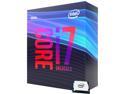
Intel Core i7 9th Gen - Core i7-9700K Coffee Lake 8-Core 3.6 GHz (4.9 GHz Turbo) LGA 1151 (300 Series) 95W BX80684I79700K Desktop Processor Intel UHD Graphics 630
Pros: Going from my old 4790K to this is one heck of an upgrade. Little overpriced for gaming would say step down to an I5 unless you just want one of the best but, is MUCH better price-performance compared to the 9900K. Runs quite cool plenty of OC headroom got mine up to 5.1ghz at 1.25Vcore and at full load stress test is stable and only gets to around 68° with an H100i v2. So overall decent improvements in power usage and thermals.
Cons: As with most of the new generation of GPUs and CPUs they are still somewhat overpriced for the improvements they offer. And as usual the improvements are slight over previous generation nothing to groundbreaking other than Intel finally bringing multi-cores to mainstream (thank AMD for putting that pressure on them).
Overall Review: Would recommend ONLY if you are at least a couple generations or more behind, such as my 4790k or a 6700k if you are sitting there with a 7700k then ONLY if you really want the more cores (My advice on PC parts is that if you have the money to upgrade always go with newest generation you can so saving the $30 to get an 8700k it's really worth it to be behind a generation and lose a couple cores.) But if you already have an 8700k would say save your money for another couple generations but, yes as I said does what you would expect and is a beast.
1/4/2019See more detail